
PMIS Processes
The core process framework for planning, providing, deploying, controlling, optimising and supporting Project Management Information Systems at project level.
3. PMIS Processes
3.1
PMIS Planning Process Group
10 processes for defining PMIS direction, information requirements, access, distribution and configuration.
3.2
PMIS Provision / Tools Procurement Process Group
6 processes for identifying, prioritising, selecting, procuring and developing PMIS tools.
3.3
PMIS Deployment and Operationalisation Process Group
5 processes for deploying tools, aligning processes, training users and stabilising operations.
3.4
PMIS Control and Optimisation Process Group
3 processes for monitoring, controlling and improving PMIS information and systems.
3.5
PMIS Support Process Group
6 processes for operations, incidents, lessons learned, enhancements, backup and closure.
3. PMIS Processes
The use of information-technology tools in project management has become a routine and widely accepted practice among project management teams. Word-processing software such as Microsoft Word, spreadsheet applications such as Excel, and standalone database tools like Access have become integral elements of project-management work. In addition, other software tools—particularly those designed for managing time and cost—are commonly used across most projects.
You have likely observed situations in many organisations where projects, or certain organisational units, purchase and implement sets of software tools with considerable cost and effort. Yet shortly afterwards, these systems are set aside, criticised for inadequate performance or for failing to meet user expectations, while the project’s information challenges persist unchanged. Despite the presence of various information and computer tools, many projects continue to suffer from insufficient information, unreliable information, outdated information, and information that is not suitable for the needs of project stakeholders. Why does this happen?
This situation demonstrates that tools alone are not sufficient for effective project-information management. As explained in the previous chapter, the absence of PMIS knowledge within the organisation is a fundamental cause of these recurring challenges.
In this chapter, we present thirty PMIS processes organised into five process groups, thereby supporting the development of PMIS knowledge within the organisation. These processes assist individuals who aim to manage the information of a single project or multiple projects. By applying them appropriately, they will be able to establish PMIS within their projects and within the organisation. It should be noted that these thirty processes are intended for PMIS implementation at the project level. For implementing PMIS within a project-based organisation, five additional processes are required, which will be discussed in Chapter Four.
The PMIS processes are defined within the following five process groups
- PMIS Planning Process Group – 10 processes
- PMIS Provision Process Group – 6 processes
- PMIS Deployment and Operationalisation Process Group – 5 processes
- PMIS Control and Optimisation Process Group – 3 processes
- PMIS Support Process Group – 6 processes
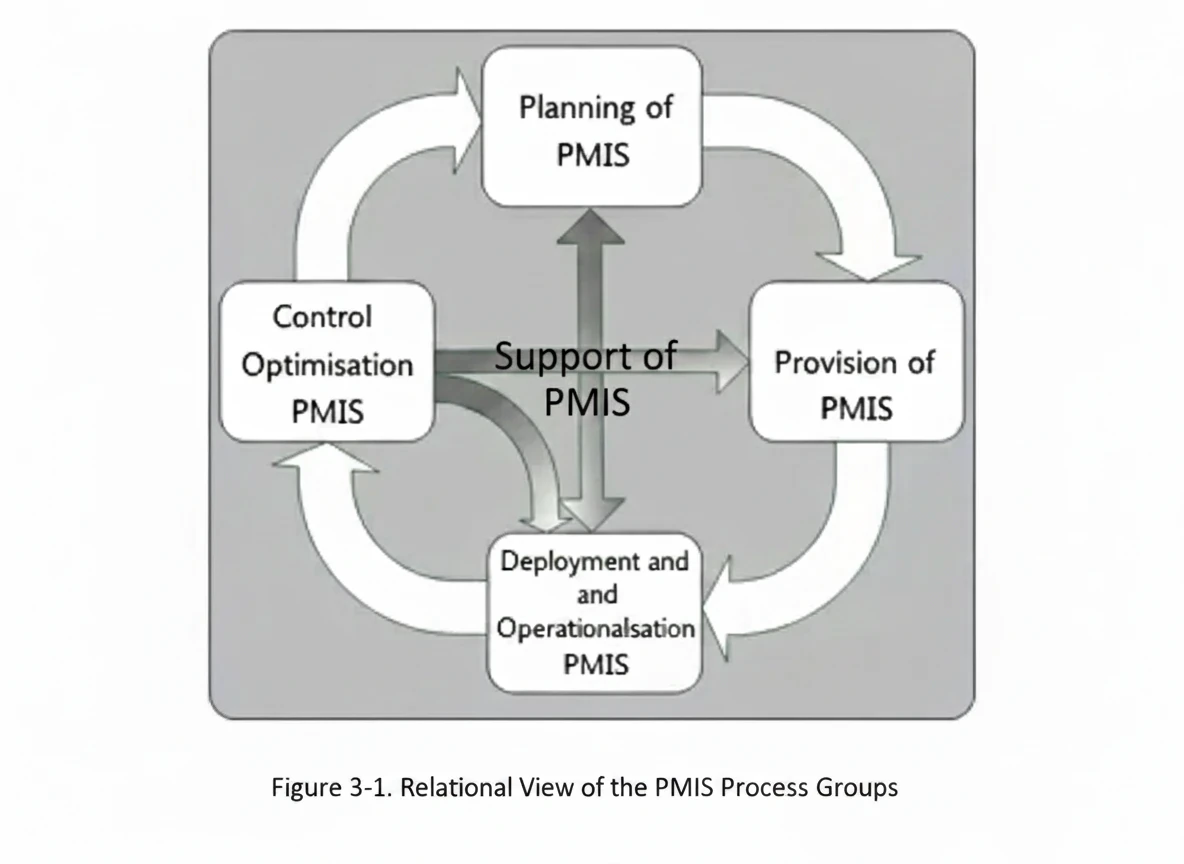
The establishment of PMIS within a project begins with the planning processes. These processes create a clear and structured understanding of what needs to be achieved within the project’s PMIS framework. As one of the most essential PMIS process groups, completing these processes effectively prepares the organisation for navigating the demanding path of PMIS implementation.
After defining the PMIS objectives for the project and identifying the project’s information requirements, the next step is to provide the appropriate tools and information systems needed for the project. The processes within the PMIS Provision Process Group ensure the selection or provision of the required PMIS tools.
The PMIS Deployment and Operationalisation Process Group forms the first operational interface between PMIS and the project. Proper execution of the processes within this group will secure the successful deployment of PMIS within the project.
The efforts invested by the PMIS team in planning, provisioning, and deploying the PMIS systems within the project are further reinforced through the processes of the PMIS Control and Optimisation Process Group. Failure to apply the processes of this group may lead to the failure of PMIS within the project and may result in consequences that could be difficult or impossible to remedy.
All activities required for establishing PMIS in the project are enabled through the support provided by the PMIS Support Process Group. The processes within this group specify the manner in which PMIS support will be delivered throughout the project.
The following figure presents a relational view of the PMIS process groups, which will be described in detail later in this chapter.
PMIS Planning Process Group
The first group within the PMIS process set is the PMIS Planning Process Group. This group functions as the analytical and decision-making core of PMIS and, based on the conditions of the project and the organisational context, establishes the overall PMIS planning framework for the project. The planning effort begins at a high level and progressively advances toward more detailed planning related to the project’s information and process requirements. Within this process group, the overarching PMIS strategies are formulated and, following approval by the authorised bodies, detailed planning for the project’s various informational domains begins.
A central activity within this process group is the identification of the project’s information requirements and expected outputs, followed by defining how information will be provided and distributed, how access to information will be organised, and how information support will be delivered.
Identifying the information requirements of project stakeholders involves determining what information is to be prepared or produced, by whom, in what form, at what time, and through which channels it should be delivered—and to whom and at what time such delivery must occur. Additional considerations include the period for which the information remains valid, the method for archiving invalid or obsolete information, and the manner in which access to archived information will be managed throughout the project. Thorough analysis of stakeholder information requirements, as well as the outputs of project-management and product-related processes, ensures that PMIS will be able to effectively provide, integrate, and distribute the required information.
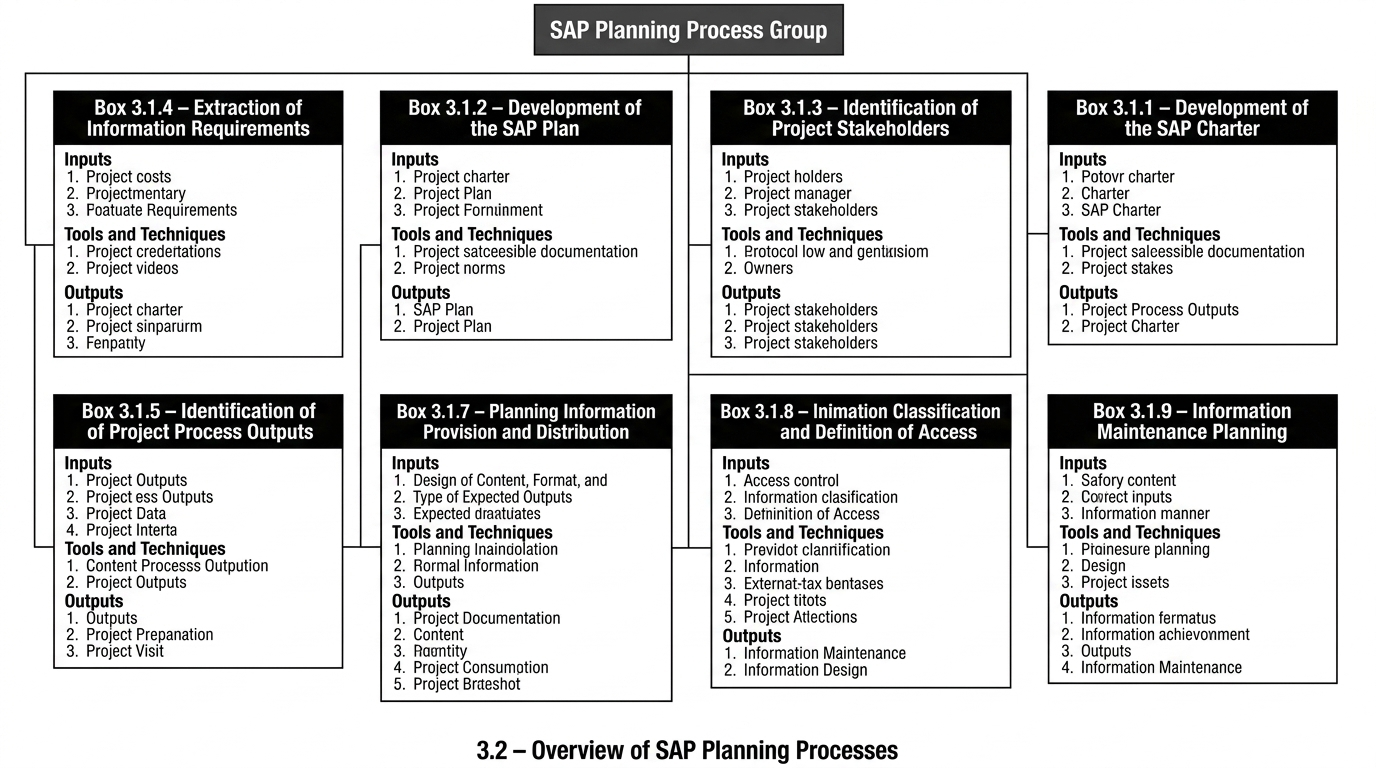
This process group comprises ten processes through which PMIS planning is conducted in a project. These processes are:
- Preparation of the PMIS Charter
- PMIS Planning
- Identification of Project Stakeholders
- Identification of Information Requirements
- Identification of Project Process Outputs
- Design of the Content, Form, and Type of Expected Outputs
- Definition and Classification of Information and Access Rights
- Planning for Information Provision and Distribution
- Planning for Information Support
- Configuration Design
Preparation of the PMIS Charter
View process diagram
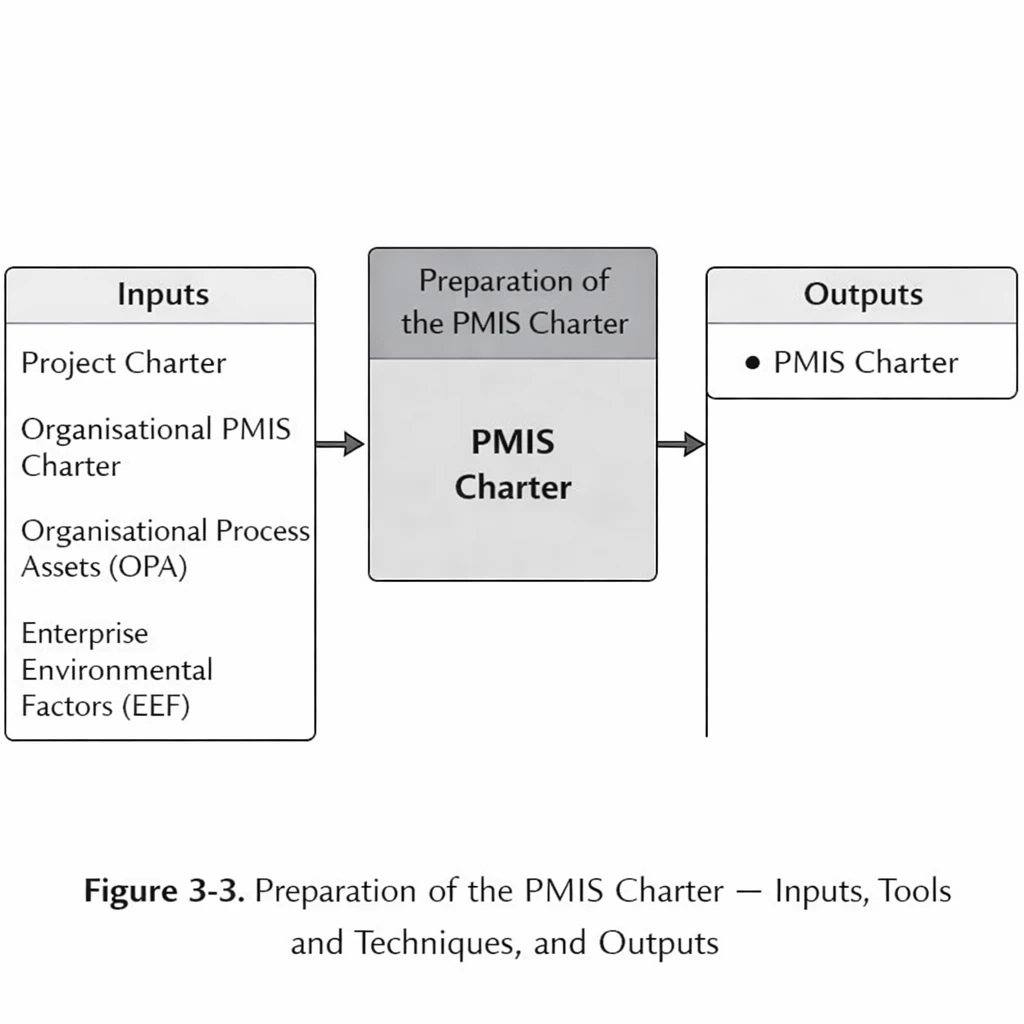
The initial and most important decision during the PMIS Planning Phase is to determine the appropriate scope and level of PMIS implementation for the project or the organisation. This determination shall take into consideration the organisation’s infrastructure, its organisational maturity level, the computer literacy of the project team and the organisation, and the size of the project.
The purpose of this process is to prepare a document in which, after analysing the expectations and conditions of the project and the organisation from an information-technology perspective, the PMIS strategy and the method for information provision are defined. This document also specifies the mechanisation level of activities, the PMIS Manager and the related team, as well as their respective levels of commitment and responsibility.
A PMIS Charter must be prepared for each project.
Preparation of the PMIS Charter: Inputs
- Project Charter
The Project Charter is the primary document that defines the status and conditions of the project. It specifies the project objectives, high-level requirements, major risks, the schedule of key milestones, and identifies the Project Manager and the project team together with their respective levels of authority. These elements form the basis for analysing the project environment.
- Organisational PMIS Charter
If the project-level PMIS implementation is carried out within an organisational-level PMIS framework, this document must serve as the organisation’s overarching PMIS policy framework for this process. The Organisational PMIS Charter is introduced in Section 4.2.2.1.
- Organisational Process Assets (OPA)
The Organisational Process Assets that may influence the Preparation of the PMIS Charter include—but are not limited to—the following:
- Standardised processes for defining and delivering IT services within the organisation
- Existing templates for PMIS Charters
- Lessons learned from PMIS implementations in previous projects or within the organisation
- Enterprise Environmental Factors (EEF)
The Enterprise Environmental Factors that influence this process include
- The organisation’s IT programme
- The organisation’s PMIS programme
- Documentation related to the IT infrastructure of the organisation and the project
- Documentation on organisational maturity, including OPM3, EFQM, CMMI, and others
- Quality-audit documentation for the organisation and previous projects
Preparation of the PMIS Charter: Tools and Techniques
- PMIS Council
One of the techniques that can be highly effective in the management of project-level PMIS and in supporting sound policy-making in this domain is the formation of a council or committee known as the PMIS Council. This council is described in Section 2.6.1. After the establishment of the council, and following a review of the project and organisational conditions—while consulting other experts on an ad hoc basis as required—the PMIS Charter is prepared by the PMIS Manager or the PMIS Project Manager. The document is then reviewed and formally approved by the council. This council is normally expected to be formed during the initiation phase of the project.
Preparation of the PMIS Charter: Outputs
The PMIS Charter is a strategic document prepared for each project to support the advancement of PMIS objectives. In this document, the project and organisational conditions are presented, along with the high-level PMIS objectives and overall PMIS strategies, which are approved by the relevant authorities within the project and the organisation. Items that may be included in this document are as follows:
- The objectives and conditions of the project and the organisation
- High-level project requirements
- The high-level project schedule
- High-level project risks
- The project organisation and defined responsibilities
- The infrastructure conditions of the project and the organisation
- A description of the Information Technology (IT) status of the project and the organisation
- A description of the IT-related cultural environment within the project and the organisation
- The primary PMIS objectives of the project
- Identification of the PMIS Manager, the overall PMIS team structure, and the responsibilities and authority levels of each member
- A high-level PMIS analysis for the project
- The high-level PMIS strategy for the project
Preparation of the PMIS Plan
View process diagram
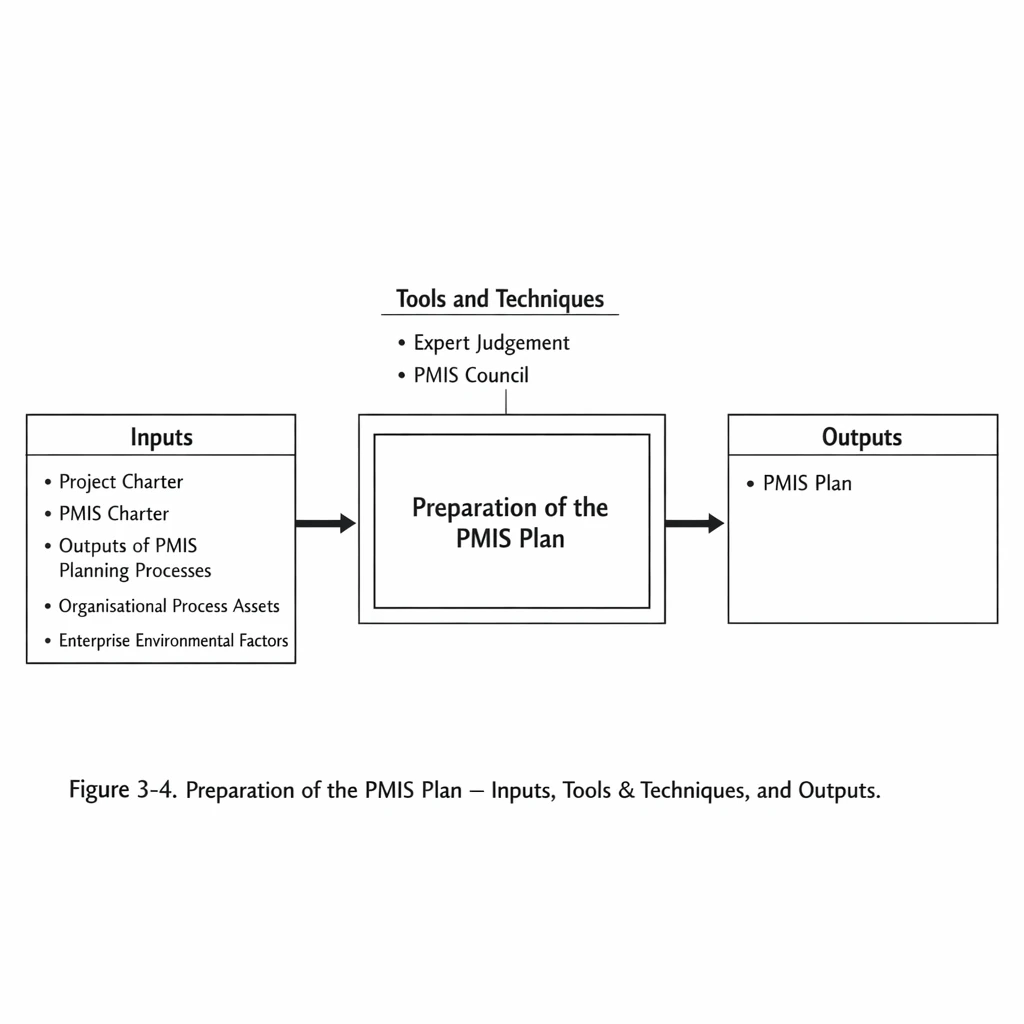
The Preparation of the PMIS Plan is the process of documenting the activities required for managing project information and integrating these activities into a unified structure. This document specifies how the PMIS will be implemented within the project and sets out the schedule according to which it will be executed, monitored, and controlled.
The PMIS Plan is initially approved by the PMIS Council and is updated throughout the project, gradually evolving as the project progresses. It should be noted that any modification to the outputs of the PMIS planning processes may require corresponding updates to this document.
Preparation of the PMIS Plan: Inputs
- Project Charter:
Used to obtain an understanding of the project’s status and operating conditions.
- PMIS Charter:
Used to obtain an understanding of the PMIS policy-making and the high-level PMIS plan within the project.
- Outputs of PMIS Planning Processes:
All outputs produced by the other PMIS planning processes are consolidated and integrated in this process to prepare the PMIS Plan.
- Organisational Process Assets (OPA):
The organisational process assets used in this process include
- existing PMIS Plan templates
- guides or work instructions for preparing the PMIS Plan
- sample PMIS Plans from previous projects
- the knowledge base of lessons learned and past information
- Enterprise Environmental Factors (EEF):
The environmental factors that influence this process include
- the organisation’s project information systems
- information-technology infrastructures
- the organisation’s and project’s information-technology culture
Preparation of the PMIS Plan: Tools and Techniques
- Expert Judgement:
In preparing the PMIS Plan, the expertise of specialists in project management, information technology, and PMIS is used.
- PMIS Council:
As the highest PMIS policy-making body within the project, the PMIS Council reviews and approves the PMIS Plan.
Preparation of the PMIS Plan: Outputs
- PMIS Plan:
The PMIS Plan is the document that, following the consolidation and integration of outputs from the other PMIS planning processes, specifies the PMIS execution plan and the PMIS execution schedule within the project. The PMIS Plan may include, but is not limited to, the following:
- a list of activities to be performed in project information management
- the PMIS processes selected for the project
- the extent of implementation of PMIS processes in the project
- a description of the tools and techniques used to execute PMIS processes
- activity schedule baselines
- cost baselines (where necessary)
- descriptions of PMIS plans
- a description of the interaction between the project PMIS, the organisational PMIS, and other organisational information systems
- a description of infrastructural requirements within the project or the organisation
Identification of Project Stakeholders
View process diagram
View process diagram
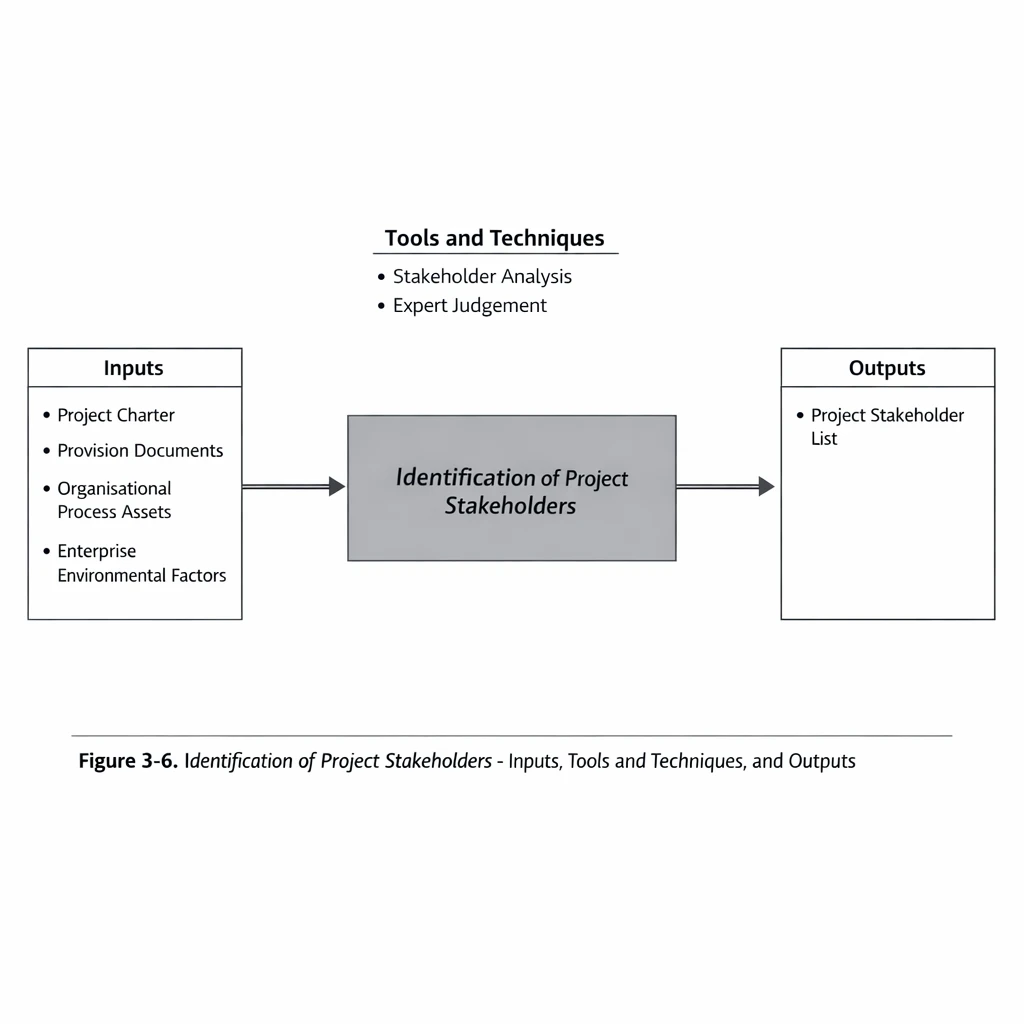
This is the process of identifying all individuals or organisations that are affected by the project and documenting information related to their interests and their influence on the success of the project. This corresponds to Process 10.1 of the PMBOK® Guide, presented here in a summarised form with minor modifications. For further information, refer to the relevant section of the PMBOK® Guide.
Definition of Stakeholders
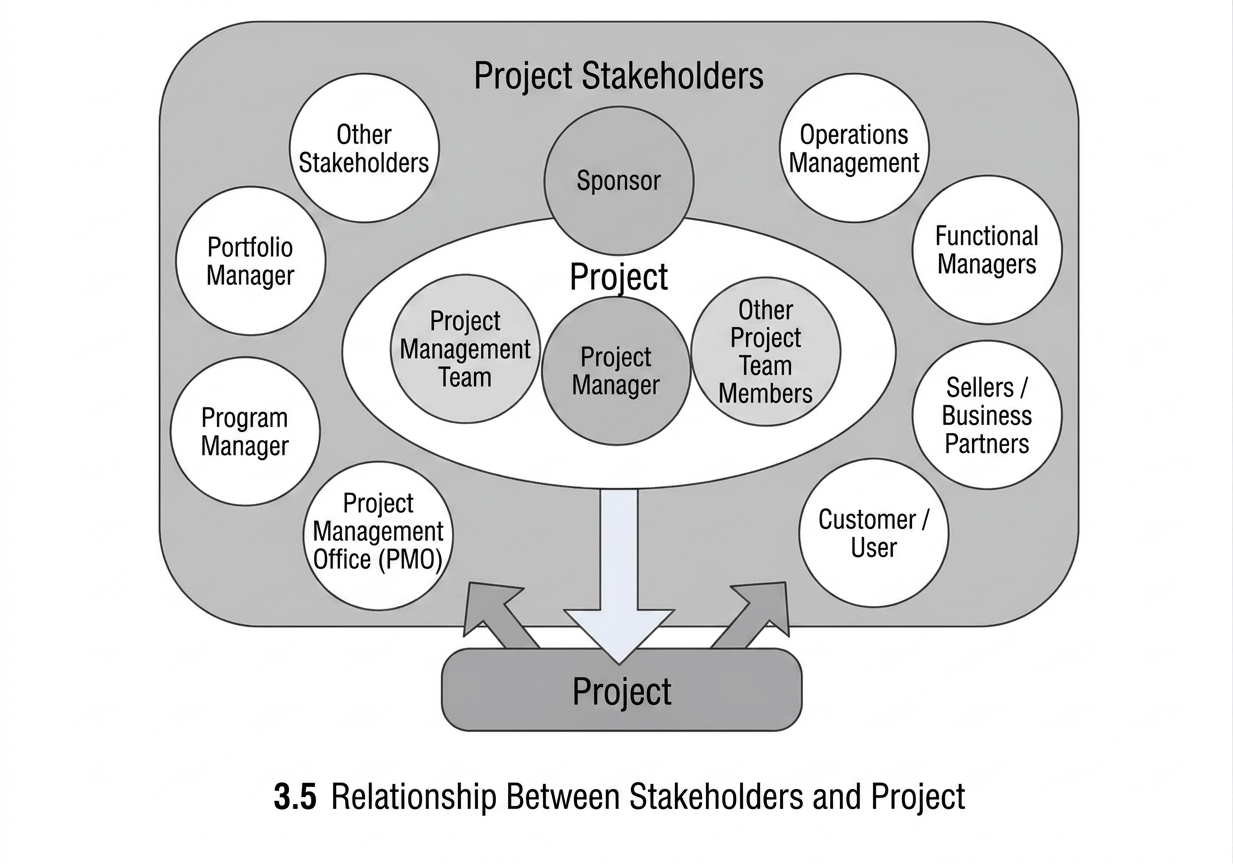
Stakeholders are individuals or organisations—such as customers, sponsors, the performing organisation, or the public—who are actively involved in the project, or whose interests may be positively or negatively affected by the project’s performance or completion. Stakeholders may also influence the project, its deliverables, and the members of the project team. Stakeholder identification is a continuous process.
For the success of the project, it is essential that stakeholders be identified at the outset of the project and that their levels of interest, expectations, significance, and influence be analysed. From the perspective of this process, the stakeholders of primary importance are those whose information requirements must be addressed and whose influence affects the success of the project.
Identification of Project Stakeholders: Inputs
- Project Charter
A formal document that authorises and introduces a project, or a phase of a project, and records the initial requirements that address the expectations and needs of stakeholders. This document is described in Section 4-1 of the Project Integration Management chapter of the PMBOK® Guide. In this process, it provides information on the internal and external parties involved in the project and the extent of their influence.
- Provision Documents
If the project involves a contract, the contracting parties will be key stakeholders. In addition, suppliers must also be considered as part of the stakeholder list.
- Organisational Process Assets
As explained in Chapter 1, these assets may be used in this process through existing templates for stakeholder registration, lessons learned from previous projects, and stakeholder records from earlier projects.
- Enterprise Environmental Factors
As described in Chapter 1, these factors support this process through familiarity with the organisational structure and culture, as well as relevant regulations and applicable standards.
Identification of Project Stakeholders: Tools and Techniques
- Stakeholder Analysis:
This technique consists of conducting quantitative and qualitative examinations of stakeholders, focusing on their interests, expectations, and influence, and identifying their relationship to the objectives of the project or the organisation. This examination is carried out with the aim of increasing effectiveness and achieving alignment with the objectives of the project. For further information, refer to Section 10-1-2 of the PMBOK® Guide and the Business Analysis Body of Knowledge (BABOK). (Some of these techniques are noted in Section 3.1.4.)
- Expert Judgement:
One of the methods used in preparing the stakeholder list is the use of expert judgement provided by individuals who possess relevant experience and knowledge. Such individuals include senior managers, identified key stakeholders, project managers, specialists within their respective domains, and consultants.
Identification of Project Stakeholders: Outputs
- Project Stakeholder List:
The output of this process is a complete list of all stakeholders associated with the project, together with their characteristics and certain assessment information. This list may include:
- Identification information: name, organisation, organisational position, role in the project, and contact information.
- Assessment information: the degree of influence on the project, the degree of criticality, a description of requirements, needs and tendencies, the level of computer literacy, and the preferred method for receiving reports (paper-based or electronic).
- Type of interaction with the stakeholder: In accordance with the strategies that exist within the project or the organisation, it must be determined how the informational relationship—regarding the level of access to information and the importance of information—will be managed for each group of stakeholders.
Extraction of Information Requirements
View process diagram
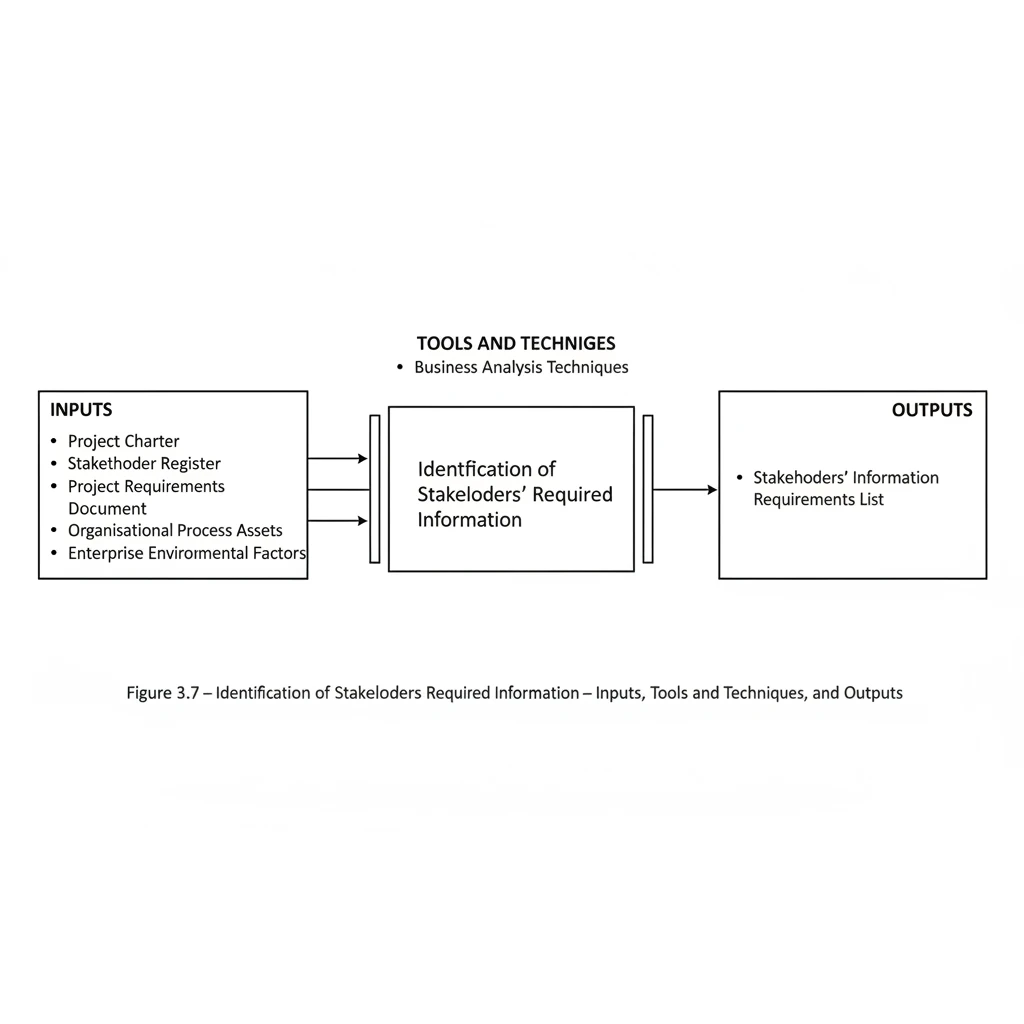
This process concerns identifying the needs, wants, tendencies, expectations, and the understood constraints of the recognised stakeholders, so that the real and effective requirements that influence the project may be distinguished from those desires or expectations that bear no direct effect upon it.
The information required in each project may generally be divided into two principal categories:
- Information required by stakeholders:
This refers to the information that stakeholders need. Such information may be explicitly stated by them, or obtained by analysts during the examination and analysis of stakeholder requirements.
- Information related to project and product management processes:
This category includes the information that is essential during the project and is used within the processes of project and product management. Such information is usually one of the inputs or outputs of these processes. This group of information will be discussed in the next section.
The preparation of the required information in both categories necessitates effective and constructive interaction with stakeholders, specialists, and consultants. In order to obtain suitable information items, several techniques used in the field of business analysis should be applied.
The International Institute of Business Analysis (IIBA) is a well-known international institute in the field of business analysis, and has produced the reference guide entitled the Business Analysis Body of Knowledge (BABOK). A number of the techniques used in this process are drawn from this guide.
According to the definition provided in this guide, business analysis is “the performance of the activities required for identifying, managing, planning, analysing, and validating the requirements of an organisation, and presenting an appropriate solution that enables the organisation to attain its defined objectives.” In simpler terms, business analysis may be regarded as the discipline concerned with examining business processes, mechanisms, information flows, objectives, and strategies within the business environment. Such solutions may be either mechanised or non-mechanised. The requirements that are met through the execution of a business’s processes are identified within this analysis.
Business analysis consists of a set of activities and techniques used in the interaction among stakeholders for the purpose of understanding the structure, policies, and operations of an organisation, and presenting solutions that enable the organisation to achieve its objectives. A business analyst must examine and analyse the information provided by a wide range of individuals connected with the business, including customers, employees, information technology specialists, and executive managers. A business analyst is responsible for extracting the real requirements of stakeholders, rather than merely expressing their unrealistic wishes.
What is a requirement? According to the BABOK, a requirement is
- A condition or capability needed by stakeholders to solve a problem or to achieve an objective.
- A condition or capability that must be met or possessed by a solution, or a component of a solution, in order to satisfy the terms of a contract, standard, specification, or other formal documents.
- A formally documented representation of the conditions and capabilities described in the preceding items.
As is implicitly conveyed by this definition, a requirement may be unclear, implicit, or derived from other requirements, or it may be directly identified and managed. One of the key purposes of business analysis is to ensure that requirements are understandable and evident to all stakeholders.
Requirements may be classified into the following categories
- Business Requirements
Business requirements represent the highest-level statements of the organisation’s objectives, purposes, and needs. These requirements explain why a project has been initiated, whether the purposes of the project will be achieved, and the reasons for applying the measurement criteria used to assess its success. Business requirements describe the needs of the organisation as a whole, rather than those of stakeholder groups or individuals within it. They are developed and defined during organisational analysis.
- Stakeholder Requirements
Stakeholder requirements are statements of the needs of specific stakeholders or particular groups of stakeholders. They describe the needs of identified stakeholders and how these stakeholders influence the solution that responds to those requirements. Stakeholder requirements serve as a bridge between business requirements and the various categories of solution requirements. They are defined and developed during requirements analysis.
- Solution Requirements: These describe the characteristics of a solution that satisfy business and stakeholder requirements. They are developed and defined through requirements analysis and are usually divided into subcategories, particularly when the necessary conditions of a solution are realised through software:
- Functional Requirements: These describe the behaviour and information related to the proposed solution. This type of requirement explains the capabilities that can be implemented within the operational system.
- Non-Functional Requirements: These refer to requirements related to indirect behavioural or operational conditions in the solution. They also describe the environmental conditions that affect the solution or the quality that the system must possess. These requirements are also known as quality or supplementary requirements. Examples of non-functional requirements include capacity, speed, security, information architecture, and the manner of presenting the user interface.
- Transitional Requirements: These represent the capabilities that a solution must possess to move the organisation from its current state to the desired state. At the same time, this type of requirement will no longer be used after the transition period. This type of requirement differs from other requirements because it is inherently temporary, and cannot be developed until the existing solution or the new solution has been defined. Such requirements usually include the conversion of information from existing systems, existing skill gaps, and other changes related to the desired state. Transitional requirements are developed and defined through the evaluation of the solution and the assessment of its implementation feasibility.
After identifying the project stakeholders and preparing their list, it becomes necessary to identify and extract the information required by them throughout the project. This process is one of the most important processes within the PMIS, and the degree of success in identifying and extracting the required and appropriate information—information that influences the decision-making capability of the project team—has a direct relationship with the achievement of the objectives of the PMIS and the project.
Extraction of Information Requirements: Inputs
- Project Charter: This document is the output of the process of developing the Project Charter in Section 4.1.3 of the PMBOK. In order to understand the status and conditions of the project, analysts and interviewers must study the information in this document, which is explained in Section 3.1.1, and, when engaging with stakeholders, establish appropriate interaction based on the overall objectives of the project.
- Stakeholder List: This list forms the basis for reviewing stakeholders’ information requirements. Considering the degree of importance of each stakeholder, and by using the techniques presented in this process, the information requirements of this group will be extracted.
- Requirements Documentation: This document, which is one of the outputs of the process of collecting the project requirements in the PMBOK document, is presented and explained in Section 3.1.3. This document presents a list of the main and detailed requirements of the project in order to fulfil the project objectives. If such a document does not exist in a project, it must be produced by the analysis team before carrying out this process.
- Organizational Process Assets: The process assets used in this process include:
- Lessons learned from previous projects
- A list of the information required for previous projects
- Enterprise Environmental Factors: The items used in this process include:
- The organisation’s project information system
- The information systems used in the project
- The inputs and outputs of the organisation’s project management software
Extraction of Information Requirements: Tools and Techniques
- Business analysis techniques: In Version 2 of the BABOK Guide, thirty-four (34) techniques are presented for the successful analysis of a business. The list below shows some of these techniques:
Selected Business Analysis Techniques
Here, a brief explanation of some of these techniques is provided
Interviews
An interview is a formal or informal approach used to obtain stakeholders’ information through direct dialogue with them. Interviews may be conducted spontaneously or based on pre-prepared questions. Generally, interviews with experienced individuals and experts are far more successful when conducted by persons who are familiar with that particular field of work.
Document Analysis
Document analysis is a method for accessing requirements through studying and reviewing project and organisational documents. In this method, by examining different types of documents related to the project—such as contracts, operating procedures, documentation of project management software, and reports generated by previous projects—part of the project’s information requirements can be obtained.
Focus Groups
Focus groups essentially involve gathering qualified specialists and stakeholders so that their views and expectations regarding a specific requirement can be understood. Usually, a trained individual should act as the session leader and guide the group so that a more appropriate result can be obtained compared with individual interviews.
Brainstorming
Brainstorming is a technique used to generate and express multiple and diverse ideas from a group of individuals regarding a specific topic within the shortest possible time (creating the maximum number of ideas in the minimum time). In other words, brainstorming is a group activity for solving a problem by rapidly generating numerous possible solutions in order to select the most appropriate one.
Observation
Observation is a direct method for watching individuals perform their work and tasks in the work environment. This method is particularly useful for examining the details of processes and in situations where individuals are reluctant to express their requirements. Observation, which is also known as job shadowing, is usually carried out by an observer who watches the user while the work is being performed.
Prototyping
Prototyping is a technique for rapidly obtaining requirements through creating a model of the expected product that is presented before its actual construction. Since prototypes are tangible and visible, they allow stakeholders to test the model of the final product in practice rather than through theoretical discussions. After sufficient feedback has been received on the prototype, the main prototype will be prepared.
Extraction of Information Requirements: Outputs
Information Requirements List
A list of the identified information items that represent the actual information required by stakeholders. This document must indicate which person requested each information item, provide a description of what the item is, and specify how and from where it was obtained. The format of this document may range from a simple document that lists all classified and prioritised stakeholder requirements, to more complete forms that include summaries, detailed explanations, and appendices.
The components of the requirements document may include, but are not limited to, the following:
- Functional requirements
- Analysed non-functional requirements
- A list of information items related to the provided requirement and the stakeholder requesting it
- Identified assumptions and constraints
- Relationships among information elements in terms of creation-related or dependency-based connections
Identification of Project Process Outputs
View process diagram
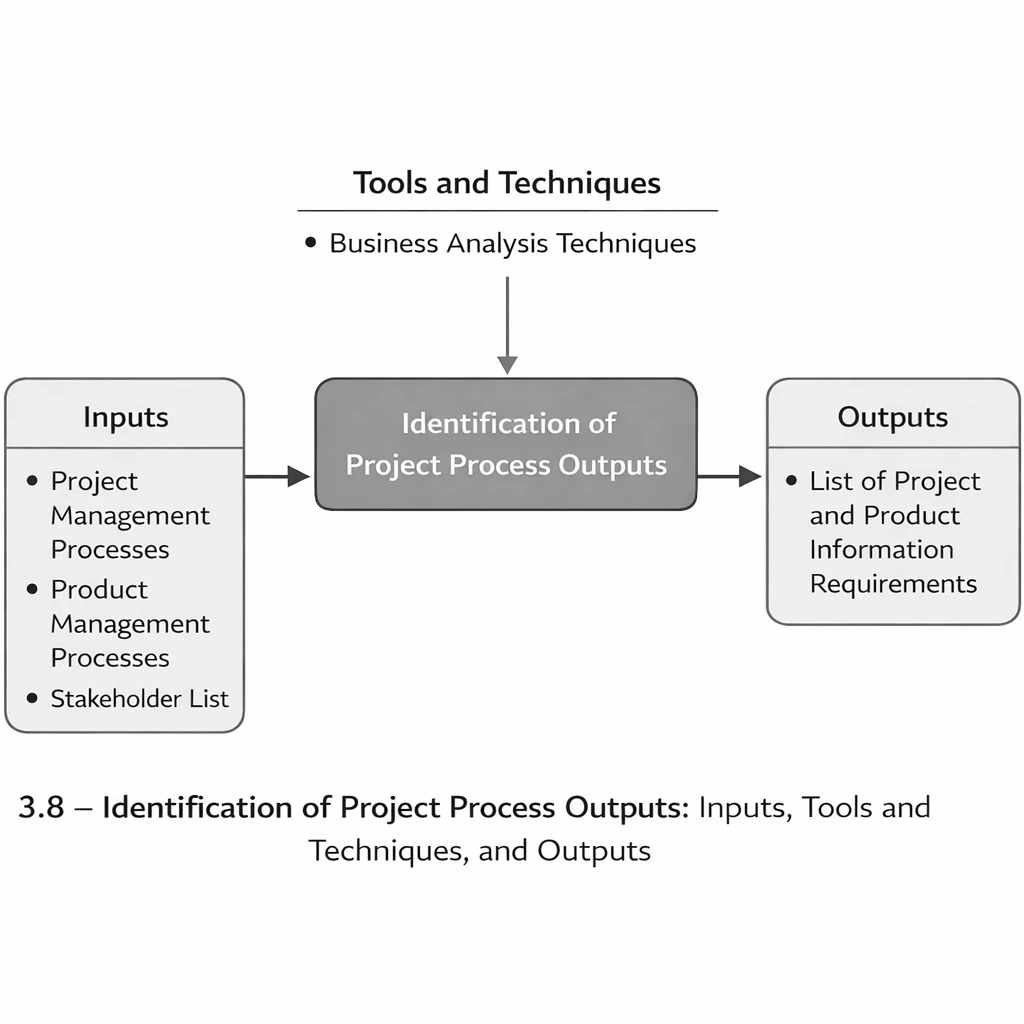
A key category of information comprises the outputs generated throughout the project lifecycle—and, depending on the project type, throughout the product lifecycle as well—that require active management. This section describes how to identify these information outputs across the relevant lifecycle(s).
Identification of Project Process Outputs: Inputs
- Project Management Processes
Project management processes, as defined in the PMBOK Guide, comprise the tools and techniques used to apply the skills and capabilities described in the knowledge areas. In the fourth edition of the PMBOK Guide, these processes include 42 processes arranged into five process groups. A brief description of these processes was presented in Chapter One.
The purpose of reviewing these processes is to identify their outputs in the form of information requirements. It should be noted that not all project management processes are used in every project, and some may require tailoring. The responsibility for selecting or tailoring these processes rests with the project manager and the project management team. The PMIS team must ensure that the tailored processes have been confirmed and approved for the specific project; however, carrying out the tailoring itself does not fall within the responsibilities of the PMIS team.
- Product-Based Processes
These processes define and create the project’s product. Product-based processes are typically determined by the project lifecycle and vary according to the application area. The project scope cannot be defined without a basic understanding of how the product is created. These processes interact closely with the project management processes and with other organisational processes. Recognising these interactions and maintaining an appropriate balance among them are important responsibilities of the project management team. The PMIS team must ensure that this balance among the processes has been established.
- Stakeholder List
This list was described in Section 3.1.3. Knowing who the key stakeholders of the project are is essential for establishing communication with them and for analysing the information requirements related to both the project management processes and the product processes.
Identification of Project Process Outputs: Tools and Techniques
- Business Analysis Techniques
All the concepts presented in Section 3.1.4 are also applicable to this process.
Identification of Project Process Outputs: Outputs
- List of Project and Product Information Requirements
This list, which may be published as either a physical or an electronic document, contains the information items related to the inputs and outputs of the project management processes and the product processes. It results from reviewing and analysing these processes throughout the project lifecycle and leads to the identification of the project’s key information items. The components of this document may include, but are not limited to:
- Functional requirements classified by outputs and processes
- Analysed non-functional requirements classified by outputs and processes
- A list of information items related to each requirement and the stakeholder requesting it within the process outputs
- Identified assumptions and constraints
- Relationships among information elements, including generative or dependency relationships
Designing the Content, Format, and Type of Expected Outputs
View process diagram

A recurring issue observed in many information systems is the lack of appropriate and practical reports. This issue is also common in project information systems; despite the generation, collection, and storage of a large volume of information, project managers and stakeholders are often dissatisfied with the way information is delivered. They frequently state that the reports do not present the information in the manner they expect, and that, although a substantial amount of information is provided, it is neither useful nor usable.
The primary reason for this dissatisfaction is the limited knowledge and experience of those who design the outputs, particularly regarding the preparation of reports and the integration of information for effective use in the project. It should also be noted that, in some cases, the recipients themselves may not clearly know what type of information would be effective for them; they can only indicate that the existing outputs are not useful.
The purpose of this process is to design outputs—regarding their content, format, medium, and level of integration—so that they are useful for the recipients and suitable for supporting their decision-making.
Designing the Content, Format, and Type of Expected Outputs: Inputs
- List of Requirements:
The list of stakeholder requirements and the outputs of the project processes described in earlier processes represent the information needs of the project, for which appropriate outputs must be designed.
- Agreements:
Project agreements are among the documents that may be used for the patterns of the required reports and outputs. These agreements usually specify the project’s commitments for providing information to the parties to the agreement, and in some cases, the required patterns are also included.
- Information Technology:
Awareness of the capabilities that information technology provides for supporting various media is one of the inputs that should be applied in this process.
- Organisational Environmental Factors:
The most important organisational environmental factors used in this process are as follows
- Report patterns from other projects
- Lessons learned from other projects
- Infrastructure or technology constraints
Designing the Content, Format, and Type of Expected Outputs: Tools and Techniques
- Requirements Analysis:
In accordance with the methods presented in Section 3.1.4, the required outputs of the project should be analysed with the approach of identifying the most appropriate output for the intended audience.
- Media Analysis
An essential activity in this process is determining the most appropriate type of media for effectively communicating information to the intended audience. This analysis considers familiarity with the existing media supported by systems and information technology, the organisational and project infrastructure and technological limitations, the contractual commitments, and the nature of audience needs.
- Prototyping
A common challenge in designing suitable outputs is that audiences may not fully grasp the implications of the requirements they have expressed. The most appropriate method is to prepare a draft or prototype version of the output for audience review and iterate based on their feedback until the desired result is achieved.
- Reporting Systems
Reporting systems are pre-built tools that enable users to design and view reports based on collected information, allowing them to generate their required outputs. Examples include the reporting module of Microsoft Access or applications such as Crystal Reports.
Design of Content, Form, and Type of Expected Outputs: Outputs
- Output Patterns
After reviewing and analysing the information requirements and the outputs committed in the project agreements, an output pattern is prepared for each type of requested output. This pattern specifies the required information items, the presentation format, the media of delivery, and the method of communicating the information. These patterns may be provided either in printed formats or as digital files to the project team or the report-implementation team.
Information Supply and Distribution Planning
View process diagram
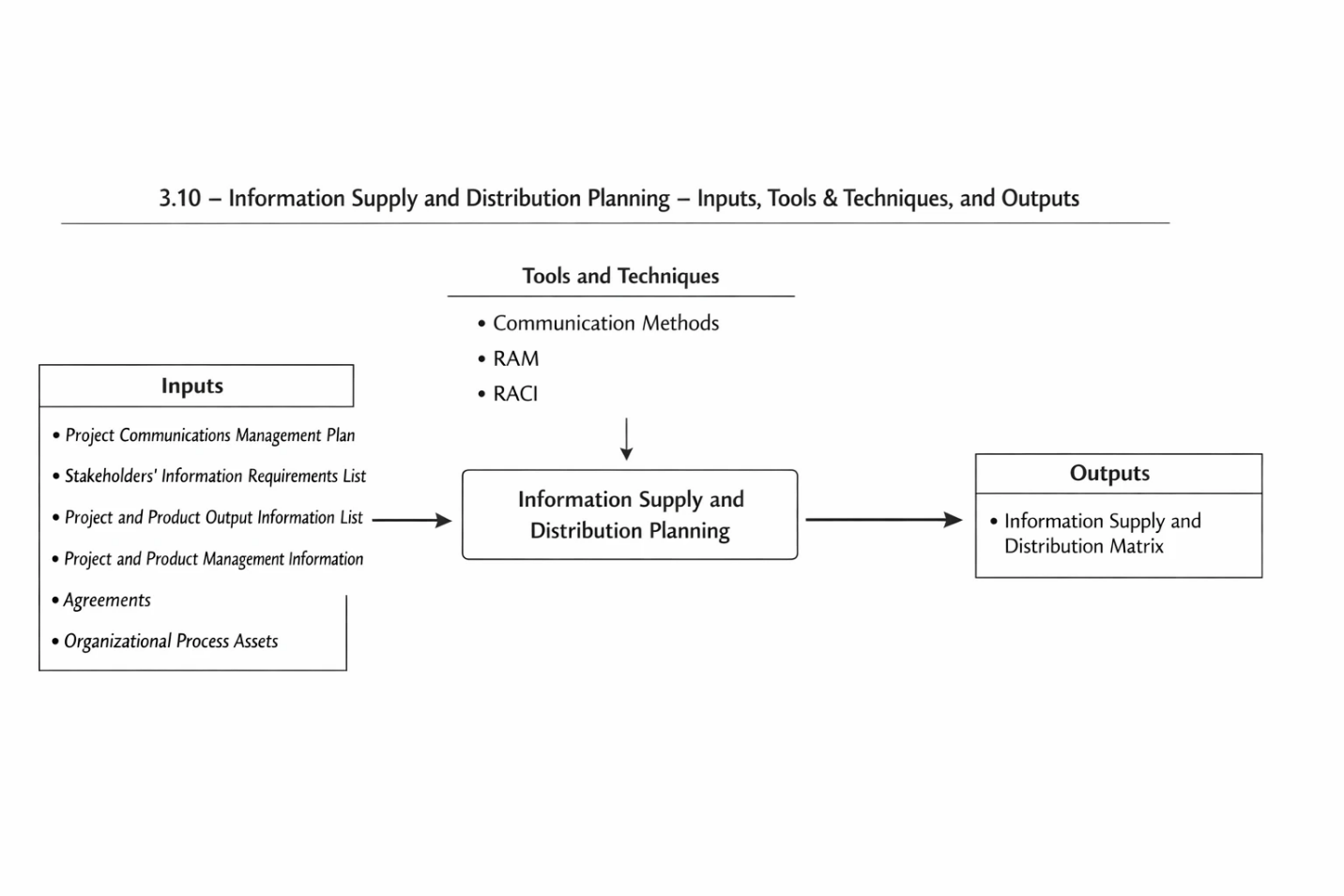
A primary objective of this process is to ensure that the information required by project stakeholders is properly provided and made available in accordance with the established plan. In this context, information supply refers to determining how the information will be prepared, who will produce it, and how it will be stored or maintained. This process also determines whether the information will be produced and distributed through mechanised and electronic methods or manually and in physical form. It should be noted that this process only specifies whether the information is electronic or paper-based; the provision of appropriate tools for managing such information will be addressed within the PMIS supply process group.
Achieving the objectives of this process requires adequate familiarity with the work processes of both the project and the organisation. Awareness of contractual commitments and communication obligations with business partners is also necessary for preparing this plan. The use of mechanised tools, information systems, and information technology significantly increases the speed of these communications.
Unfortunately, due to the absence of adequate legal and regulatory frameworks governing the admissibility of digital documents in our country, the electronic exchange of legal records—such as accounting, financial, and contractual documents—is not currently feasible. However, it is recommended that planning be organised in such a way that the information is first generated through mechanised and digital methods and that the corresponding paper documents are subsequently prepared. Regarding distribution methods, notifications or document transmissions should initially be performed electronically, followed by the delivery of paper documents to the recipients within an agreed timeframe.
Another important consideration concerns the timing of producing or distributing information. Time is not necessarily defined as a specific calendar date—although in some cases a fixed date may be required—but rather as a period defined relative to the occurrence of a triggering event. For example, issuing a confirmation letter one week after receiving the advance payment, or sending a response to the consultant fourteen days after receiving the transmitted document. Distribution times are derived from the project work processes and the contractual commitments of the project.
Information Supply and Distribution Planning: Inputs
- Communications Management Plan
This document is the output of the Communications Planning process described in Section 10.2.3 of the PMBOK Guide. It defines communication requirements, the purpose of information distribution, and the schedule and sequence of distribution. If this document has not been prepared, the PMIS team should prepare it prior to performing this process.
- Stakeholder Information Requirements List
A list of information requested by stakeholders, as described in Section 3.1.3.
- Project and Product Output Information List
A list of information items produced in project and product management processes that require supply and distribution.
- Project and Product Management Processes
To determine the responsible individuals, the methods of supply and distribution, and the required timeframe, all active project and product management processes must be reviewed in order to determine how the information will be supplied and distributed.
- Agreements
These important documents define the obligations and communication requirements in interactions with contracting parties and will be used in this process.
- Organizational Process Assets (OPAs)
Processes used in other projects or operational units related to the project, as well as templates from other projects in this area, are among the items that will be used in this process.
Information Supply and Distribution Planning: Tools and Techniques
- Communication Methods
Individual and group meetings, video and audio conferences, computer-based chats, and other remote communication methods can be used for distributing information.
- Responsibility Assignment Matrix (RAM)
This technique clarifies the relationship between responsibilities for supplying and distributing information and the members of the project team or the organisation. In larger projects, the RAM can be developed at various levels of the project organisation. In this method, a table is prepared in which the first column indicates the type of activity related to producing or distributing information, and the subsequent columns specify the organisational responsibilities for performing that activity.
- RACI Method
This technique is also a type of responsibility assignment matrix. The difference is that it uses four designations to specify the type of responsibility: ® Responsible, (A) Accountable, © Consulted, and (I) Informed. This method may also be expanded by modifying these designations or by adding additional ones. An example of this table is shown below.
Information Supply and Distribution Planning: Outputs
- Information Supply and Distribution Matrix:
The Information Supply and Distribution Matrix is a document that specifies which information items must be produced by which individuals and to whom they are to be distributed. The timings of production and distribution are also defined in this document. An example of this matrix is presented in the table below. This form may be modified according to the needs of each project. Abbreviated letters may be used to indicate the type of responsibility or the timing.
Classification of Information and Definition of Access Rights
View process diagram
Determining access to information is usually one of the challenging matters within organisations and projects. Naturally, individuals tend not to welcome any form of restriction and expect to have unrestricted access to all information. In small companies and projects, this matter is generally not significant within the organisation, and concerns about access typically arise only with respect to individuals outside the organisation or project. However, in a large organisation or project, the absence of a clear structure for categorising information and the absence of defined access rights can create serious and risky problems for the organisation.
Before addressing access rights, the most important matter that must be examined is the organisation’s policies and strategies concerning how information is categorised and the degree to which it is considered confidential. Just as neglecting this matter can be dangerous, excessive sensitivity in imposing restrictions and creating unnecessary categories will also result in a lack of trust among individuals and failure in the management of information.
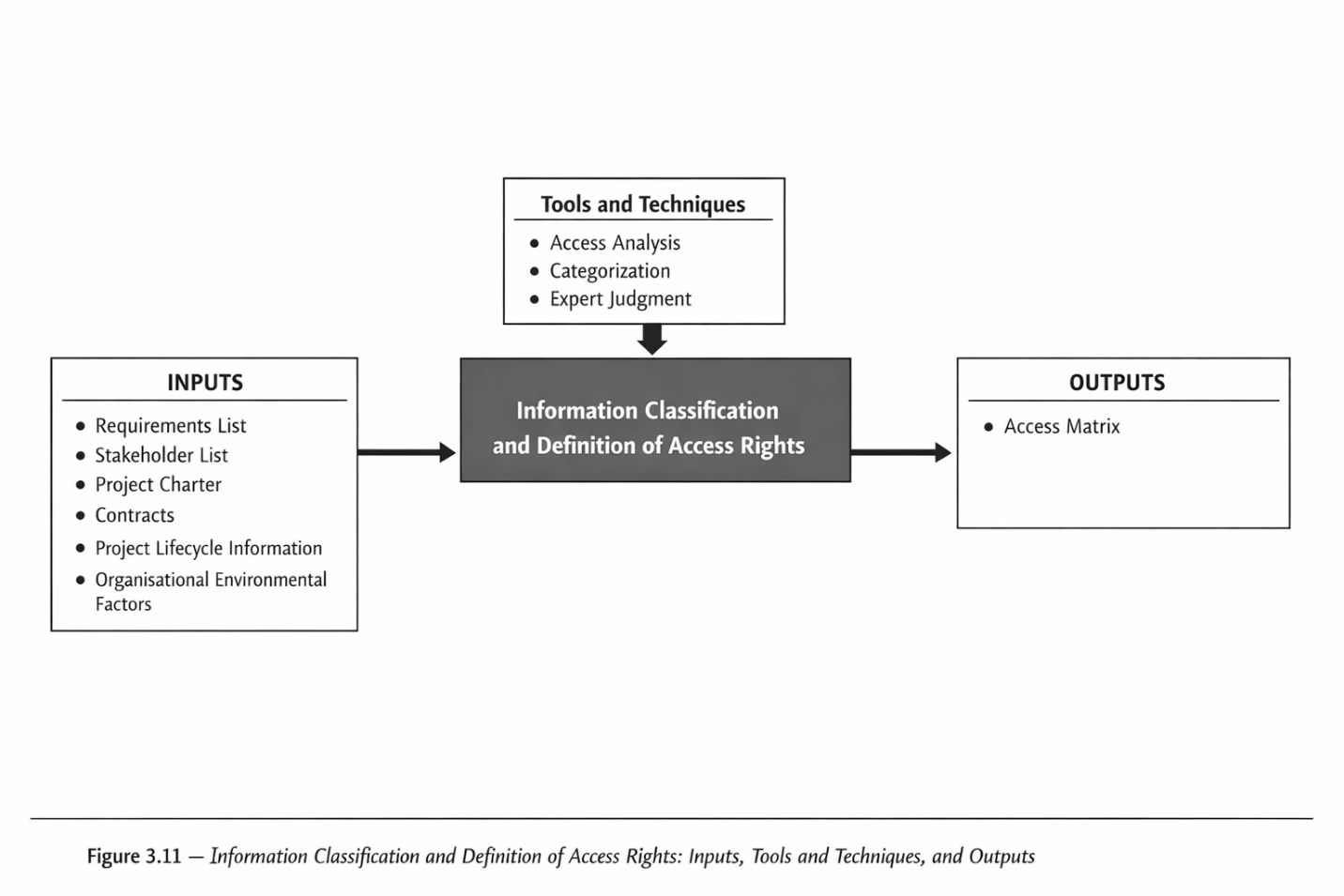
Information Classification and Definition of Access Rights – Inputs
- Requirements List
The list of information requirements obtained from stakeholders and from the outputs of project and product management is reviewed in this step.
- Stakeholder List
As described in Section 3.1.2, this list is used to ensure that all stakeholders are considered with respect to access to information.
- Project Charter
The project charter can assist in understanding the relationships of the project with internal and external parties involved in the project, including project sponsors, customers, team members, participating groups and units, and other individuals or organisations affected by the project.
- Agreements
Awareness of contractual obligations concerning the use and receipt of information is important. Reviewing the project’s agreements also clarifies the individuals or organisations that are parties to these agreements.
- Supply and Distribution Matrix
This document, described in Process 3.1.7, identifies the producers and recipients of information throughout the project and serves as one of the key documents for determining access rights. Access rights should be defined by considering the roles or individuals who produce, approve, or receive the information.
- Organisational Environmental Factors
The organisational environmental factors that may be used in this process include
- Access patterns from other similar projects
- Organisational policies and strategies regarding the organisation’s business counterparts
- The political conditions and confidentiality requirements of the organisation and the project
- The organisation’s or project’s information categorisation
- Policy or infrastructural constraints related to access rights
Information Classification and Definition of Access Rights – Tools and Techniques
- Access Analysis
The method used for analysing access to project information follows these steps
- Identify all stakeholders and business counterparts associated with the project.
- Identify the roles of individuals and organisations in producing, approving, or receiving information.
- Prepare a complete list of the project’s information items.
- Classify information with respect to confidentiality.
- Define the required types of access based on project needs.
- Determine the type of access for each information item for each stakeholder and business counterpart.
- Grouping
Grouping information and individuals simplifies and clarifies the definition of access rights. By grouping information items and individuals based on their similarities, access rights can be defined at the group level. This approach reduces the number of access entries and enhances the readability of the access matrix.
- PMIS Council
Given the sensitivity involved in defining access rights, the use of the PMIS Council for approving and communicating these access rights to users can reduce tensions during the implementation of access rights within the project.
Information Classification and Definition of Access Rights – Outputs
- Access Matrix
This is an important and practical document which, based on the judgement of the PMIS Council, may even be considered confidential and not accessible to everyone. In this document, the policies and strategies for access rights, as well as the types of access, are first described, and a table of access rights is presented accordingly.
The document may include appendices containing input information such as the referenced sources used in its preparation. The contents that may be included in this document are:
- Description of the project and organisational conditions with respect to information confidentiality
- Statement of the access policy and strategy in the project
- Description of the information classification
- Description of the types of access rights
- Definition of similarity groups of stakeholders and access rights
- Access Matrix by Stakeholders or Access Groups
- Appendices
Access Types
Access permissions are typically classified into the following levels, although they are not limited to these levels:
–Create / Generate : The ability to create this information item (typically within automated systems).
–Personal Read / View : The ability to view information created by the individual.
–Read / View – Others: The ability to view information created by others.
–Personal Edit: The ability to edit information created by the individual after it has been created.
–Edit – Others: The ability to edit information created by others.
–Personal Delete: The ability to delete information created by the individual.
Delete – Others: The ability to delete information created by others.
Information Maintenance Planning
View process diagram
Information in every organisation and project is considered an organisational asset. Whether in physical or electronic form, this information must be planned and managed in a way that protects it from the risk of damage or loss. In addition, measures should be considered to determine how information can be recovered in the event of unexpected incidents that lead to the loss of part of the information.
Providing preventive solutions to avoid potential problems, as well as defining predefined methods for addressing information threats, are among the objectives pursued by this process. Examples of this process include planning and defining rules for the maintenance and archiving of project documentation in terms of physical storage and safety measures, as well as providing plans for the storage and backup of project information and defining methods for information recovery.
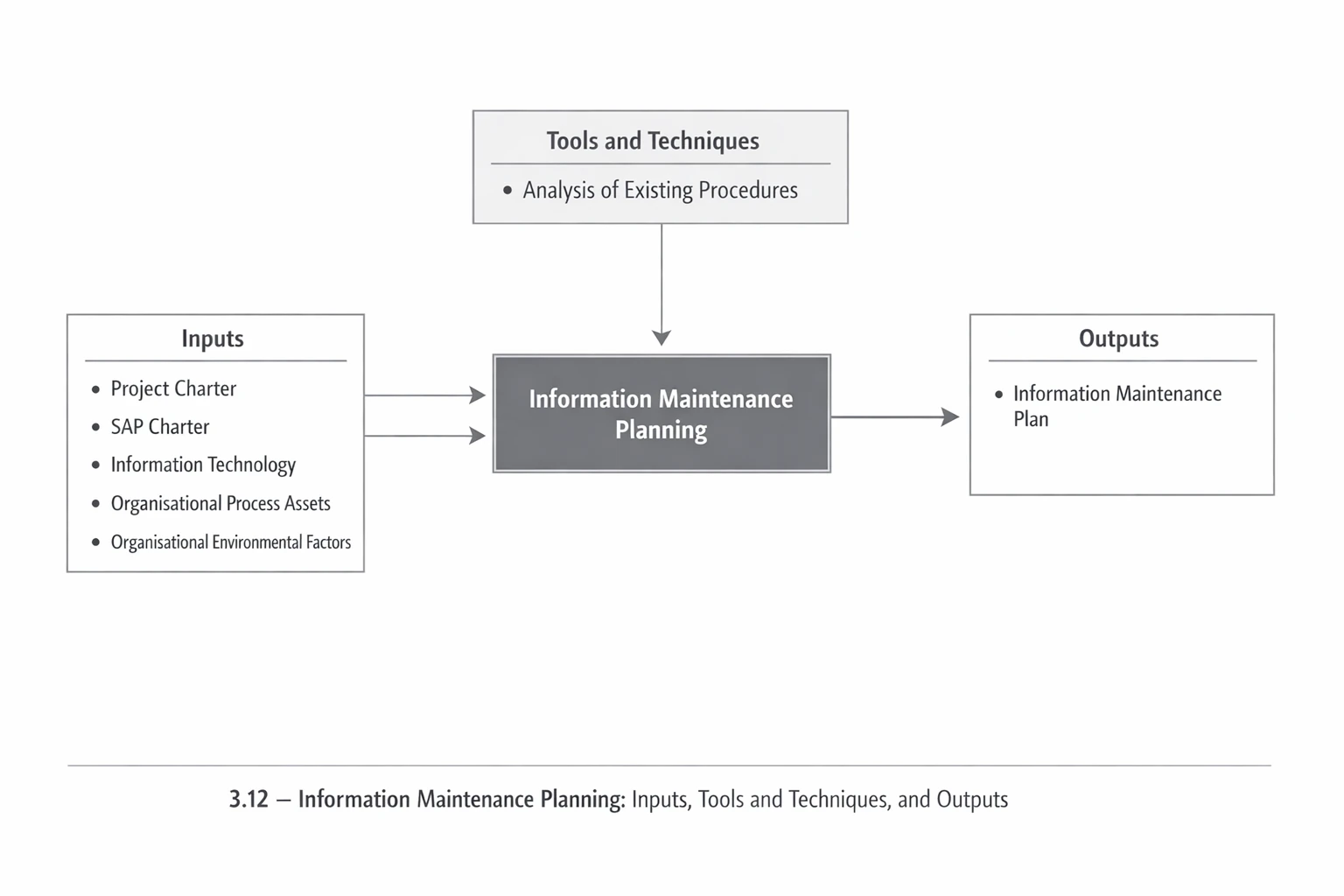
Information Maintenance Planning – Inputs
- Project Charter:
To understand the project’s conditions in terms of geographical dispersion, execution locations, and other project circumstances, the information included in the Project Charter should be used in this process.
- PMIS Charter:
Decisions made regarding the PMIS conditions of the project are among the determining factors in planning information maintenance.
- Organisational Process Assets:
Existing procedures for maintaining and supporting information, whether within the organisation or in previous projects, can be used for planning in this process.
- Enterprise Environmental Factors:
Existing infrastructures within the organisation or the project, information technology tools related to maintaining and supporting information, and facilities available for maintaining physical information are considered relevant factors in this process.
- Information Technology:
Awareness of the latest technologies in information storage and backup is one of the elements that can influence decision-making and the selection of methods in this process.
Information Maintenance Planning – Tools and Techniques
- Analysis of Existing Solutions:
Reviewing and analysing various available solutions using appropriate methods, in order to select the most suitable solution for different project conditions, is one of the important techniques in this process.
Information Maintenance Planning – Outputs
- Information Maintenance Plan:
A document that, by describing the project’s conditions from the perspective of geographical dispersion, the types of project documents and information, and the communication conditions with other stakeholders, provides a plan for the maintenance, storage, backup, and recovery of information.
Information Configuration Design
View process diagram
Projects usually deal with large volumes of information throughout their life cycle. This information is created, modified, distributed, and eventually archived. Managing this volume of information during the project—particularly with regard to how it is maintained, how its integrity is validated, and how it may change during the project life cycle—is a matter that must be planned in every project. In this regard, numerous standards and guidelines exist, among which the Practice Standard for Project Configuration Management published by the Project Management Institute may be noted.
Configuration management refers to the process of identifying configuration items, controlling the release of these items and the changes made to them during the project life cycle, recording and reporting the status of configuration items and change requests, and verifying and validating configuration items. The objective of configuration management is to maintain and support the integrity of all specified project outputs and to make them available to the relevant parties.
The activities performed in configuration management include
Configuration Identification
Selecting and identifying configuration items provides a basis for defining and confirming the product configuration, labelling products and documents, managing changes, and establishing accountability.
Configuration Status Accounting
When the required data related to configuration items becomes available, the information is recorded and reported. This information includes the list of approved configuration identifications, the status of proposed configuration changes, and the status of the implementation of approved changes.
Configuration Audit and Verification
Configuration audit and verification ensure that the composition of the project’s configuration items is correct and that the related changes are recorded, evaluated, approved, tracked, and properly implemented.
It should be noted that the Information Configuration Plan constitutes a major part of the overall Project Configuration Plan, and in this section only this component is addressed.
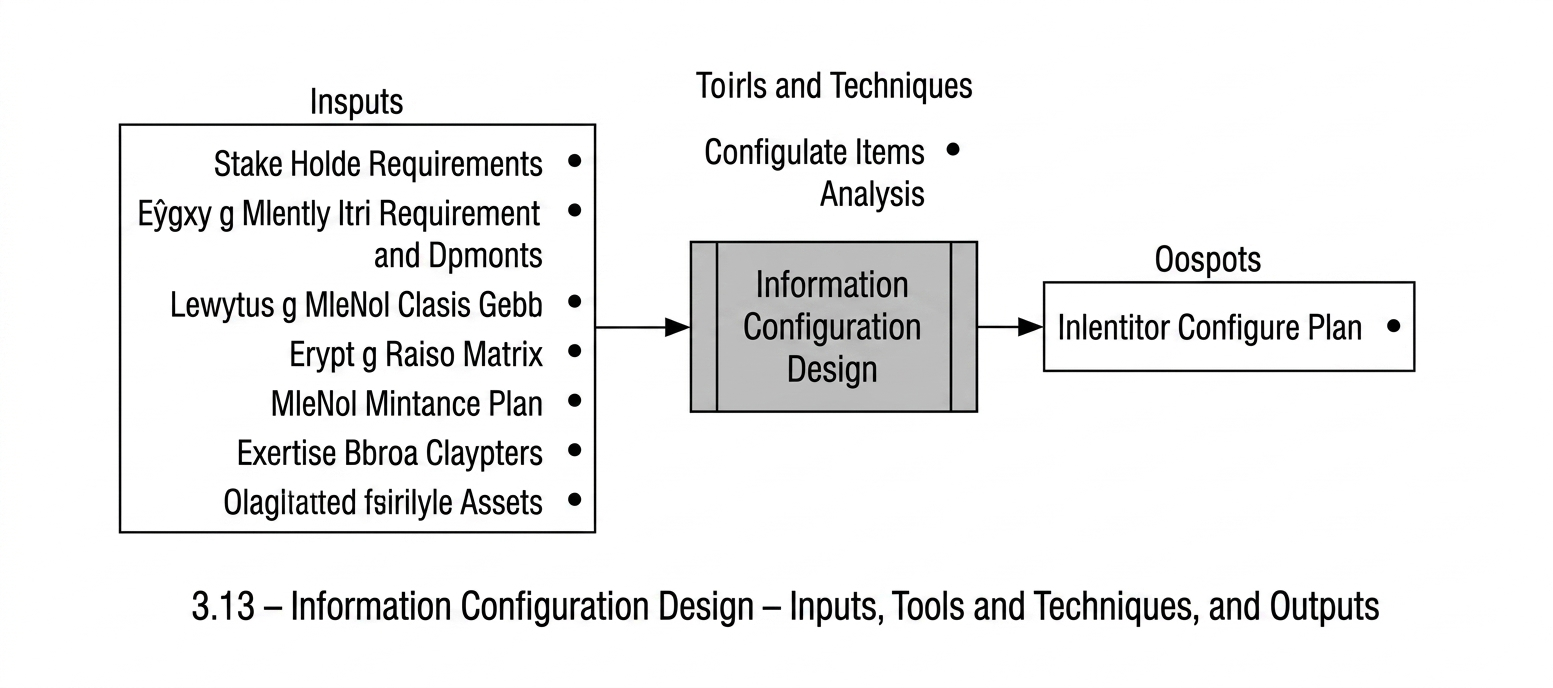
Information Configuration Design: Inputs
- Stakeholder Requirements List
Used to identify the information items required by stakeholders.
- Project and Product Information Requirements List
Used to identify the information items that constitute the outputs of project and product processes.
- Categorisation of Information and Access
Used to identify the level of confidentiality associated with the information.
- Information Supply and Distribution Matrix
Used to identify the producers and recipients of information for the purpose of controlling information changes.
- Information Maintenance Plan
Used to identify the manner in which information is stored for the purpose of controlling information changes.
- Organisational Environmental Factors
Factors influencing this process include
- A configuration management system
- An information collection and distribution system
- Organisational Process Assets
The organisational process assets influencing this process include
- A configuration management knowledge base
- Procedures for approval and authorised changes
- Procedures for change control within the project and the organisation
Information Configuration Design: Tools and Techniques
- Analysis of Configuration Items
Review and analysis of all project information to determine the items that must be placed under configuration.
Information Configuration Design: Outputs
- Information Configuration Plan
A key document that specifies the procedures for identifying, evaluating, and auditing information, and that defines the initial information items identified for configuration. Among the important aspects of this document is the provision of an initial basis for information configuration in the project. The document must specify the manner in which changes to the document itself are to be undertaken.
PMIS Provision Process Group
We live in an era in which advancements in modern technologies—such as computers, the internet, and computer software—have remarkably increased the speed of information distribution and access. In today’s world, leading organisations utilise information-technology tools as a competitive advantage and make substantial investments in developing their IT infrastructure and information tools.
Remaining aligned with the competitive environment of today is not feasible for organisations and companies; they are inevitably compelled to enter this turbulent arena. Turbulent, in the sense that with the continuous advancement of technology, new innovations and methods emerge on a daily basis, and the costs associated with this transition are also considerable.
Unfortunately, one of the key points that is often neglected in the field of information technology—which was briefly mentioned in Chapter One—is that this domain is not solely dependent on technology. Human and organisational factors also play a highly influential role. Individuals’ computer literacy and the organisation’s functional and technological maturity are among the elements whose neglect can adversely affect success in this area.
Moreover, it is essential to consider that the utilisation of technological tools is typically intended to increase organisational profitability and efficiency, and there must be an appropriate relationship between the costs incurred in this domain and the resulting increases in organisational efficiency and profitability. Otherwise, this domain may turn into a luxury item which, as Mr Bill Gates has stated, will ultimately lead to increased organisational inefficiency.
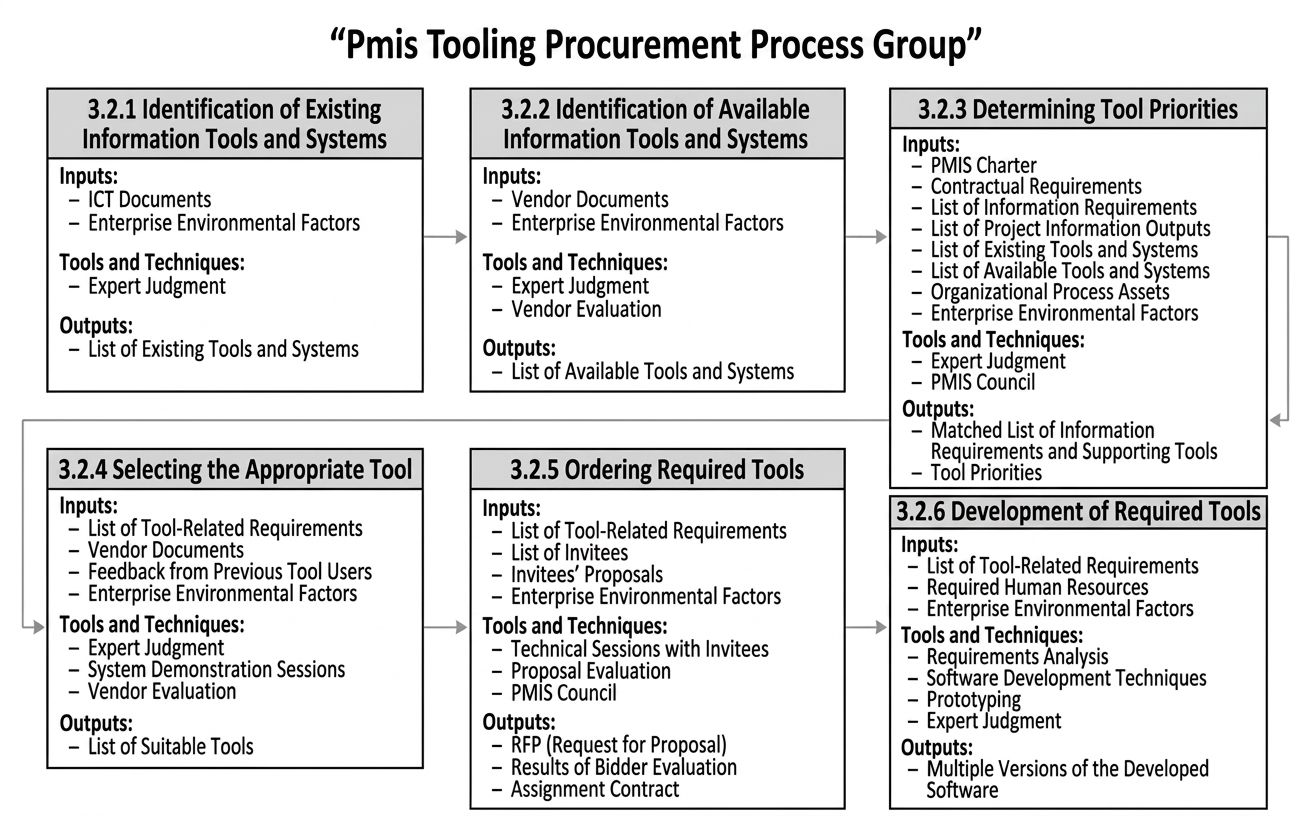
Selecting appropriate tools for the production, collection, processing, and distribution of project information is one of the objectives of this process group. This subject is addressed through six processes.
PMIS tools appropriate to the project’s scale: One of the most important points emphasised in this process group is that the selection of tools must be aligned with the size of the project, the users’ level of information-systems literacy, the organisation’s maturity, and the organisation’s environmental factors. Neglecting any of these elements will increase project costs and reduce the likelihood of successful project execution.
Another point worth noting is that this process group deals solely with the provision of PMIS tools within an individual project. Given the limited timeframe of most projects, undertaking time-consuming activities is typically not feasible, and project needs relating to the provision of required tools must be addressed within the shortest possible time. Planning for foundational and long-term activities, however, is a matter that must be handled at the organisational level, and this will be explained in the next chapter.
To provide PMIS tools within a project, the following six processes are used
- Identification of existing tools and information systems
- Identification of available tools and information systems
- Determination of tool priorities
- Selection of suitable tools
- Ordering of required tools
- Development of required tools
An overall view of the PMIS tool-provision processes is shown in the figure below.
Identification of Existing Tools and Information Systems
View process diagram
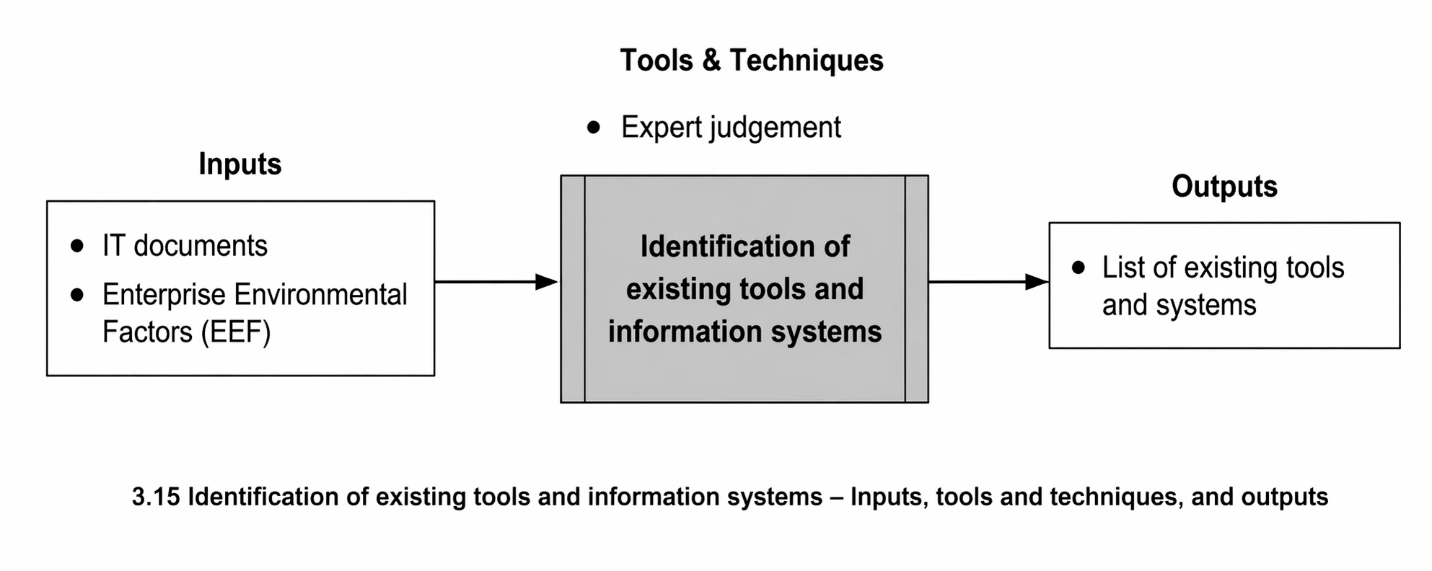
Given the limited time available in a project for identifying and setting up tools, recognising the capabilities that the project can already make use of is exceptionally important. In this identification step, a list of these tools and systems is prepared by drawing on the opinions of experts who have experience in this area within the organisation or the project, as well as the organisation’s environmental factors. It should be kept in mind that, in many organisations and projects, certain important systems exist that are known only to the specialists who work with them.
Identification of Existing Tools and Information Systems: Inputs
- ICT Documentation: One of the sources that can support the identification of existing tools is the organisation’s ICT documentation. Typically, documents related to software components and operational tools are the most useful in this regard.
- Enterprise Environmental Factors (EEF): The organisational environmental factors used in this process include:
- Existing information systems guide
- Documentation from other projects on this subject
- Information systems used in other projects within the organisation
Identification of Existing Tools and Information Systems: Tools and Techniques
- Expert Judgement: The most important and fastest method for understanding the current situation is obtaining the opinions of experts in the project and the organisation, particularly specialists in the IT Department and experts from planning and project-control units.
Identification of Existing Tools and Information Systems: Outputs
- List of Existing Tools and Systems:
This document specifies all tools and information systems that the project is currently using or is able to use. For each tool or system, the document must clearly describe the nature of its use within the project, the project components in which it is applied, and the types of information it provides. It is important to note that such tools and systems are not confined to large or complex platforms; even a simple Excel sheet used to maintain a list of project documents and to record their status is considered an information system and must be taken into account.
The items that may be included in this document are as follows
- Name and description of the tool or system
- Information regarding the developer and the support provider
- Description of its current status and how it can be used in the project
- Identification of the users of this system within the organisation or project
- Indication of the extent to which it is active within the organisation or project
- Indication of the level of user satisfaction with the system
- Identification of the information items—identified in the previous section—that this tool or system provides
- Reference to its software and technical specifications
- A general assessment of the tool and a determination of whether it can be used in the project
Identification of Available Tools and Information Systems
View process diagram
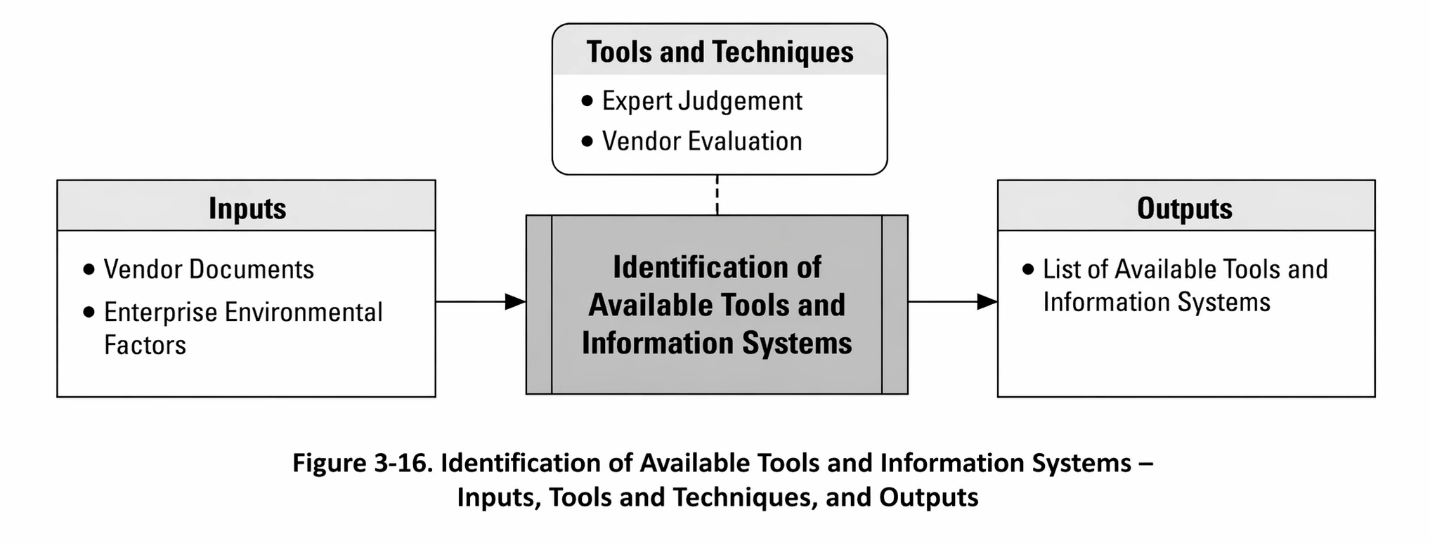
In addition to the tools and systems currently used in the project, there may be other tools and information systems that potentially exist and could be used in the project. These systems may have been recommended by an individual or an organisation, or they may have been used in other projects and could likewise be applied in this project. In some cases, the use of a particular tool or system may be contractually required, in which case it must be used.
The term “available” indicates that the project can make use of such systems under certain conditions, for example by purchasing them from a vendor or by deploying the related software so that it becomes usable in the project.
Identification of Available Tools and Information Systems: Inputs
- Vendor Documents
Since some of the available systems are typically offered by vendor companies, once these systems are identified, their technical and financial documentation should be obtained and used in vendor evaluation.
- Enterprise Environmental Factors (EEF)
The environmental factors relevant to this process include
- Systems used in other projects within the organisation
- Documentation from other projects in this domain
- Previous catalogues from tool vendors
Identification of Available Tools and Information Systems: Tools and Techniques
- Expert Judgement
Since the users of the systems and tools are individuals, they possess the most information for evaluating these tools, understanding how they are used, and assessing their alignment with their own requirements.
- Vendor Evaluation
Vendor evaluation is one of the most important activities in this process. At this stage, vendors are examined solely from the perspective of the availability of their tools or systems and the alignment of their capabilities with the project’s requirements. If a decision is later made to procure a tool or system, the full evaluation will be conducted within the process of selecting the appropriate tool. The following reviews are carried out for vendor evaluation at this stage:
- Reviewing system capabilities and their alignment with project requirements
- Reviewing technical and software conditions
Identification of Available Tools and Information Systems: Outputs
- List of Available Tools and Information Systems
This document contains the specifications of all tools and information systems that the project may potentially be able to use. It must describe how each tool or system is used, in which part of the project it will be applied, and for providing what information it is required. Topics that may be included in this document are:
- The name and introduction of the relevant tool or system
- Information about the producer and the support provider
- A description of its status and how it can be used in the project
- Reference to other users of this system within the organisation or the project
- Identification of the information items—defined in the previous section—that the tool or system provides
- Reference to its software and technical specifications
- A general analysis of the tool and clarification of whether it can be used in this project or not
Tool Prioritisation and Selection of an Appropriate Tool
View process diagram
View process diagram
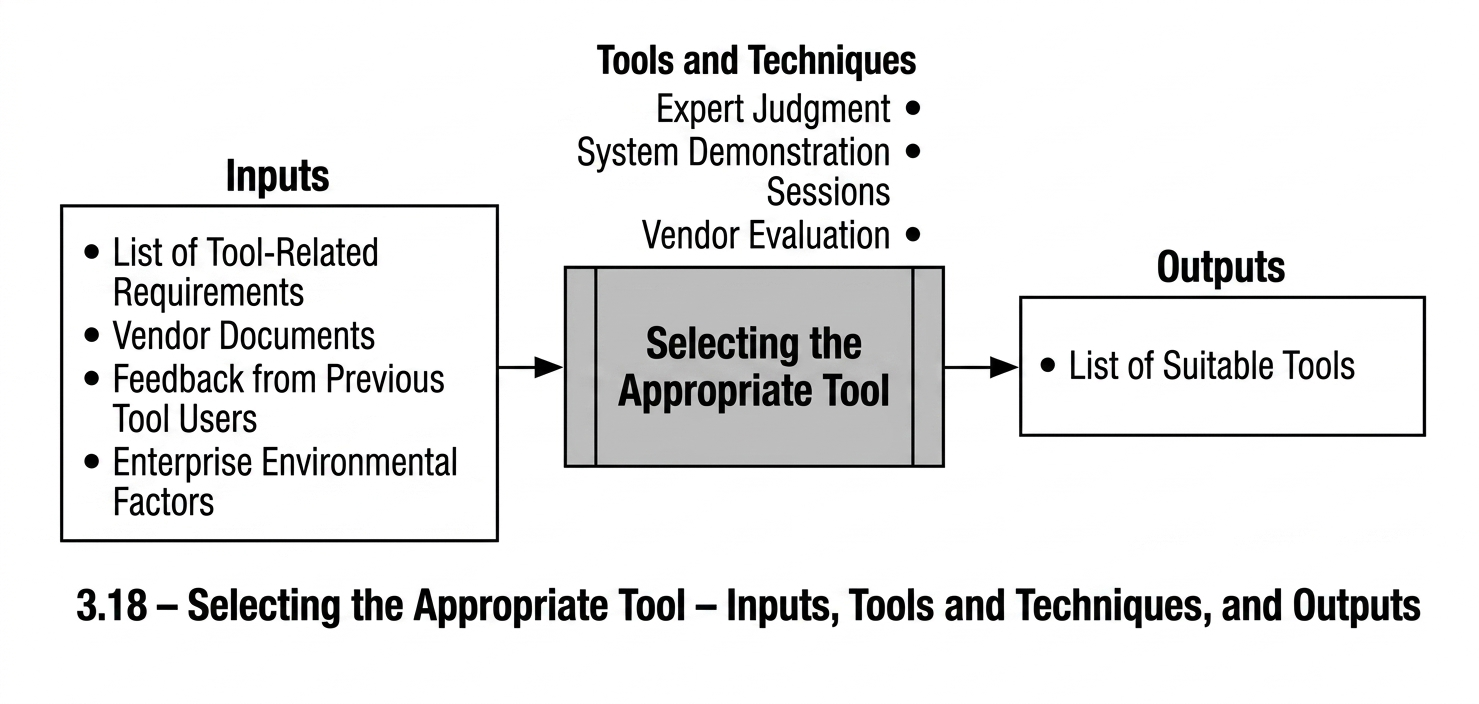
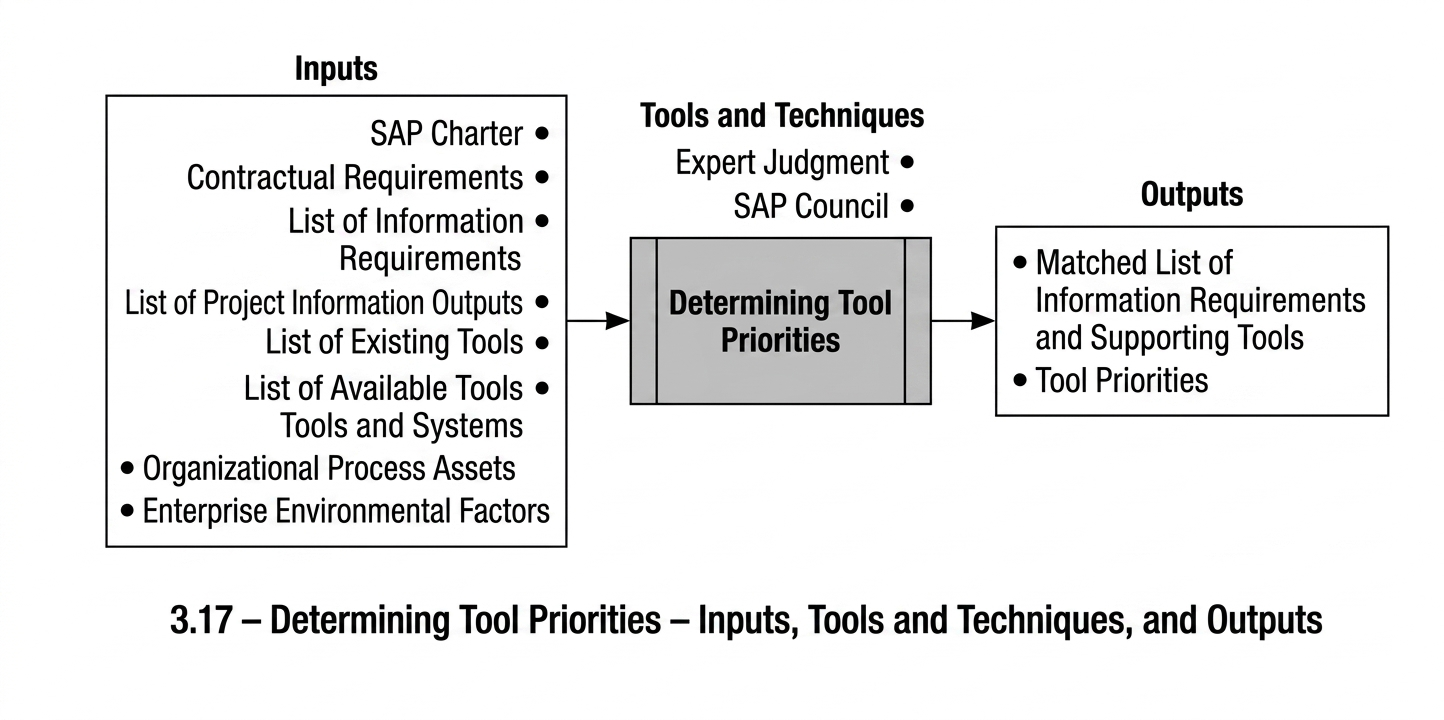
As explained in the introduction to this process group, the appropriate use of tools is an issue that must be emphasised in the PMIS. In fact, using numerous diverse and complex tools is not an achievement; rather, the real skill lies in identifying and applying the appropriate tools for the project. Tools should contribute to improving efficiency and speed in projects, or address organisational needs that have a high priority.
In this process, after defining the project’s tool requirements, decisions are made regarding which tools must be used in the project, which tools are optional, and which tools should not be used.
Furthermore, a mapping list is prepared to specify which information areas will be supported by which tools. This list also identifies information items that must necessarily be supported by tools but for which no tool has yet been selected, as well as information that must be managed without tool support.
In order to obtain managerial support and ensure implementation, these lists must be formally approved by the Enterprise PMIS Governance Committee.
Tool Prioritisation: Inputs
- EPMIS Charter:
To become familiar with the project context and the initial agreements reflected in the policies approved by the Enterprise PMIS Governance Committee, this document must be consulted in this process.
- Contractual Requirements:
Contractual requirements represent one of the most important factors influencing decisions regarding project tool prioritisation. Contractual commitments regarding the use of a specific tool typically obligate the project to use that tool. An important point to consider is that even if a tool is specified as a contractual requirement, but its provision or use is not feasible for the project or creates issues in project activities, the matter may be reviewed or modified through coordination meetings with the contracting parties.
- List of Stakeholder Information Requirements:
In this process, information requirements are analysed from the perspective of tool support. This involves determining which parts of this information must be generated, processed, integrated, or distributed in a mechanised and tool-based manner. Familiarity with the project context and the organisation’s Enterprise Environmental Factors plays a significant role in this assessment.
- List of Project Information Outputs:
This information, which is primarily focused on project processes, is also examined in this process from the perspective of tool support.
Tool Prioritisation: Inputs
- List of Existing Tools and Information Systems
Awareness of tools that are already in use within the project and can support part of its information requirements is used in preparing the comparative list of information requirements and tools.
- List of Available Tools and Information Systems
Familiarity with other tools and information systems that can be procured and are potentially usable in the project is also used in preparing the comparative list of information requirements and tools.
- Organizational Process Assets
Knowledge of the processes and work methods used in previous projects or within the organization is one of the factors influencing the determination of the project’s tool priorities.
- Enterprise Environmental Factors
The organization may impose certain requirements on projects. For example, the mandatory use of specific systems for payment requests or warehouse operations that are already used by the organization’s financial unit may require the project to adopt particular tools or systems.
Although the interests of the project and the organization are generally aligned, those performing this process must prioritise the interests of the project when making the final decision. If a conflict arises between project and organizational interests in this regard, the issue must be escalated to higher organizational levels for review. The Enterprise PMIS Governance Committee has the appropriate authority to communicate with those higher levels regarding such matters.
Tool Prioritisation: Tools and Techniques
- Expert Judgment
Expert judgment is one of the techniques used to determine tool priorities. In applying expert judgment, it is necessary to establish an appropriate alignment between expert opinions and the actual needs of the project. As explained in the requirements review section, there is a distinction between needs, wants, preferences, and expectations, and therefore the determination of priorities must be based on the actual needs of the project.
- Enterprise PMIS Governance Committee
The list of priorities will be submitted to the Enterprise PMIS Governance Committee for final review and approval. This committee is the final approving authority for the list. Given the recommended composition of the Enterprise PMIS Governance Committee, the committee may also provide expert opinions regarding this list.
Tool Prioritisation: Outputs
- Comparative List of Information Requirements and Supporting Tools
The purpose of preparing this list is to determine how all project information items will be supported from a tooling perspective. The list presents all project information items and specifies which tool supports each item in the areas of production, processing, integration, and distribution. It should be noted that an information item may be supported by several tools in different areas, and more than one candidate tool may exist in a particular area.
If an information item must necessarily be supported by a tool, but no tool has been selected or is not available for that purpose, the term “tool required” will be used to indicate this situation.
Information items that are managed manually and do not require tool support shall be identified in the list using the terms “Manual” or “Non-mechanised”.
Tool Prioritisation
This document describes the project’s information requirements and the tool-support arrangements for meeting those requirements, and also explains the rationale for tool prioritisation. The tools are classified into three groups: mandatory tools, optional tools, and high-risk tools.
Mandatory Tools
Mandatory tools shall be evaluated based on the benefits they provide to the project and the degree of urgency associated with their use. A priority number shall also be assigned to each of these tools.
Optional Tools
Although optional tools are not emphasised to the same extent as mandatory tools, it is nevertheless necessary to determine which of these tools should be deployed and used within the project.
High-Risk Tools
High-risk tools are those whose use in the project may cause disruptions to project activities or increase project risks. The project’s approach to addressing such tools is also presented.
Where appropriate, the two lists produced in this process may be presented as a single consolidated list.
Selection of an Appropriate Tool: Inputs
- List of Tool-Related Requirements
During the tool prioritisation process, a cross-reference list was prepared to identify the information requirements and the available tools that could potentially support those requirements. This list is used to identify relevant vendors and the requirements expected to be addressed by their tools.
- Vendor Documentation
Vendor documentation includes vendor and company profiles, the technical and functional specifications of the proposed product, and other relevant information that may assist in identifying and evaluating vendors.
- End-User Feedback
One of the most valuable and reliable sources for evaluating vendor products is feedback obtained from other organisations and their users regarding the tool. This information is considered reliable only when evaluators communicate directly with these organisations and obtain feedback from the actual end users. Vendor claims or formal recommendation letters are not sufficiently reliable; therefore, efforts should be made to collect this information directly from end users.
- Enterprise Environmental Factors (EEF)
Relevant Enterprise Environmental Factors affecting this process include
- The organisation’s technical and infrastructural constraints and conditions, such as the organisation’s database platform or requirements related to communication with other organisational systems
- Software procurement patterns
- Organisational or project procurement rules and regulations
Selection of an Appropriate Tool: Tools and Techniques
- Expert Judgment
In this process, expert judgment is utilised both in assessing system functionalities and in evaluating information technology aspects.
- System Demonstration Sessions
One of the most effective methods for identifying the capabilities of a software tool is to observe the system directly and examine its functionalities using real data and real information. Whenever possible, demonstration sessions are recommended to be conducted at one of the organisations where the system has already been implemented, with the participation of actual users.
These sessions are typically attended by several experts from different domains. It is recommended that the main system evaluators prepare a questionnaire aligned with the project’s requirements prior to the session and distribute it to participants at the beginning of the meeting. Responses are preferably structured in a multiple-choice format to facilitate appropriate consolidation of the results.
The outcomes of this questionnaire provide useful information regarding the degree of alignment between the tool and the project’s requirements.
Vendor Evaluation
After reviewing vendor documentation, conducting product demonstration sessions, and collecting feedback from experts and specialists, the next step is to consolidate these inputs and finalise the vendor evaluation.
When multiple options exist for a particular requirement, an effective approach is to prepare a Vendor Technical Evaluation Table. In this table, the rows represent the evaluation criteria, while the columns represent the vendors being assessed. This structure enables evaluators to review vendors side by side and compare their performance across the defined criteria.
To derive a comparative score, each evaluation criterion is assigned a weighting factor, and each vendor’s performance with respect to that criterion is scored on a scale from 1 to 4. The total score for each vendor is calculated by multiplying the score assigned to each criterion by its weighting factor and summing the resulting weighted scores across all criteria. Ultimately, the vendor with the highest total score is considered the best technical option.
Selection of an Appropriate Tool: Outputs
- List of Suitable Tools
After reviewing vendor products and aligning them with the project’s information requirements, one or more documents should be prepared to present the results of the evaluation. Since this document will typically be referenced during the organisation’s procurement process, its format and presentation should comply with the organisation’s procurement procedures and templates.
In general, such documentation typically includes the following elements
- The results of the technical evaluation together with the justification for selecting the preferred product
- The results of the financial comparison among the products
- A consolidated presentation of the technical and financial results, including the final ranking of vendors and the overall recommendation regarding the selected tool
- Any additional information required according to the organisation’s procurement procedures
Procurement of Required Tools
View process diagram
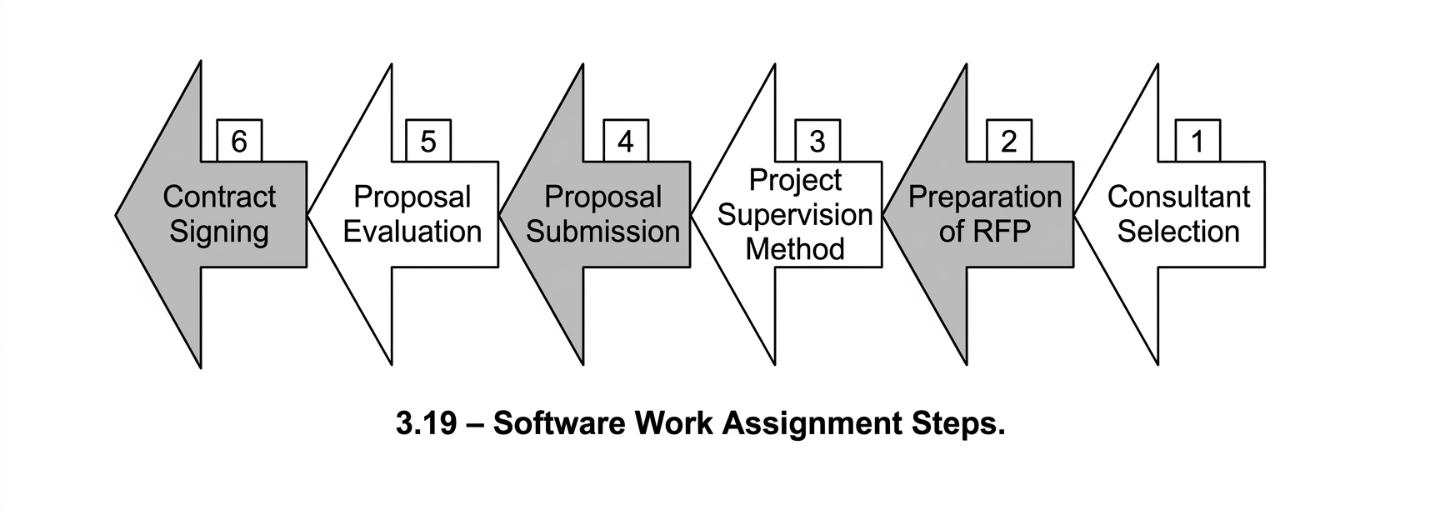
View process diagram
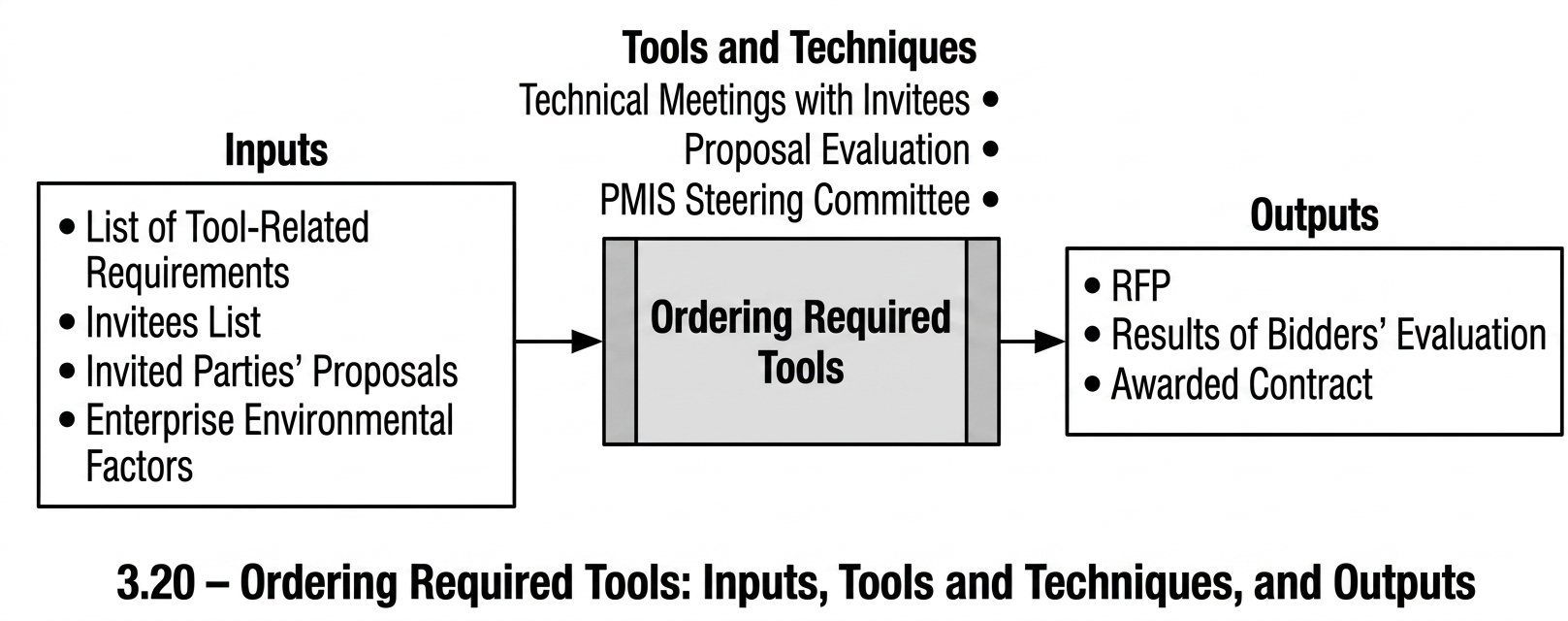
This process is applied when a project requires a tool or information system that must be procured from external sources. Such a situation arises when a requirement has high priority, no suitable tool exists to fulfil it, and neither the project nor the organisation possesses the capability to develop the tool internally. In such cases, a technical proposal shall be prepared and submitted to relevant vendors in order to outsource the work.
Due to the long-term implications of software acquisition and the specialised expertise required, software procurement is typically conducted at the organisational level. Therefore, whenever such a need arises, it is recommended that the matter, in coordination with the Enterprise PMIS Governance Committee, be escalated to the organisational level or, where applicable, referred to the organisation’s IT Department, unless project interests explicitly require the tool to be developed within the project itself.
This process focuses on tools developed at the project level that exhibit limited complexity and minimal interaction with other systems. Organisation-wide software solutions require decision-making at the organisational level.
According to Phase One of the methodological guidance provided in the National Software Engineering and Development Standards, prepared by the High Council of Informatics, the definition and assignment of work in software projects consist of six stages. A dedicated guidance document has been published for each stage:
Selection of Consultants
Where necessary, technical or managerial consultants are selected to provide specialised support and guidance to the project.
Preparation of the Request for Proposal (RFP)
A formal document shall be prepared specifying the requirements, technical specifications, and Contractual Requirements & Documentation necessary for outsourcing the work.
Defining the Supervision Approach for Software Projects
The mechanisms and procedures for supervising the outsourced software project are determined.
Proposal Submission
Invited vendors submit their proposals.
Proposal Evaluation
The submitted proposals are evaluated in accordance with the defined criteria.
Contract Award and Signing
The outsourcing contract is prepared, finalised, and formally agreed upon by the authorised parties.
Procurement of Required Tools: Inputs
- List of Tool-Related Requirements
The cross-reference list produced during the tool-prioritisation process—which specifies the information requirements that the tool to be procured must support—constitutes the primary input for preparing the Request for Proposal (RFP) and its associated Contractual Requirements & Documentation.
- List of Invitees
The list of companies, organisations, or individuals invited to submit proposals may serve as an input to this process. In some cases, however, this list may be compiled within the process itself.
- Proposals Submitted by Invitees
After the invitees have been identified and the RFP has been prepared and distributed, the invited parties submit their proposals in accordance with the requirements and conditions defined in the RFP.
- Organisational Environmental Factors
The organisational environmental factors relevant to this process include
- Established patterns and procedures for selecting consultants and contractors
- Procurement laws and regulations governing purchasing and ordering
- Established patterns for evaluating contractors’ proposals
Procurement of Required Tools: Tools and Techniques
- Technical Meetings with Invitees
To respond to questions raised by invited contractors and to clarify any potential ambiguities, technical meetings should be held with them. These meetings are typically conducted jointly to ensure that all invitees receive consistent and uniform information.
- Proposal Evaluation
In this process, similar to the process of selecting the appropriate tool, the proposals received will be evaluated on the basis of defined criteria.
- Review by the Enterprise PMIS Governance Committee
Given the common challenges observed in contractor selection processes, it is advisable that the proposal evaluations be reviewed and approved by the Enterprise PMIS Governance Committee, so that the resulting decision benefits from stronger legitimacy and institutional standing.
Procurement of Required Tools: Outputs
- Request for Proposal (RFP)
The Request for Proposal (RFP) is a document that, in accordance with the Namatan guideline, must include at least the following sections:
- Purpose of defining the project
- Statement of project requirements and objectives
- Description of the requested technical specifications
- Format for proposal submission
- Rules and procedures for the evaluation of proposals
- Governing laws and regulations applicable to the project
- Description of the current status of the project and the organisation
- Schedule for submission of proposals
- Results of the Evaluation of Proposing Parties
After the technical and financial evaluation of the submitted proposals, the results are prepared and presented in accordance with the standard templates and established practices adopted within the project or approved by the Enterprise PMIS Governance Committee.
- Contract Preparation for Work Assignment
Using appropriate technical and legal expertise, a contract shall be prepared that defines the necessary terms and conditions for assigning the work to the selected contractor.
For this purpose, the sample templates provided in the Namatan guideline may be used, or the contract may be developed with the support of professional consultants, ensuring that all Contractual Requirements & Documentation are fully and accurately addressed.
Development of Required Tools
View process diagram
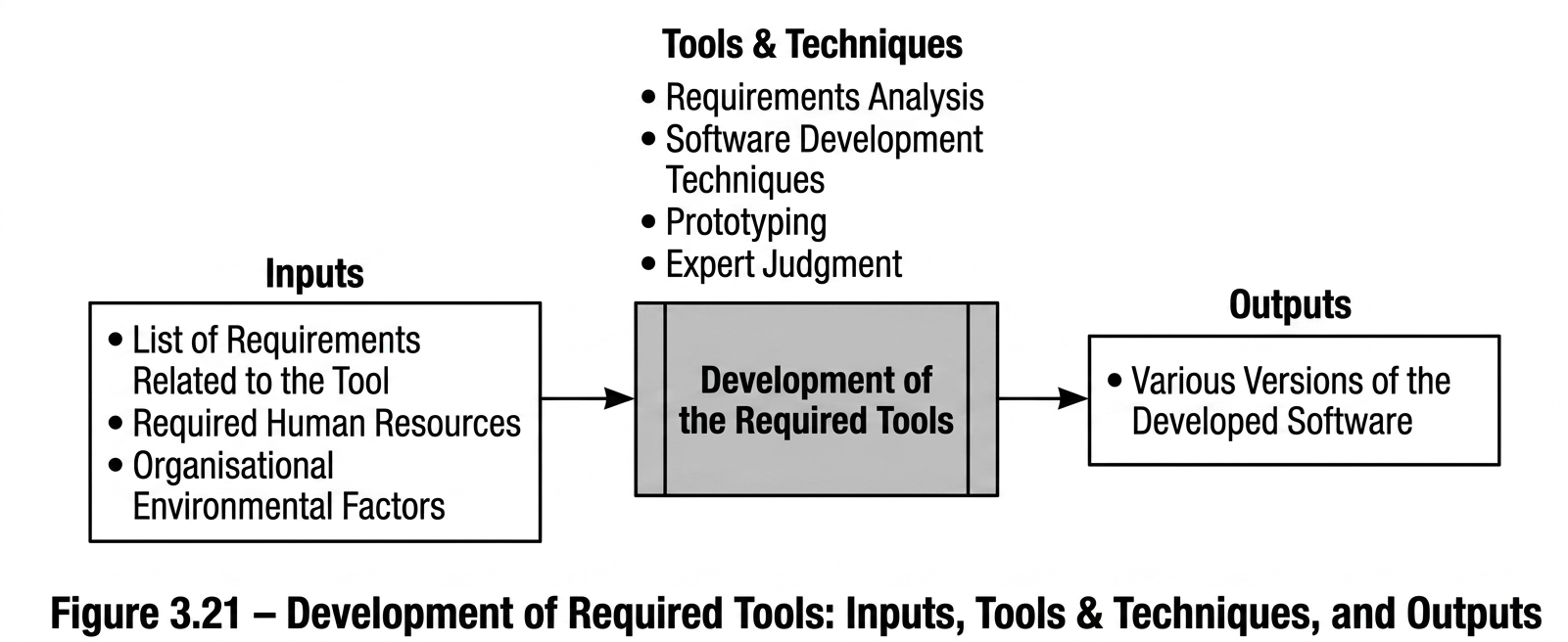
The development of software tools is considered one of the most high-risk activities among implementation projects worldwide. According to published statistics on the success rates of information technology projects, the failure rate of such projects is clearly high, and these projects are typically associated with significant cost and considerable risk. Except in cases where the implementing organisations are themselves software companies, it is strongly recommended that projects refrain from developing complex software tools. Priority should instead be given to acquiring suitable tools through purchase, and if an appropriate tool is not available, the work should be assigned to qualified contractors.
However, the objective of this process is the development of small- and medium-scale tools that may be required at particular stages in order to address the information needs of projects and resolve project-related issues. In some cases, such development may be as simple as creating a worksheet in Microsoft Excel and defining the necessary formulas within it. One example of software development within projects is the preparation of the reports required by the project.
The development of software tools requires specialised expertise and practical experience, and a detailed explanation of such processes lies beyond the scope of this document. Therefore, this process focuses only on the general considerations that should be taken into account when developing small- and medium-scale tools. For further information, reference should be made to specialised sources addressing this subject.
It should be noted that software development is a step-by-step, incremental, and maturity-driven process. It is not possible to satisfy all stakeholder requirements and expectations in a single step.
Development of Required Tools: Inputs
- List of Requirements Related to the Tool: As in the two preceding processes, this list serves as the primary document for identifying and understanding the relevant requirements.
- Required Human Resources: Depending on the size of the project and the type of work, the necessary human resources must be provided in the relevant units. This may include the temporary reassignment of existing organisational staff to the project, the recruitment of full-time or part-time personnel, or the contractual outsourcing of part of the work. The essential point is that the management of these activities is carried out within the organisation.
- Enterprise Environmental Factors (EEF): The organisational environmental factors applied in this process include:
- Patterns for acquiring human resources
- Existing software development patterns within the organisation
- The organisation’s technical and infrastructural requirements
Development of Required Tools: Tools and Techniques
- Requirements Analysis: As mentioned earlier, requirements analysis and the presentation of a mechanised solution are among the key techniques supporting successful software development.
- Software Development Techniques: All software development methods that must be identified and implemented by the development team constitute essential prerequisites for executing this process.
- Prototyping: One of the techniques used in software analysis and design, highlighted separately due to its importance. Prototyping helps the project team and experts establish effective interaction by reviewing the actual forms of the software, thereby facilitating their participation in system analysis, design, and delivery.
- Expert Judgment: Obtaining expert opinions through committees established for defining and delivering the work is a proven and sensitive method for ensuring user satisfaction. Involving knowledgeable users in defining and delivering the system according to the initial specifications significantly reduces later issues that may lead to changes in the requirements.
Development of Required Tools: Outputs
- Different Versions of the Developed Software: Since software development progresses step by step, it is expected that multiple versions of the software will be produced and delivered until it reaches maturity and completion.
PMIS Deployment and Operationalisation Process Group
A primary reason for the lack of success in the use of PMIS tools in projects and organisations is the improper deployment and operationalisation of these systems. Inadequate planning for system roll-out often leads to a significant portion of their capabilities remaining unused or being used incorrectly.
A familiar example is the use of general-purpose systems such as Microsoft Office. In many organisations and projects, only a limited portion of the capabilities of applications such as Excel spreadsheets or Word word processors is actually utilised. In practice, it can be stated that in many cases up to 50 percent of the capabilities of these commonly used systems remain unused in projects.
One reason for this situation is users’ unfamiliarity with the available capabilities of these systems, largely due to insufficient training. Another factor, which is no less important than training, is the absence of appropriate standard operating procedures aligned with the capabilities of the tools. In most cases, users operate these systems based on their personal experience, and no formal instructions exist to guide the proper use of their functionalities.
Naturally, the larger and more complex a software system becomes, the greater the need for effective training and clearly defined work procedures aligned with the capabilities of the tools.
According to the classification introduced within the PMIS Procurement Process Group, three general categories of tools or information systems can be identified in projects based on the manner in which they are produced and developed.
Categories of Information Systems
Purchased Systems
Systems that are acquired from outside the organisation and operate according to their predefined methods.
Commissioned Systems
Systems that are commissioned from an external contractor based on the requirements of the project or the organisation.
Internally Developed Systems
Systems that are developed by an internal unit or by one or more individuals within the organisation.
From the perspective of modifiability, all three categories of systems can be classified into two general groups:
Modifiable Systems
Systems for which updates or modifications can be carried out by users, system administrators, or suppliers.
Non-Modifiable Systems
Systems for which modifications are not possible, whether due to being closed, lack of access to the developers, high modification costs, or other limiting factors.
PMIS Deployment and Operationalisation Process Group
This process group is initiated when a tool or information system is intended to be used within a project. The tool may already be in use, may have been purchased and require deployment, or may be a system that has been developed (either internally or through commissioning) and is scheduled for deployment in the near future. Each of these systems must undergo the processes of this process group to ensure their effective use within the project.
Within this process group, PMIS tools are appropriately deployed and operationalised in the project through five processes:
Deployment and Operationalisation Planning
System Installation and Initial Configuration
Process-to-Tool Alignment
User Training
PMIS Operationalisation
The figure on the following page presents an overall view of the processes included in this process group.
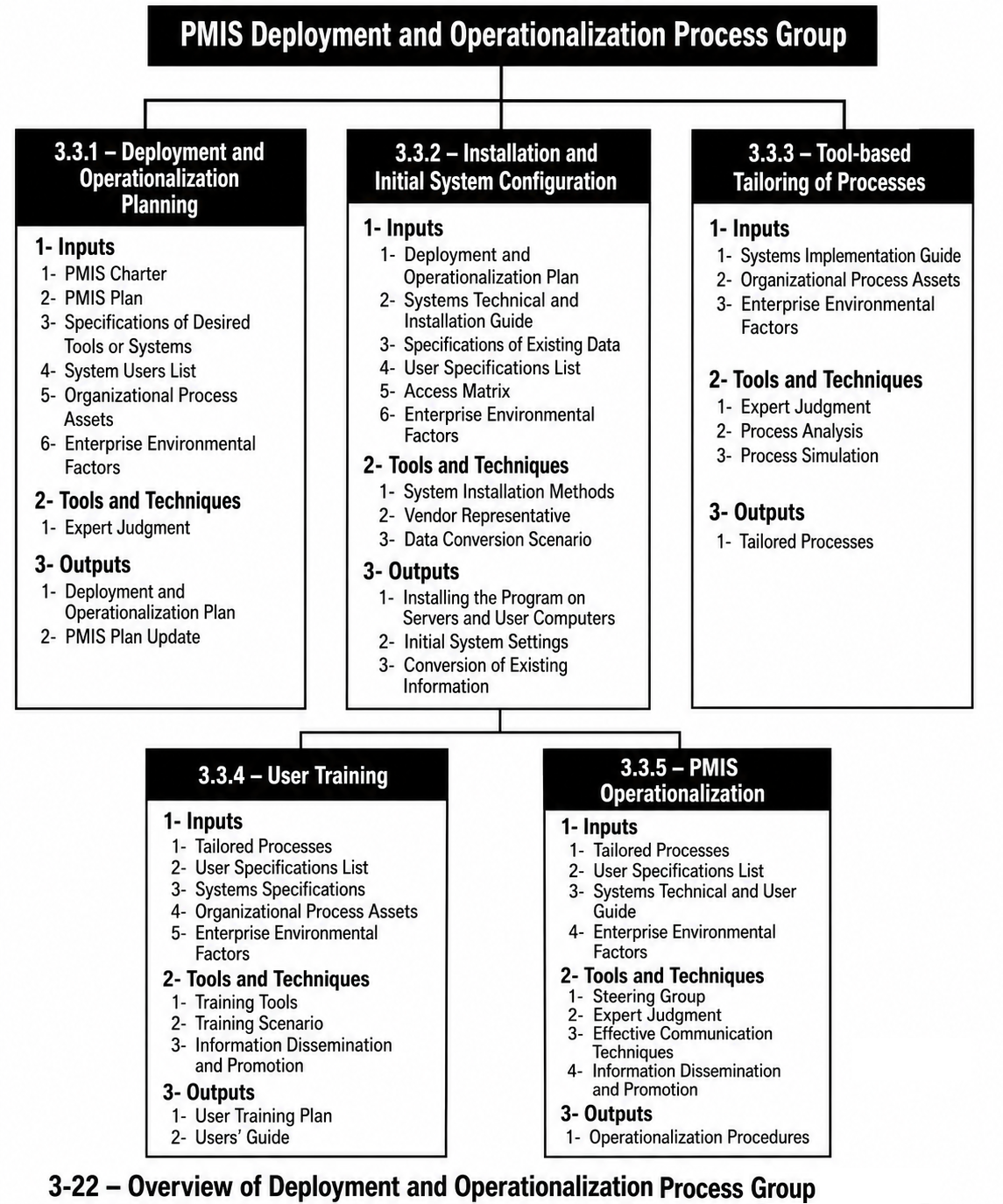
PMIS Deployment and Operationalisation Planning
View process diagram
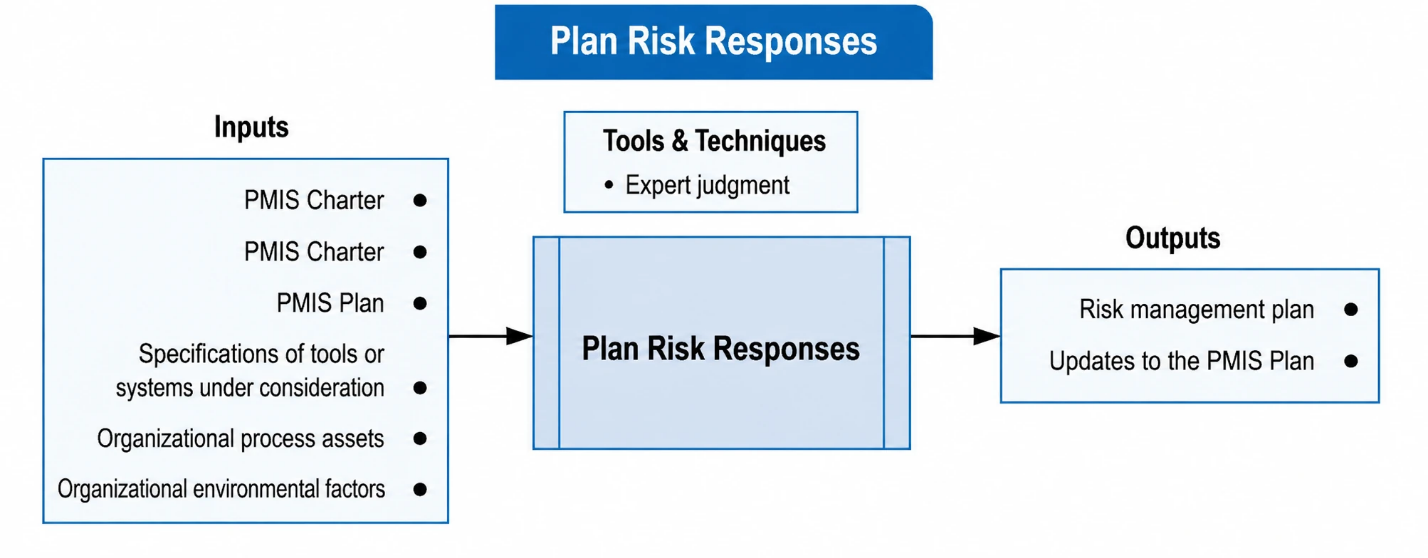
This process focuses on planning and coordinating the processes within the PMIS Deployment and Operationalisation Process Group. By obtaining information about project conditions, tool specifications, the status of PMIS within the project or organisation, the status of project users, and the organisational environmental and process conditions, this process determines the method, sequence, and timing through which a system or a group of systems should be deployed and operationalised within the project.
During this process, the overall conditions of the project, the users, and the systems must be carefully considered, and an integrated and appropriate plan should be developed in order to determine the most suitable deployment approach. It is essential to gain a clear understanding of the project’s conditions and limitations in using these tools. Due to the operational nature of projects, the passage of each day in the project timeline may delay the use of the system and may lead to disruptions in the recording, maintenance, and distribution of information.
In some cases, the deployment of an information system may take a considerable amount of time. In such situations, PMIS management should anticipate the necessary measures within the deployment plan in order to provide a temporary solution for recording and maintaining the relevant information. The implementation of such temporary solutions depends on the importance of the information and the specific conditions of the project.
Another important issue in deployment and operationalisation planning is attention to the input data of the system. If part of the information required by the system has previously been maintained manually or stored in another tool or system, a clear plan must be defined for entering this information into the new system. This task may be performed either through manual data entry or through automated data conversion. Selecting the appropriate method for entering the data is an important element of the deployment plan and must be considered with great care.
Planning for process-to-tool alignment activities, training planning, and operational planning are additional matters that must be taken into account during deployment and operationalisation planning.
3.23 Deployment and Operationalisation Planning – Inputs, Tools & Techniques, and Outputs
Deployment and Operationalisation Planning: Inputs
- PMIS Charter
The PMIS Charter is used as an input to provide awareness of the project status and the policies that have been approved within the project’s PMIS. However, if a tool is to be implemented for the PMIS without prior planning, this input will not exist, and the required project conditions must be obtained from other project documents.
- PMIS Plan
This document is likewise used to obtain an understanding of the overall PMIS planning established for the project.
- Specifications of the Intended Tools or Systems
The specifications required for the tools or systems that are to be launched and deployed include:
- Technical specifications
- Installation guide
- User guide
- Administration guide
- Data requirements and data conversion guidelines
- List and Specifications of Users
Adequate awareness of the status of users who will work with the system is necessary. This awareness is required both for determining how to interact with these users and for planning their training. For instance, users at higher managerial levels may need to receive training separately, while groups of users who share similarities in how they use the system, their workplace location, or other common characteristics may be trained together.
- Organizational Process Assets (OPA)
As will be explained in the tool alignment process, it is necessary to understand the current work processes so that the extent of the changes required in these processes for alignment with the tools can be properly planned.
Enterprise Environmental Factors (EEF)
The Enterprise Environmental Factors (EEF) relevant to this process include
- The status of the organization’s technology infrastructure
- The condition of the existing data used within the system
- Familiarity with previously used systems in this domain
- The organization’s training capabilities
- Deployment Patterns
- Technological and legal constraints
Deployment and Operationalisation Planning: Tools and Techniques
- Expert Judgement
Expert judgement is applied in the following areas
- Awareness of the status of system users
- Familiarity with effective approaches for interacting with users
- Familiarity with the work processes performed within the project
Deployment and Operationalisation Planning: Outputs
- Deployment and Operationalisation Plan
After reviewing the specifications of the relevant tool and identifying the conditions related to its deployment, the planning results are presented in a document structured under the following headings.
If the system to be deployed is significant in terms of importance or extent of use, this document must also be approved by the PMIS Governance Committee.
The document includes
- A brief description of the tool specifications and its use within the project
- Description of the deployment strategy
- Description of the activities to be carried out
- General description of the activities required to align processes with the tool
- Description of the training strategy and methods
- Description of the methods for data conversion and transfer (if applicable)
- Description of the individuals involved in the activities and their respective responsibilities
- Description of the activities of the operationalisation phase
- Schedule of activities
- Update of the PMIS Plan
If changes have occurred in this plan compared with the initial PMIS Plan, the PMIS Plan must be updated accordingly.
Installation and Initial Configuration of Systems
View process diagram
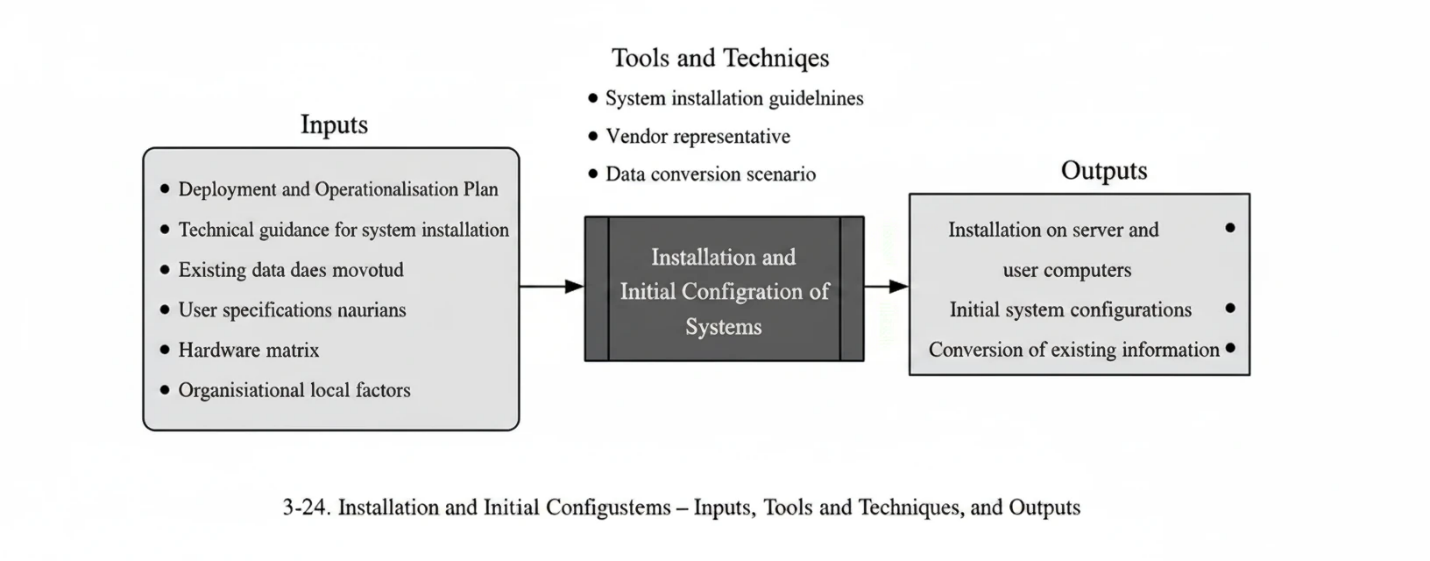
In most cases, after a tool or system has been purchased or received, the required installation and configuration activities must be carried out. Software installation is typically performed in two ways:
- Installation on a Central Server
Some network-based and enterprise-wide applications require certain components to be installed on a central server. This usually includes installation of the database and several supporting services necessary for communication with the main application.
- Installation on User Workstations
Some software applications need to be installed directly on users’ computers. These applications may operate independently on a single computer or serve as client components within a broader network-based or enterprise system.
Web-based applications form another category of software that does not require installation on users’ computers. They are installed only on the central server and accessed and executed through a web browser.
Installation of information systems requires adequate technical expertise and experience. Such installations should either be performed by the authorised representative of the vendor or by an experienced system administrator who follows the instructions in the installation guide.
After installation, the initial configuration of the system must be completed. These configurations should be performed by system administrators who have received appropriate training and possess specific permissions required to carry out such tasks within the system.
Initial configurations are typically divided into several main areas; however, they are not limited to these categories.
User Definition and Registration
All users who are expected to work with the system must be defined and registered in the system. This definition typically includes the user’s personal information as well as network-related attributes.
Initial System Definitions
Information systems usually perform part of the system’s initial definitions automatically during installation. However, some other initial definitions may vary depending on the characteristics of the project or the organisation. These definitions must therefore be prepared by the system administration team and entered into the system.
Configuration of Information Access (Access Control)
Users are granted access to information in accordance with the classification defined during the “Information Classification and Access Definition” process within the PMIS Planning Process Group. Accordingly, the necessary Access Control settings must be established based on the defined classifications and the applicable Application Access Levels.
Granting Work Permissions (Access Permissions)
In some systems, permission to access information is separate from permission to perform certain operations or activities within the system. In such cases, the relevant Access Permissions must also be granted to users in accordance with the predefined rules and authorisations.
Entry of Previously Generated Project Information
In some cases, a tool or information system is introduced at a stage of the project when part of the project information has already been produced or stored. In such situations, the relevant information must be identified and, if considered necessary and important from the project perspective, entered into the new system.
Another activity addressed in this process is the entry of project information that already exists. The entry of information into an information system can be carried out in various ways. In general, previously existing information may be in one of the following two forms:
- Non-electronic information, such as project correspondence stored in physical folders for which no electronic index exists; or
- Electronic information that already exists in digital form.
In accordance with the above classification, the system administration team, with awareness of the data structure of the new system, is to identify the data items required for entry and their specifications, and to prepare a data conversion scenario. This scenario must specify which information, with which specifications, is to be collected, in what manner it is to be gathered, and by what method it is to be entered into the system.
If the data specifications of the new system match the existing information
- For non-electronic (physical) records, users may enter the data directly into the system on the basis of the physical documents.
- For electronic information, the conversion is carried out within the system through the preparation of data conversion modules.
If no such match exists, the required information must be created in accordance with the prepared scenario and then transferred to the new system.
System Deployment and Operationalisation: Inputs
- Deployment and Operationalisation Plan:
This document, which is the output of the preceding process, outlines the schedule and activities of this process and indicates how it is aligned with related processes.
- Technical Documentation and Installation Guides:
Technical documentation and installation guides provide the information required for system installation procedures and initial configuration settings.
- Legacy Data Specifications:
If Legacy Data is to be incorporated into the system, its specifications and relevant details must be made available to the deployment implementation team.
- User Information List:
In order to define system users and determine the type of Access Permissions to be granted to each of them, user information—including identification details and organisational positions—must be provided.
- Access Matrix:
This document, which is the output of the information classification and access definition process, is used in this process to determine how Granting Access is performed for users.
- Enterprise Environmental Factors (EEF):
The organisational environmental factors that may support this process include
- Technology infrastructure
- Data conversion patterns
- Technological and legal constraints
System Deployment and Operationalisation: Tools and Techniques
- System Installation Methods:
Using technical documentation and installation guides, the optimal installation method is selected in accordance with the project’s and the organisation’s conditions.
- Vendor Representative:
When the system has been procured from a vendor, installation and initial setup are typically the responsibility of the vendor and are carried out by the vendor’s representative.
- Data Conversion Scenario:
As explained earlier in this section, a documented scenario describing how data will be converted and entered into the new system must be prepared. Since the team responsible for preparing this scenario is usually different from the team that performs the data conversion activities, the scenario must be documented and delivered to the data conversion team.
System Deployment and Operationalisation: Outputs
- Application Installation on the Server and User Computers:
Following the selection of the optimal installation method, the application is installed on the central server and on all user computers.
- Initial System Configuration:
After installation, the initial configuration settings are entered into the system in accordance with the plan prepared by the system administration team.
- Conversion of Existing Data:
Once the data conversion scenario has been prepared, the conversion of existing data—whether performed manually or electronically—is carried out.
Process-Tool Alignment
View process diagram
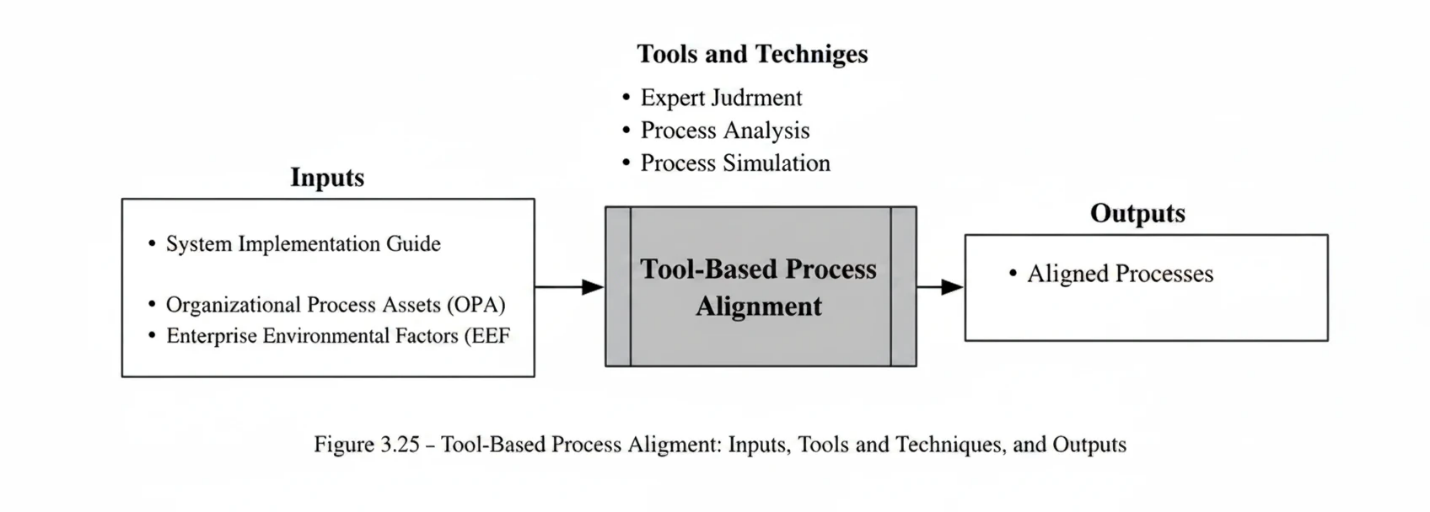
You may have encountered situations in which a mechanised system was implemented in a project or organisation at significant cost and effort, yet operational issues increased after deployment. One of the factors that may lead to failure in software system deployment is the lack of alignment between work methods and the tool-based perspective.
This means that, with the introduction of a tool, the methods by which work is performed will inevitably differ from the organisation’s previous manual procedures. In practice, the presence of mechanisation tools requires the development of new approaches so that work processes can be executed with greater speed and ease.
Tool-Based Process Alignment: Inputs
- System User and Administration Guides
To understand how tools and information systems operate, the system user and administration guides should be reviewed. Studying these guides makes it possible to design new tool-based solutions by using the capabilities provided by the system.
- Organizational Process Assets (OPA)
The existing work procedures used prior to the introduction of the tool must be extracted from the organisation’s work patterns and process templates. These procedures may already be documented, or they may need to be identified through interviews and analytical methods discussed in previous chapters. This ensures that the organisation’s as-is processes are clearly identified before designing tool-based solutions.
- Enterprise Environmental Factors (EEF)
Enterprise environmental factors applicable to this process include
- Operational and legal constraints
- Alignment patterns observed in other systems
- Lessons learned from previous tool-based alignment efforts
Tool-Based Process Alignment: Tools and Techniques
- Expert Judgment
Expert judgment plays an important role in this process. Experienced specialists help in understanding the current situation, gathering opinions about new tool-based solutions, and anticipating how users and the project may react to these solutions. It is recommended that the proposed solutions be reviewed in joint sessions involving experts and stakeholders so that their views on the suggested methods can be collected.
Tool-Based Process Alignment: Tools and Techniques
Process Analysis
Using process analysis techniques—some of which were introduced in Section 3.1.4—PMIS analysts first examine existing manual work procedures and identify user and project requirements. After analysing these inputs and gaining a thorough understanding of available tool capabilities, they propose new solutions based on tool-based alignment of processes.
It should be noted that performing tool-based alignment requires significant experience in designing effective tool-based solutions. This alignment can be implemented incrementally; in some cases, transitional or interim solutions may be introduced initially. Following feedback collection and impact assessment, processes can then be revised accordingly.
Successful tool-based alignment demands effective interaction and communication with both users and project managers. Analysts must therefore apply the specialised communication skills inherent to this discipline to foster constructive collaboration.
Process Simulation
To validate proposed processes and solutions, process simulation tools may be employed. These tools offer a broad range of capabilities suitable for testing new processes and evaluating outcomes.
If such tools are unavailable, manual simulation is a viable alternative: process steps are executed virtually, results are recorded at each stage, and the new operational conditions are assessed with expert input.
It is recommended that all proposed solutions be evaluated and tested—using either method—before being deployed operationally.
Tool-Based Process Alignment: Outputs
Aligned Processes
After reviewing current work processes and proposing new solutions through a tool-based alignment approach, these processes are to be formally documented. Documentation serves three key purposes: presentation to operational teams, securing formal approval from relevant authorities, and inclusion in the project’s PMIS documentation.
The documentation approach depends on the PMIS team’s capabilities and resources within the project. Advanced process modelling tools may be used where available. Otherwise, diagramming tools such as Microsoft Visio offer a practical alternative.
A critical aspect of this documentation is the clear distinction between manual activities and system-based activities. Diagrams must explicitly indicate which process steps are performed manually and which are executed within the tool.
Comprehensive process documentation should include the following elements
- Description of current operating conditions
- Diagram of the current processes
- Description of tool capabilities and their impact on the workflow
- Description of the new solution
- Diagram of the new process
User Training
View process diagram
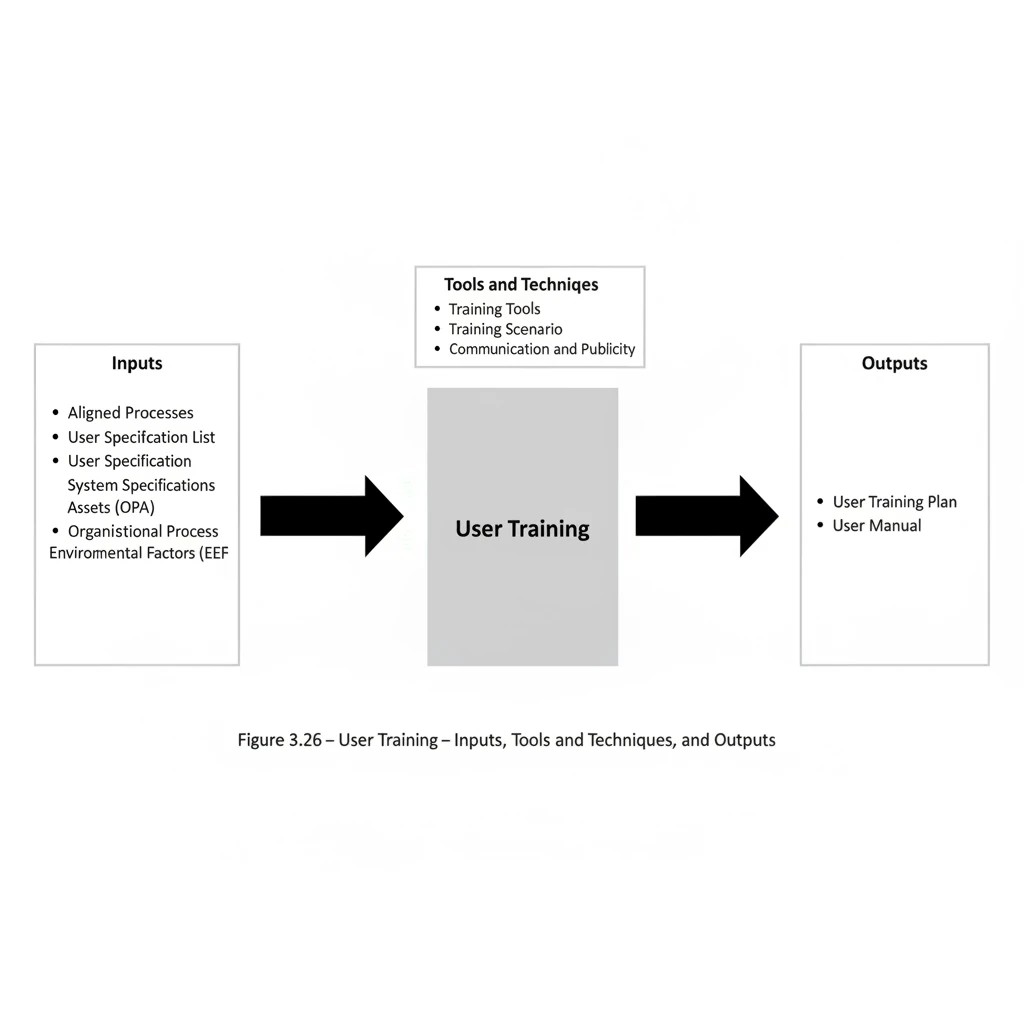
User training plays an important and sensitive role in the deployment and operationalisation of information systems and automation tools. It is important because, without proper training, effective use of the tools will not be possible and the deployment of the system will face challenges. It is sensitive because the first interaction that users have with the new system occurs through training programmes; if this initial interaction does not create a favourable impression, the system deployment process may encounter difficulties.
User training may be provided by the software vendor. However, the key issue in training is the planning of the training activities and the quality of their delivery. Vendors have no knowledge of the conditions of your organisation or its users. Therefore, you must determine how the training will be conducted, how participants will be grouped, and where the training sessions will be held. For this reason, the responsibility for training in your organisation or project should not be completely delegated to system vendors. In cases where, for any reason, training is conducted at the vendor’s premises, the class schedule and the training itself should be carefully reviewed and supervised.
Another important point is that training is not limited to presenting the capabilities of the tool. Users also need essential information that enables them to use the system properly, including familiarity with the work process and the way the tool is used in the execution cycle of the work. Therefore, training should be conducted after the tool-based alignment of processes has been completed. During the training sessions, after presenting the system capabilities, attention should be given to how the system is used within the course of performing the work. It is recommended that, where possible, the sessions be conducted in a workshop format so that users have simultaneous access to computers during the training.
Another critical consideration in training planning is that users are currently engaged in their primary responsibilities. Training for these systems should not interfere with users’ main work. Therefore, even though deploying these systems is important for the project, the deployment-related activities and the associated arrangements should not create disruption in the normal course of ongoing operations.
Accordingly, training should be scheduled with full awareness of appropriate time periods. These time periods can be identified through consultation with managers and relevant experts. Providing prior notice of the training dates enables users to plan for their participation in the training sessions and to organise their ongoing tasks accordingly.
Another point to consider is the type of learning media used in training. As you are aware, from the perspective of psychology, individuals differ in how they receive information. Some individuals are primarily visual, some are auditory, and a smaller group is tactile/kinesthetic. Although there is no opportunity here to discuss this topic in detail, the useful point for practice is that a larger proportion of people are visual—meaning they can form an appropriate understanding of events through observation—followed by auditory learners, with tactile learners forming a relatively small portion. Considering this, the use of audio-visual media in training can support learning and improve the reception of the materials. For this reason, it is recommended that presenters use visual media such as instructional videos or presentation software (e.g., PowerPoint) and present their materials in a structured, visually organised form. If some project personnel are located in remote locations, instructional videos can be prepared to guide them, and any shortcomings or problems can be addressed through telephone communication.
The provision of a user manual for each tool or system is an essential requirement. Experience shows that, in training classes, users usually learn at most 50% of the content, and until they become involved with the systems in an operational manner, they will not develop an appropriate understanding of how the systems work. Therefore, by providing suitable user manuals, users should be guided in using the system during the execution phase. If a user manual for a system is not available, it is necessary for the PMIS team to prepare this documentation and make it available to users.
User Training – Inputs
- Aligned Processes
Aligned processes, which are outputs of the Tool-Based Process Alignment process, are used in this process to prepare appropriate training media. These documented processes are also applied in developing the training scenario, which will be described in the Tools and Techniques section.
- User Specification List
Understanding user characteristics—such as job category, organisational position, educational background, and individual and behavioural attributes—can assist in planning the training programme. In certain cases, it may be preferable to provide dedicated training for specific individuals rather than include them in general training classes.
- System Specifications
For the preparation and organisation of effective training, adequate information regarding the system’s functions, operation, and capabilities is required. Such information may include system user guides, tool presentation files, or any materials that provide relevant information about the system.
- Organisational Process Assets (OPA)
Familiarity with the organisation’s current working methods and with their differences from the new solutions is useful in designing the training. Existing organisational procedures related to training are also among the organisational process assets that can be utilised.
- Enterprise Environmental Factors (EEF)
Enterprise environmental factors that may support this process include
– training-planning templates
– previous lessons learned related to training
– user manual templates
User Training – Tools and Techniques
- Training Tools
The appropriate selection and use of training tools—taking into account the conditions of the project, the users, and the system—is regarded as one of the important aspects of user training. The PMIS training group should be familiar with common presentation methods and the related tools and be able to make an appropriate and informed choice among them.
The tools that may be used include
- Word processors, such as Microsoft Word, for preparing training booklets and user guides
- Presentation tools, such as Microsoft PowerPoint, for preparing training materials
- Screen-recording tools, such as Camtasia Studio, for producing instructional videos that demonstrate how the systems are used
- Audio and video recording tools for producing training videos and audio podcasts
- Training Scenario
One suitable method for achieving appropriate training is the preparation of a training scenario. Although this activity may be regarded as a specialised task, with practice and by studying relevant references, appropriate results can be achieved.
The purpose of the training scenario is to specify the details of a training session from beginning to end. This includes defining the class strategy, the detailed content to be presented, the training media, and the sequence of topics. If the class is conducted in workshop format, the exercises to be carried out during the session are also specified.
In summary, if the class is considered as a film, the training scenario enables the reader to understand the overall atmosphere of the session and the content presented. When the training scenario is prepared, it can be expected that the trainers will conduct the sessions in accordance with the intended design.
Communication and Publicity
Due to their ongoing responsibilities, individuals in project environments may overlook the training sessions scheduled for them. Therefore, effective communication is required both to reinforce the importance of the system and to remind users of the timing of the training classes.
The method of communication and publicity is one of the items that is specified and scheduled within the User Training Plan. Communication may take place through telephone reminders, formal correspondence, reminder emails, in-person follow-up, or other methods depending on the users and the project conditions.
User Training – Outputs
- User Training Plan
The User Training Plan is a document that, for each system or tool, describes the training objectives, methods, schedule, and manner of conducting the training. The principal elements of this document may include:
- training objectives of the system
- training strategy
- topics to be presented
- available training media
- training venue and related facilities
- training schedule
- training scenario
- user grouping
- types of training classes
- User Guide
The User Guide is an important training document prepared for each software system and describes how the tool operates and how the operational processes are performed. If such a document does not exist for a system, it is prepared at this stage and made available to users.
PMIS Operationalisation
View process diagram
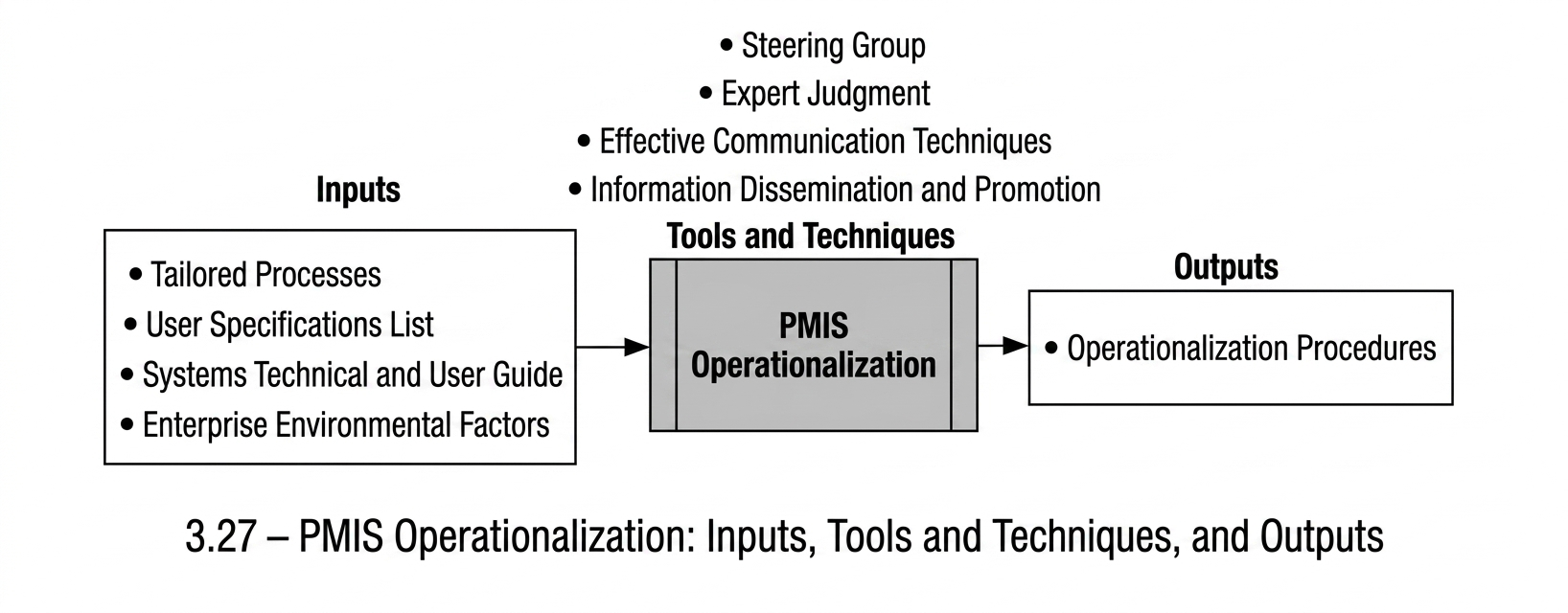
The distinction between the deployment phase and the operationalisation phase is made because the conditions of both the users and the system differ across these two periods.
Deployment Phase
During the deployment phase, users have not yet established an actual working relationship with the system and interact with it mainly in a trial or training context. At this stage, the primary focus is on gaining user confidence and trust and introducing the system’s general and initial capabilities.
Operationalisation Phase
In the operationalisation phase, users begin working with the system in a real operational environment, where their level of tension and psychological pressure is typically higher. If this phase is not managed appropriately, the system may encounter difficulties.
Operational issues and mismatches become apparent during this period. Any improper functioning of the system may delay routine activities, which can place the success of the system’s launch at risk.
User Engagement During Operationalisation
Close interaction with users is necessary at this stage. The use of the system in the operational environment should be experienced together with them, helping reduce concerns that may arise from the possibility of incorrect system behaviour. Users should be assured that, if any issue occurs, the PMIS Technical Admins will address it promptly and that there is no cause for concern.
Planning Requirements
To respond effectively to such situations, the PMIS operationalisation plan should be prepared in advance, anticipating expected conditions and also providing mechanisms for managing unforeseen ones.
Timeline and Transition
The operationalisation period begins immediately after the system’s launch and deployment and continues until the system reaches a stable condition, after which the support period follows. It may not always be possible to determine precisely when the transition from operationalisation to support occurs.
It may be considered that the operationalisation period constitutes the initial part of the support period, and therefore the concepts presented under the PMIS Support Process Group also apply during this phase.
Rationale for Distinguishing the Two Phases
These two phases are distinguished to highlight the specific characteristics of the operationalisation period compared with the support period, particularly the need for very close interaction with users and the relatively unstable condition of the system. For example, the number of PMIS Technical Admins during the operationalisation period may need to be greater than during the support period, due to the higher level of interaction with users and their need for more frequent responses.
PMIS Operationalisation: Inputs
- Aligned Processes
To support awareness of the newly configured processes during system operationalisation, all aligned processes need to be fully accessible to the operationalisation team. It is recommended that the PMIS Technical Admins display the aligned process diagrams in large format in their workspaces so they may refer to them when responding to users.
- User Specification List
A user list is required for establishing communication with users during response activities. The user-history recording methods introduced in the Support Process Group begin from this stage.
- Technical and User Guides
The PMIS Technical Admins need to have access to the system’s technical and user guides so they may consult them when necessary while responding to users.
- Enterprise Environmental Factors (EEF)
The organisational environmental factors relevant to this process include
- users’ experience with information systems
- the educational level of the user group
- the organisation’s maturity level in information systems
- the influence of users’ previous perceptions of earlier information-system deployments
- the degree of support from senior managers
PMIS Operationalisation: Tools and Techniques
- Steering Group
During operationalisation, trained individuals familiar with information systems undertake the responsibility of interacting with users. Further explanation is provided within the Support Process Group, in the section related to stewardship.
- Expert Opinion
During the operationalisation period, obtaining expert opinion regarding the system is important. This feedback supports the identification of potential issues and contributes to building user trust. User feedback may be gathered through individual communication, email-based feedback requests, or troubleshooting and question-and-answer sessions.
A key point is that during the operationalisation period, feedback is not expected to occur passively; users need to be encouraged to share their views. This approach supports effective communication and strengthens user confidence.
PMIS Operationalisation: Tools and Techniques
- Effective Communication Techniques
Although the use of effective communication techniques is necessary throughout system deployment, operationalisation, and support, communication assumes particular importance during the operationalisation stage. Individuals who interact with users need to be aware that users may experience psychological pressure at this point, and their reactions may not fully reflect normal or routine behaviour.
With this understanding, it is important to approach users in a manner that provides reassurance, while listening patiently and attentively to their requests and concerns. In the subsequent step, attempts to address their issues may be supported through understanding and empathy.
Communication needs to be based on honesty. While unrealistic promises may appear to resolve a situation temporarily, they can lead to a loss of trust over time. Maintaining calmness and demonstrating respect toward the other party are among the most important characteristics of effective communication.
- Communication and Publicity
During this stage, communication and publicity continue to hold an important position. In the operationalisation period of systems, users require information about the systems more than at any other time. If changes occur in work procedures or if system issues are resolved, these developments need to be communicated to users through various means.
Visual publicity can also contribute in this regard. Installing banners, sending emails, or distributing promotional letters may help increase users’ sense of reassurance.
PMIS Operationalisation: Outputs
- PMIS Operationalisation Procedure
This output consists of preparing the activities that need to take place during the operationalisation process. Depending on the scale of the project, it may be developed as a formal document and, where necessary, submitted to managerial levels for approval. If the importance or organisational scope of the system is substantial, this document may also be submitted to the PMIS Council for approval prior to the system becoming operational.
Topics that may be included in this output include
PMIS operationalisation strategy
Activities that take place during the operationalisation process
Operationalisation schedule
Preventive activities
Operationalisation monitoring programmes
PMIS Control and Optimisation Process Group
It may appear that after the extensive planning effort, the demanding activities of identifying and selecting the required tools, and the sensitive and high-pressure work of deploying the systems, the main portion of the work has been completed. These are indeed significant achievements. However, the continuation of the journey begins here, and ongoing attention becomes particularly important. Neglecting the activities within this process group can place previous efforts at risk.
The Nature of Enterprise-Wide Systems
Information systems and mechanised tools—especially those implemented across the organisation—require continuous care and oversight. This form of monitoring is ongoing in nature, and even short periods of inattention may gradually turn the system into what can be described as an “information dump.” The accumulation of incorrect, irrelevant, or excessive data leads to conditions in which obtaining suitable and reliable information becomes highly difficult, and in some cases, impossible.
Objectives of This Process Group
This process group focuses on approaches for
- monitoring and controlling information, as well as the processes through which information is collected and distributed, in order to reduce the likelihood of storing unsuitable information during the project
- recognising that some sources of data errors may originate from project processes or from solutions implemented within the PMIS
- identifying such issues and refining or optimising them as required
These activities aim to maintain the integrity of information and support the effective functioning of the system throughout the project.
Relationship with PMIS Planning
This process group may be regarded as the quality control dimension of PMIS operations. Based on the planning conducted in the PMIS Planning Process Group, the focus here is on realising those plans and monitoring their proper execution. As shown at the beginning of this chapter, the PMIS process groups are connected through the cycle introduced earlier.
As illustrated in this figure, the role of PMIS Control and Optimisation within the PMIS set can be understood accordingly. Through this process group, the feedback required for addressing PMIS data issues and process issues is returned to the other process groups. The smaller grey arrows indicate that this process group may also provide direct feedback to preceding process groups. Such feedback is direct when the matters involved are minor and do not influence the PMIS process or the overall PMIS plan. Otherwise, the feedback is communicated through the PMIS Planning Process Group.
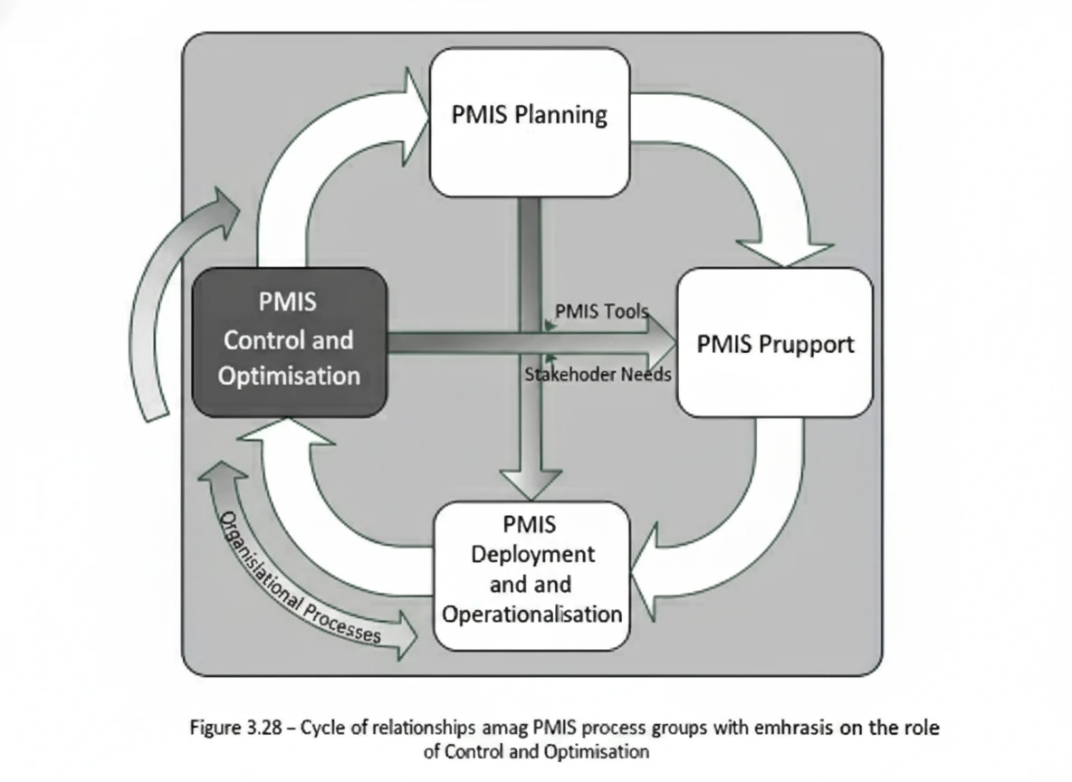
This process group presents the activities of monitoring, control, and optimisation through three processes:
- Planning for Monitoring, Control, and Optimisation Process
- Information Systems Monitoring and Control Process
- Information Systems Optimisation Process
An overview of these processes is presented in the following figure.
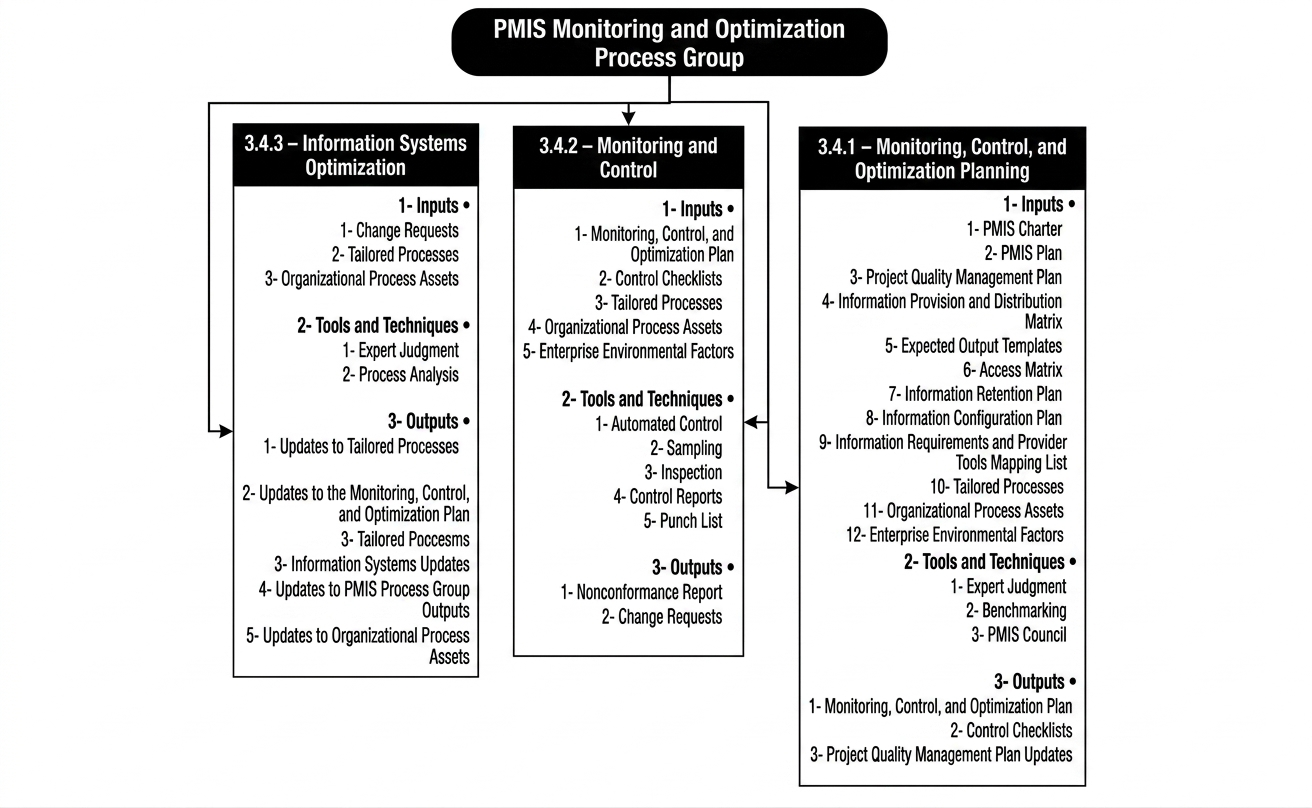
Planning for Monitoring, Control, and Optimisation
View process diagram
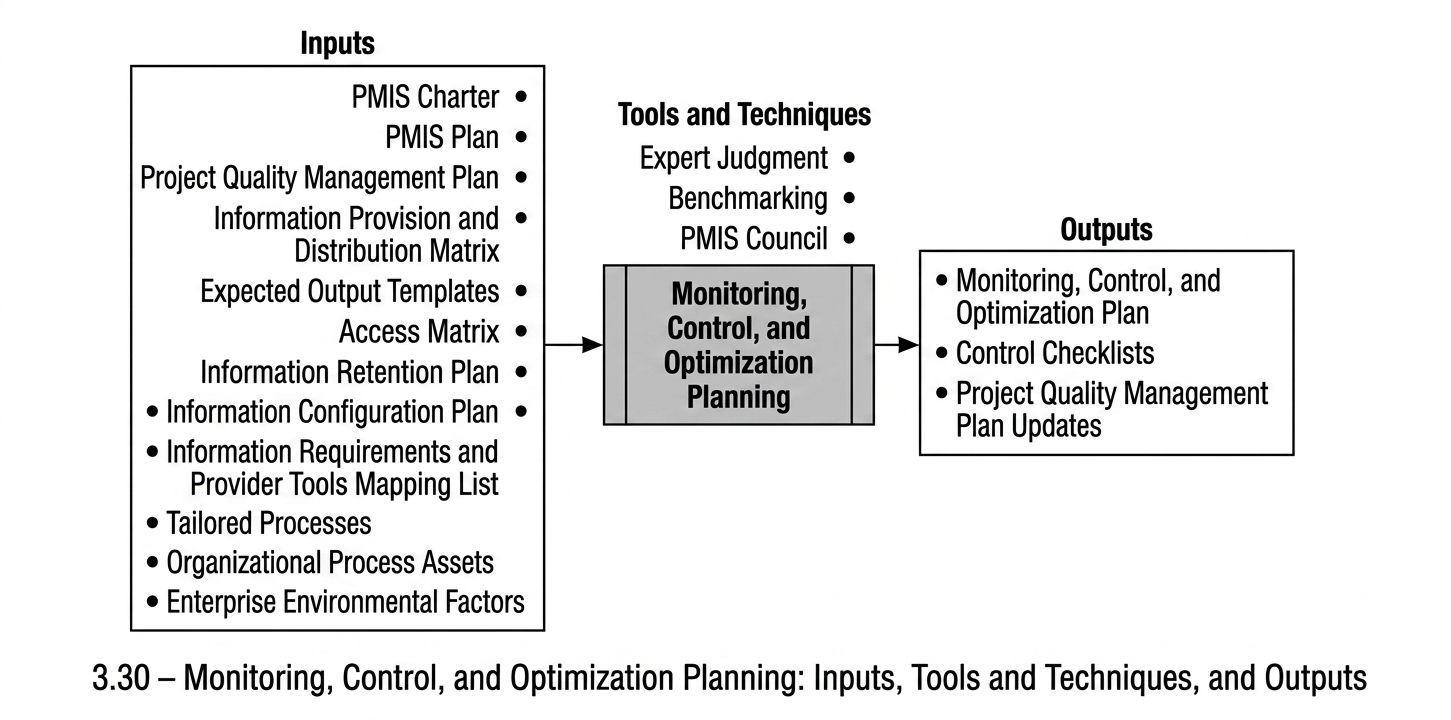
Monitoring and control of information are among the important and sensitive matters in projects and organisations. This sensitivity arises for two main reasons. First, individuals generally do not feel comfortable being subject to monitoring and supervision. Second, the information itself holds significant importance. Determining who should monitor project information and how this monitoring should be conducted has therefore been a long-standing challenge.
In this process group, the subject of information classification and information confidentiality levels is not addressed, as these topics are explained in the Information Classification and Access Definition process. The purpose of this process is to determine how monitoring and control activities should be planned so that it can be ensured that work proceeds in accordance with the initial planning.
In general, monitoring and control processes require considerable time and resources. Therefore, one of the most important considerations in this planning is determining the level of monitoring that adequately supports the project in achieving its objectives.
Another important consideration concerns the method of monitoring. Monitoring and controlling project information and technical processes require sufficient familiarity with these matters. For this reason, such monitoring should be performed by experienced technical personnel within the project.
The focus of this process is therefore the planning of monitoring and control activities, including determining who performs the monitoring and control, when these activities take place, how they are carried out, and which types of information are subject to monitoring and control.
Within monitoring planning, a large portion of information-related monitoring activities is performed by experts from the technical sections of the project, while the PMIS control team maintains overall oversight of information and processes.
Monitoring activities should be considered during the execution of project processes. Accordingly, designers of new processes should incorporate monitoring considerations into the process flows. One form of feedback that may be provided from this section to other process groups is the modification of processes in order to ensure the required monitoring of information.
It should also be noted that monitoring the correct functioning of tools and information systems from a software perspective is the responsibility of the system administration group, which will be discussed in the PMIS Support section.
Planning for Monitoring, Control, and Optimisation: Inputs
PMIS Charter: The output of Process 3.1.1, used to provide an understanding of the overarching PMIS policies governing the project.
PMIS Plan: The output of Process 3.1.2, used in this process to provide an understanding of the overall PMIS planning approach.
Project Quality Management Plan: The output of the Project Quality Planning process (PMBOK® Guide Process 8.1), used to provide an understanding of the project’s quality management plans. Efforts are made to avoid parallel activities alongside the project’s quality control processes; where possible, monitoring and control activities are incorporated into the existing project quality control mechanisms.
Information Supply and Distribution Matrix: This matrix, the output of PMIS Process 3.1.7, is used to understand the workflow of project information production and distribution, and to verify the accuracy of this planning.
Expected Output Templates: The format and structure of generated information are subjects of monitoring and control. These templates, developed in PMIS Process 3.1.6, serve as the baseline for verifying the consistency and correctness of produced project information.
Access Matrix: This document defines the access levels for individuals, groups, and roles with respect to project information. As the output of the Information Classification and Access Definition process (Section 3.1.8), it is approved by the PMIS Governance Committee. The validity of information access within the project is subject to ongoing assessment and monitoring.
Information Retention Plan: The output of the Information Retention Planning process (Section 3.1.9), this document details the methodology for storing and retaining project information. Monitoring of information retention practices is conducted in accordance with this plan.
Planning for Monitoring, Control, and Optimisation: Inputs
Information Configuration Plan
Monitoring the project’s information configuration items involves continuous and ongoing monitoring and control throughout the project. The information configuration plan presented in Section 3.1.10 specifies the PMIS plan in this respect, and, based on this document, a configuration control plan is developed.
Information Requirements and Supplier Tools Matching List
In order to identify which information is produced and distributed through which project tools or information systems, this matching list is used, and the monitoring plan is prepared on the basis of these tools. This document is an output of the Tool Prioritisation activity presented in Section 3.2.3.
Adapted Processes
One dimension of monitoring and control relates to the correct performance of activities based on the designed processes. These new solutions, which have been adapted to the tools, are produced in the Process–Tool Adaptation activity presented in Section 3.3.3 and are used in this process as the basis for monitoring the intended work processes.
Organizational Process Assets (OPA)
Existing quality management procedures within the project or organisation, as well as current project execution processes, are among the organisational process assets that can be used in this process.
Enterprise Environmental Factors (EEF)
The factors affecting this process include
Project quality organisational structure
Project quality management tools
Process management tools used in the project or organisation
Configuration management tools
Information storage and retention tools
Information collection and distribution tools
Planning for Monitoring, Control, and Optimisation: Tools and Techniques
Expert Judgment
Obtaining the insights of specialist experts in project technical fields, as well as those from the project’s quality function, plays a vital role in formulating the PMIS monitoring plan.
Benchmarking
This method involves comparing the project’s actual or designed solutions with those of other comparable projects, to identify best practices and generate improvement ideas. Selected benchmark projects may be sourced either internally within the organisation or externally.
PMIS Governance Committee
Given the importance of the project monitoring and control plan, it is reviewed and approved by the PMIS Governance Committee, after which it is officially communicated to the Project Manager or other relevant authorised personnel for implementation.
Planning for Monitoring, Control, and Optimisation: Outputs
Monitoring, Control, and Optimisation Plan
This plan is a key document within the PMIS and the project documentation set. It articulates the objectives and strategies for monitoring, controlling, and optimising project information, and details the approach for conducting oversight throughout the various information domains of the project. The principal topics included in this document are:
Objectives of project information monitoring and control
Description of information monitoring and control strategies
Plan for monitoring and controlling information accuracy
Plan for monitoring and controlling process accuracy
Plan for monitoring and controlling access accuracy
Plan for monitoring and controlling information retention accuracy
Plan for monitoring and controlling configuration
Procedures for optimising information and processes
Monitoring and Control Checklists
These are structured lists of defined activities specifying the steps and methods for controlling and reviewing specific qualitative or monitoring subjects. Developing such checklists requires thorough understanding of relevant work processes and is typically undertaken by experienced personnel or acquired from specialised commercial sources. These checklists provide assurance to monitoring and control planners that supervisors employ suitable methodologies, and they also help supervisors apply proper techniques in their oversight activities.
Project Quality Management Plan Updates
Based on the planning performed in this process and the solutions devised within the Monitoring, Control, and Optimisation Plan, updates to the Project Quality Management Plan may become necessary.
Information Monitoring and Control
View process diagram
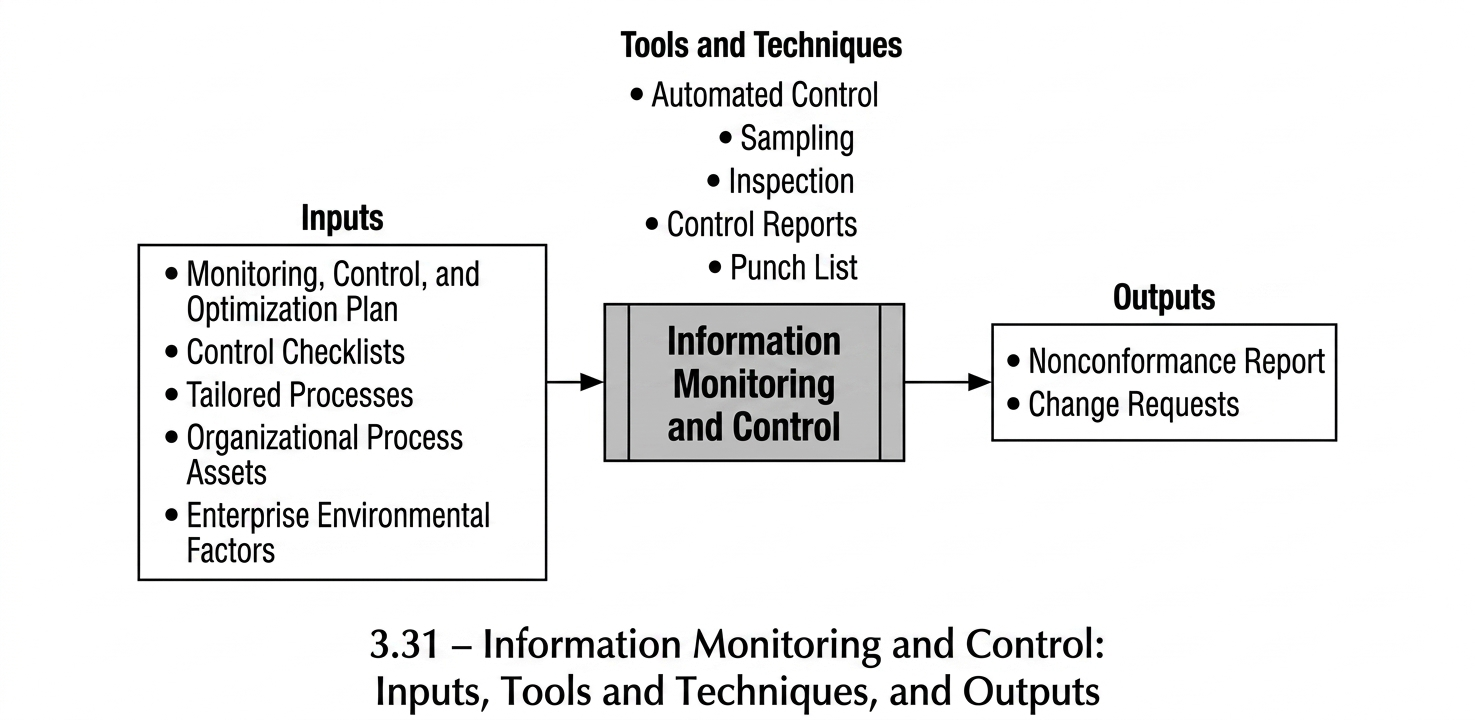
As stated earlier, information monitoring and control constitute one of the most sensitive and significant areas in projects and organisations.
An important point discussed previously concerns maintaining an appropriate balance in monitoring and control activities. The scale and characteristics of a project may not justify extensive monitoring. It is not always necessary for all information and processes to be subject to inspection and supervision. Control activities may impose considerable costs and may also increase the duration of project execution.
Projects generally perform structured monitoring and control of their activities for two main reasons. In some cases, such monitoring is carried out due to requirements imposed by the client. In other cases, the level of organisational and project management maturity leads the project to follow defined quality standards.
When a project’s monitoring strategy defines a Monitoring and Control Plan, that plan is carried out through this process.
Classification of Information Monitoring and Control
Information monitoring and control activities can be divided into two main categories.
Oversight of Processes and Monitoring Results
This type of monitoring takes place at a higher level and provides assurance that the processes and activities planned for information control are appropriate.
Operational Monitoring of Information
This type of monitoring is performed within operational processes and is carried out by operational personnel. The method and scope of this monitoring are defined in the approved Monitoring and Control Plans.
Based on this classification, responsibility for the higher-level oversight of processes and monitoring outcomes lies with the PMIS Group. Planning is expected to ensure that information monitoring and control activities are performed using appropriate mechanisms, either through mechanised systems or by system users.
In addition, close coordination with the Project Quality function during the design and implementation of information monitoring and control programmes helps avoid parallel or redundant activities within the project.
Information Monitoring and Control: Inputs
- Monitoring, Control, and Optimisation Plan
The most important input to this process is the Monitoring and Control Plan, which specifies how information is to be monitored and controlled. In this process, control activities are carried out in accordance with this plan.
- Control Checklists
Control checklists are one of the outputs of the Monitoring and Control Planning process described in Section 3.4.1. In this process, a checklist can be used as a reliable guide.
- Adapted Processes
In order to provide an understanding of how work is performed in the project, the adapted processes are used by those responsible for monitoring and control.
- Organizational Process Assets (OPA)
All templates, methods, and existing processes related to the monitoring and control of project information can be used in this process.
- Enterprise Environmental Factors (EEF)
Examples of factors that can be used in this process as environmental factors include
- Regulations and laws
- Standards and monitoring and control guidelines relevant to the specific project domain
Information Monitoring and Control: Tools and Techniques
- Automated Control
One of the appropriate methods that can be used in information systems is the automated control of information at input points and during information processing. In these methods, by mechanising the control rules required, the entry or flow of incorrect information is prevented.
- Sampling
In some cases, it is not necessary for information to be monitored and controlled every time. Instead, information can be monitored at specified times through sample-based monitoring. The decision regarding which types of information can use sampling is made by the monitoring and control planners, taking into account the importance of the information and the nature of the process.
Information Monitoring and Control: Tools and Techniques
Inspection
The term inspection can carry different meanings depending on the context. In this process, inspection refers specifically to the direct physical observation of information-production activities that involve tangible artefacts.
Typical examples include reviewing the methods used for storing the project’s physical documents and examining whether these storage practices remain consistent with the established monitoring and control procedures.
Such inspections allow the project team to verify that physical information artefacts are handled, stored, and maintained in accordance with the defined information management arrangements of the project.
Control Artifacts
The generation of automated outputs that highlight information errors, inconsistencies, or irregularities within information systems provides substantial support to information monitors. When projects deal with large volumes of information, effective monitoring and control activities often become impractical without the assistance of such artefacts.
Control Artifacts therefore function as analytical outputs produced by information systems that make information problems visible and support the identification of discrepancies across the project’s information environment. By presenting structured views of detected issues, these artefacts assist monitors in examining the consistency, accuracy, and overall quality of project information.
Punch List
A Punch List is a structured method for recording checklist items in a way that enables systematic tracking of unresolved issues. Through this mechanism, it becomes possible to determine which information-related issues identified during monitoring activities remain outstanding.
The Punch List therefore supports the follow-up of corrective actions by allowing project participants to monitor the status of each recorded issue and ensure that unresolved items are addressed in subsequent activities. In this sense, the Punch List contributes to the traceability of information-related problems identified during monitoring and control activities.
Information Monitoring and Control: Outputs
Non-Conformance Report
One of the most significant outputs of the Information Monitoring and Control process is the Non-Conformance Report. This report is a documented record that identifies a specific information-related discrepancy occurring within the project.
During the Monitoring and Control Planning stage, the method through which Non-Conformance Reports are managed is typically defined. The report usually follows a standard project template and specifies:
which information item was produced or distributed incorrectly,
when the issue occurred,
and which project participant or organisational unit was responsible.
Non-Conformance Reports serve as an important input to the Information Systems Optimisation Process. Their findings may lead to corrective actions related to the affected information itself, as well as to adjustments in the supporting information systems or associated operational processes.
Change Requests
When a Non-Conformance Report indicates that the identified issue originates from deficiencies in the information production or distribution procedures, or from inadequate performance or malfunction of a tool or information system, a Change Request may be initiated.
The Change Request normally follows a predefined project template and is submitted as an input to the Information Systems Optimisation Process. Depending on the outcome of the evaluation, the request may result in modifications to information systems, improvements to operational procedures, or other adjustments intended to prevent the recurrence of similar information-related issues.
Information Systems Optimisation
View process diagram
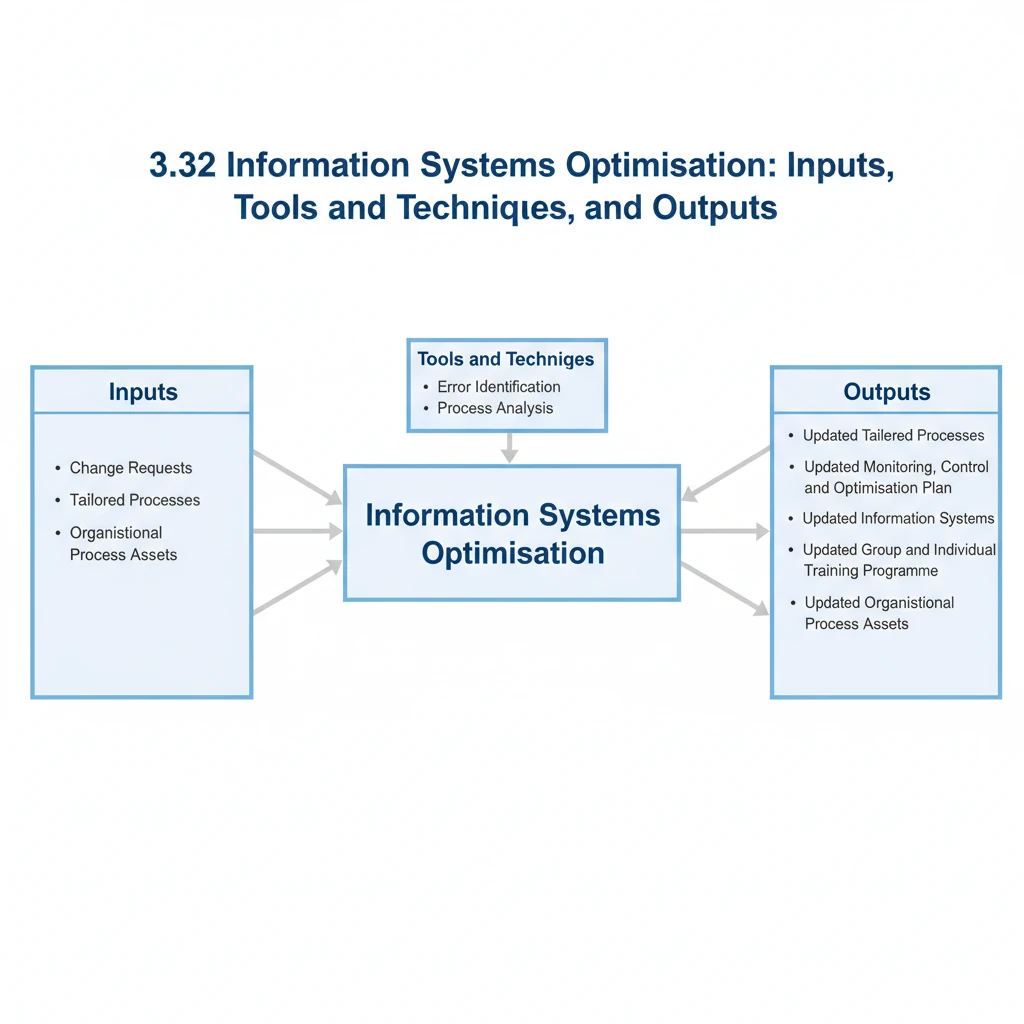
Once the project’s information monitoring plan has been established and implemented, two distinct categories of issues may be identified through the monitoring process.
The first category comprises errors attributable to individual users during their work activities. In such cases, the erroneous information is corrected within the system, and appropriate feedback or guidance is provided to the responsible user.
The second category involves systemic issues stemming from deficiencies in operational procedures or faults within the information systems themselves. Addressing these issues necessitates the revision or optimisation of the affected procedures or information systems.
Consequently, the Information Systems Optimisation process is initiated to analyse these systemic issues and implement the necessary improvements.
Information Systems Optimisation: Inputs
Change Requests
This document is an output of the preceding Information Monitoring and Control process and serves as the trigger for the Information Systems Optimisation process. Each Change Request specifies which procedures or information systems require optimisation or modification.
Tailored Processes
The project’s Tailored Processes—those that have been adjusted via Controlled Tailoring—are examined whenever a Change Request is submitted. Process analysis techniques are then applied to identify and implement optimisation opportunities.
Organisational Process Assets (OPA)
The project’s existing operational procedures and related Organisational Process Assets are also reviewed within this process. These assets may be refined or optimised to enhance the overall effectiveness of the project’s information systems.
Information Systems Optimisation: Tools and Techniques
Expert Judgement
Expert judgement plays a critical role in identifying system errors and obtaining proposals for corrective actions or optimisation. In many cases, determining the root cause of information system errors is not possible without the insights of users and subject-matter experts.
Process Analysis
Process analysis techniques are applied to examine existing processes and support their optimisation. The use of these techniques represents an effective approach within this process.
Information Systems Optimisation: Outputs
Updated Tailored Processes
If information inconsistencies arise due to deficiencies in newly implemented solutions, the affected Tailored Processes must be reviewed and optimised.
Updated Monitoring, Control, and Optimisation Plan
In some cases, the method used for information control may need to be modified. In such situations, the Monitoring, Control, and Optimisation Plan must be updated accordingly.
Updated Information Systems
If the issue originates within the information systems themselves, the defect must be escalated to the relevant system administration or support function and addressed in accordance with established Incident Management procedures.
Updated Outputs of the PMIS Planning Process Group
Information issues may arise from errors or deficiencies in the initial planning activities. In such cases, the relevant outputs of the PMIS Planning Process Group must be revised.
Updated Organisational Process Assets (OPA)
In some cases, the issue may originate from one of the project’s ongoing processes. In such situations, the problem is resolved through corrective modification of the relevant process, and the associated Organisational Process Assets (OPA) are updated accordingly.
PMIS Support Process Group
The PMIS Support Process Group encompasses the activities and processes established to support PMIS users, register and follow up on system issues, oversee the proper maintenance and storage of project information, and consolidate these data at the end of the project. This is the most extensive process group within PMIS. It begins when PMIS activities start within the project and remains active throughout the entire project lifecycle. Although some processes in this group commence with the implementation of the information systems, in principle, the activities of this group should start from the very beginning of the project.
A central responsibility within this group is the stewardship and operational management of the information systems, which plays a decisive role in ensuring PMIS success within both the project and the organisation. In practice, the primary point of interaction between PMIS and the project or organisation is realised through the system stewards and administrators. In addition, communicating system issues and the conditions under which PMIS is executed to the system providers—and following up on their resolution—constitutes one of the key responsibilities of this process group.
The group is also responsible for registering and tracking system change requests and facilitating communication between users and system providers regarding such requests.
This process group consists of six processes
- PMIS Operations Management
- PMIS Incident Logging and Resolution
- PMIS Lessons Learned Registering
- Bug Fixing and System Enhancement
- Data Backup
- Project Closure
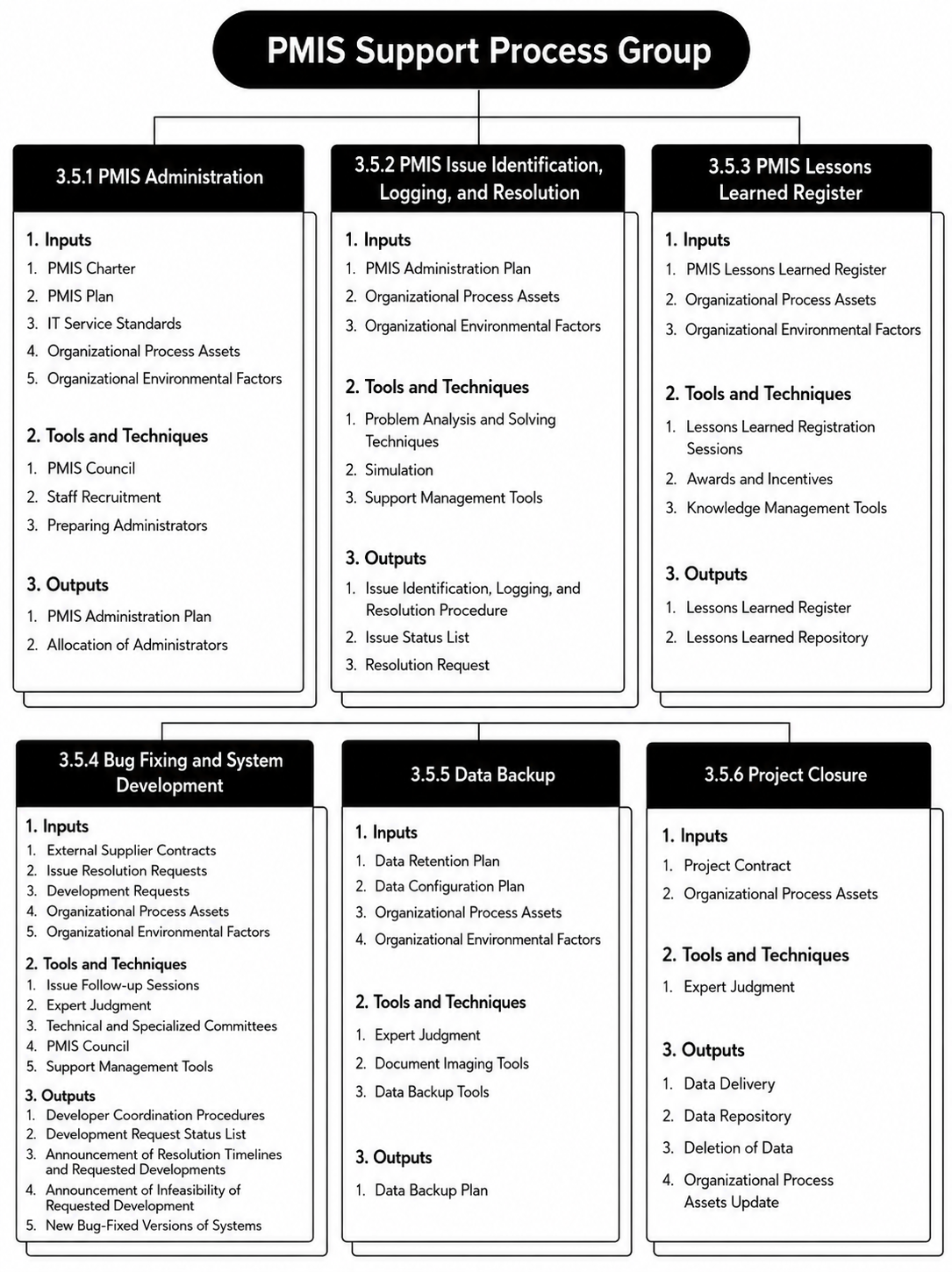
PMIS Operations Management
View process diagram
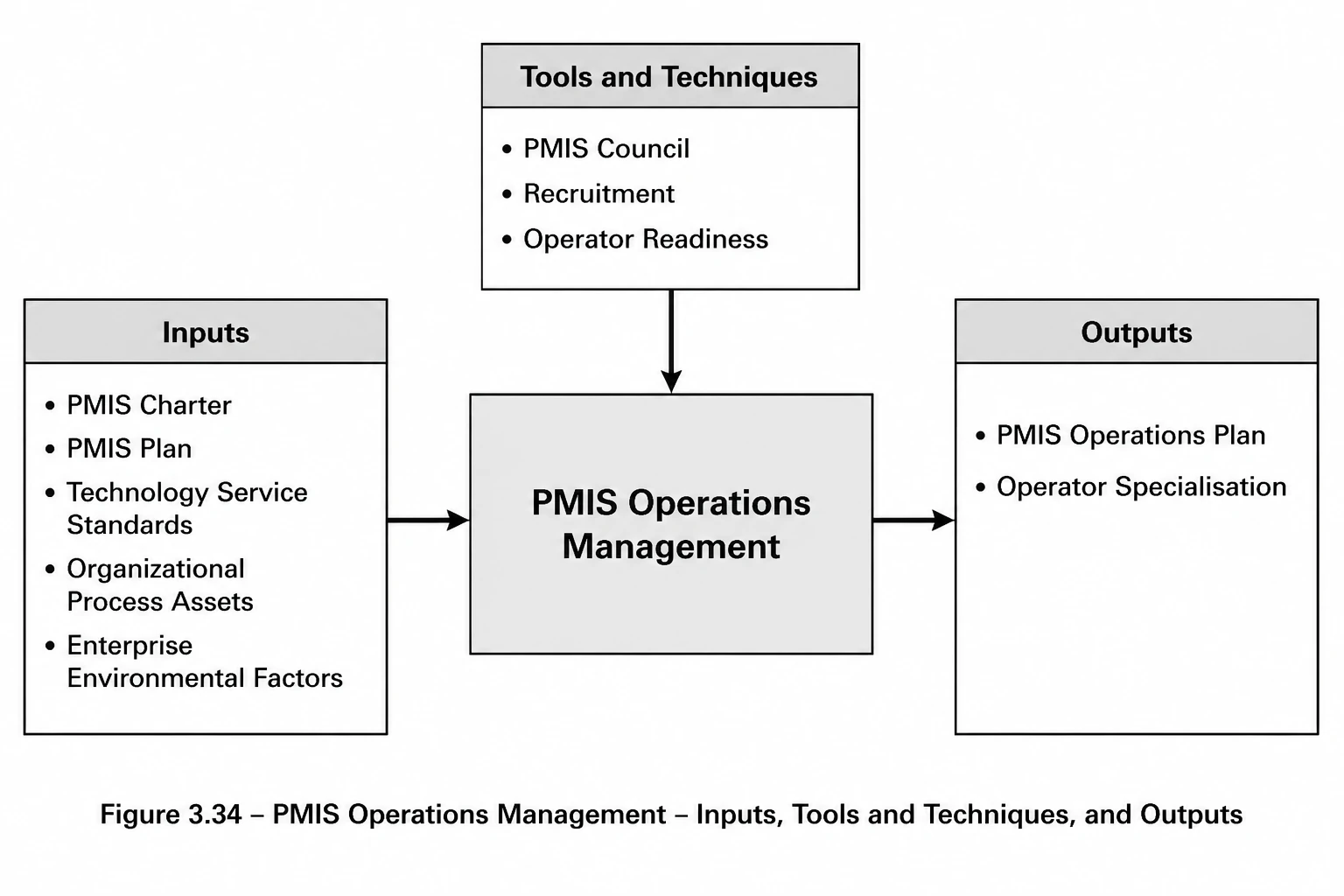
In contemporary information-technology terminology, the concept of operations encompasses a broad domain with a specific and well-defined meaning. It applies both to infrastructure and hardware services and to information-system services; the present discussion focuses on the latter. From one perspective, operations include all activities related to providing services to customers and users of information-technology capabilities. From a broader viewpoint, they encompass the management of delivering those services in an appropriate manner. What is common across these interpretations is that operations concern the activities and processes aimed at delivering satisfactory services to users of information-technology services.
Within the context of PMIS, this process seeks, on the one hand, to define how services should be delivered in accordance with the conditions of the project and the capabilities of the PMIS implementation teams. On the other hand, it involves planning for the provision and preparation of the personnel responsible for carrying out these operational activities.
The term operator refers to individuals who possess foundational knowledge of information-technology concepts—such as databases and the fundamentals of software system development—and who have completed the necessary training to work with and operate the relevant information system or tool. In addition to technical familiarity, these individuals must demonstrate appropriate interpersonal and communication capabilities, enabling them to guide users effectively in addressing their issues.
Operators are not necessarily expected to resolve all problems directly. When required, they may refer issues through appropriate escalation paths and follow up to ensure that they are addressed. The guiding principle is to provide users with timely and appropriate responses.
It should be recognised that recruiting, training, and preparing personnel capable of fulfilling these operational responsibilities is a time-intensive undertaking and requires prior experience in similar operational roles. Therefore, given the importance of this matter, the provision or recruitment of such personnel should begin in the early stages of the project so that they are available when needed.
PMIS Operations Management: Inputs
- PMIS Charter: In order to be aware of the PMIS policies, this document must be used in this process.
- PMIS Plan: Awareness of PMIS planning within the project is one of the requirements of this process. An important point is that the output of the PMIS Operations Plan is itself one of the inputs to the PMIS Plan. Here, the term PMIS Plan refers to the other plans of the project, excluding the Operations Plan itself, so that the Operations Plan can be prepared with reference to them.
- Technology Service Standards: Awareness of service standards—particularly information-technology service standards such as ITIL or ISO/IEC 20000, which relate to IT service management—can help ensure that appropriate planning is carried out in order to respond to the needs of PMIS users.
- Organizational Process Assets (OPA): Using existing templates and experiences of PMIS operations in other projects, or operational practices at the organisational level, represents methods and processes that can be highly useful for this process.
- Enterprise Environmental Factors (EEF): The organisational structure of the project, the level of information-technology literacy of project users, and the physical location of project implementation are among the factors that influence this process and the manner in which operational services are delivered.
PMIS Operations Management: Tools and Techniques
- PMIS Council: Due to the importance of support and operational activities in PMIS, the operational requirements should be reviewed and approved through the PMIS Council. This council can be particularly effective in emphasising the importance of operations and in facilitating the provision of the required personnel.
- Recruitment: One of the important aspects in the field of operations is the provision of suitable and experienced operators. Operators may not necessarily have experience with your specific systems, but they must have sufficient experience in general operational matters such as user training, dealing with users, and resolving system issues. The use of interview techniques and personnel evaluation methods in recruitment is among the approaches required for this process.
- Operator Readiness: No matter how experienced the operators may be in operational matters or specific systems, they must become familiar with the project conditions, the organisation, and the procedures for performing the work. These activities are time-consuming, and therefore the necessary provisions for them should be considered in the PMIS Operations Plan from the very beginning of the project.
PMIS Operation: Outputs
● PMIS Operation Plan
The PMIS Operation Plan is a practical document that specifies the project’s operational strategies, the method of operational service delivery and operational support, and defines the responsibilities and activities of the operators.
This document may include the following sections
Operational strategy
Scope of users covered by the operation
Classification of users from the perspective of how services are received
Determination of the expected operational services according to different user groups
Method of handling system issues and the follow-up procedure
Method of handling system changes and the procedure for registration and tracking
Method of recording PMIS lessons learned
● Allocation of Operators
After determining the required number of operators and obtaining approval from the PMIS Council, and after these operators are provided, they are assigned to perform operational activities.
If such activity is not carried out, all operational activities will encounter difficulties.
PMIS Incident Identification, Recording, and Resolution
View process diagram
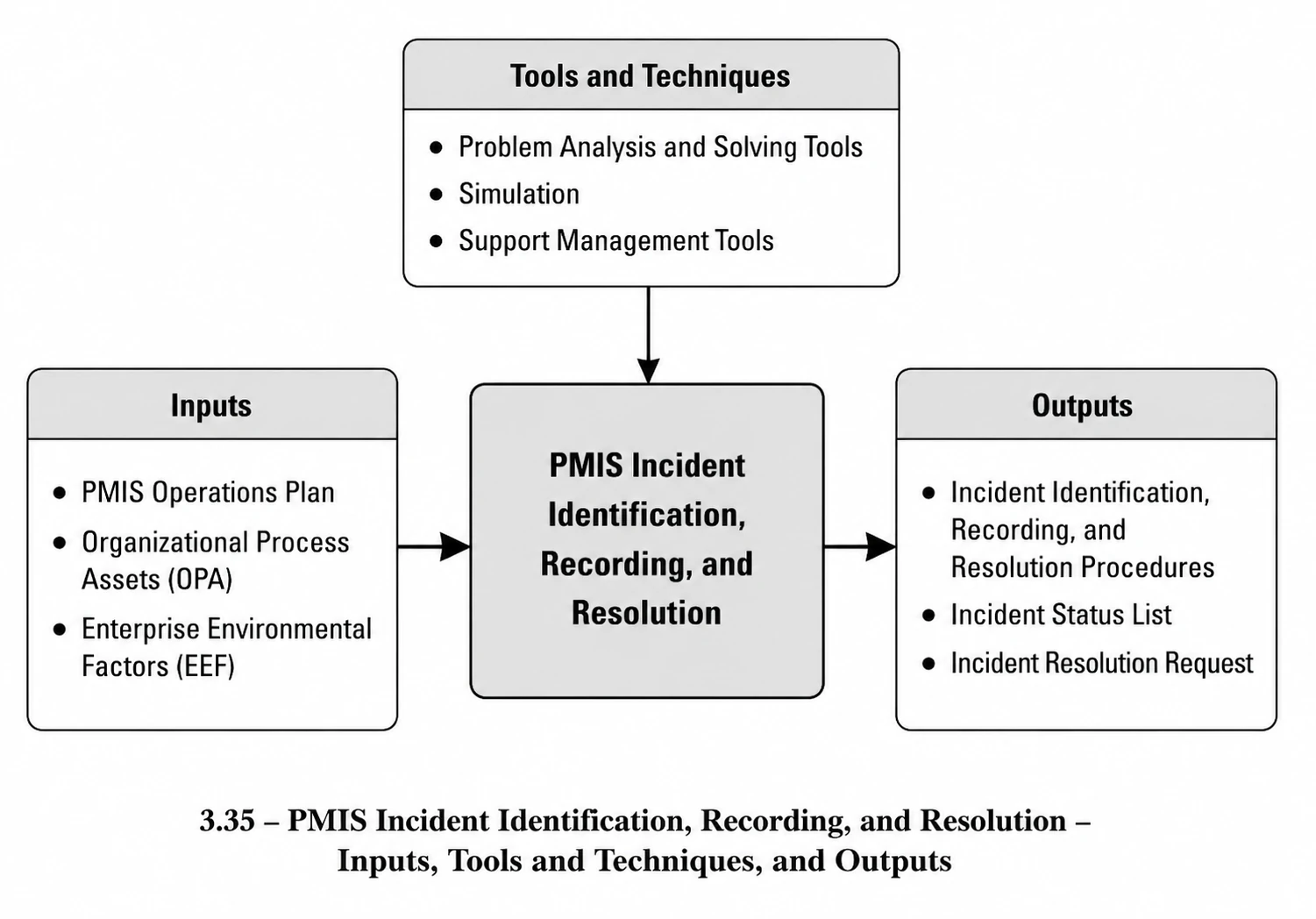
Every tool or information system, given that it is created by humans and also used by humans, naturally may contain errors or defects at both of these stages. The errors and defects of such systems can be categorised, from the perspective of the origin of the error, into several groups:
● Errors and defects that arise due to faults in programme logic.
● Errors and defects that arise due to faults in programme implementation.
● Errors and defects that arise due to user errors.
In general, the errors and defects that fall into the first two groups should be resolved by the system implementers, and errors of the third type, in some cases, can be resolved by the operation group. However, the important point is that, in certain situations, determining which type of error has occurred is very difficult.
Operators, by using problem-solving methods and problem-analysis techniques, and also by relying on the experience gained from the relevant system, identify the type of error and then take action to resolve it.
Errors can also be categorised into several groups from the perspective of the result of the error:
- An error whose occurrence disrupts the continuation of system use for the relevant user.
- An error whose occurrence disrupts the continuation of operation of the entire system.
- An error that causes faults in the system data.
- An error that manifests itself in the outputs of the system.
Errors may also be classified into several groups from the perspective of resolution priority, although this classification may vary depending on the conditions of the project and the systems. For example:
- Fatal errors: errors whose existence will create very serious problems in project information and must be resolved immediately.
- Important errors: errors whose existence is significant and must be resolved as soon as possible.
- Minor errors: errors whose resolution is desirable but not necessary.
The objective of this process, in the first stage, is to identify and categorise different types of system errors, determine the priorities for their resolution, and prepare the guidelines and procedures for resolving errors. In the next stage, the activities of identifying, recording, and resolving errors are carried out.
The preparation of the guidelines within this process is the responsibility of the PMIS planners, and the operational execution of this process forms part of the duties of the operators.
Incident Identification, Recording, and Resolution: Inputs
- PMIS Operations Plan
This document, which is produced in the PMIS Operations process, defines the framework and operational strategies within the project and must be used in preparing the relevant procedures and guidelines.
- Organizational Process Assets (OPA)
Any processes and procedures related to service delivery within the organisation, as well as those concerning service quality management in the project or the organisation, are used in this process. In addition, PMIS-related processes from other projects or organisations may also be applied in this domain.
- Enterprise Environmental Factors (EEF)
The organisation’s software development capabilities, the project’s organisational structure, the level of information technology literacy of project users, and the physical location of project execution are among the factors that influence this process.
Incident Identification, Recording, and Resolution: Tools and Techniques
- Problem Analysis and Solving Techniques
The problem analysis and solving methods referred to in Section 3.1.4 are essential techniques for identifying the root causes of errors and determining the type of error that has occurred.
- Simulation
One appropriate method for diagnosing errors is for the operator to repeat, in the same sequence, the actions described by the user that led to the reported error, so that the outcome of the situation can be examined.
Support Management Tools
Although support management systems are extensive and provide a wide range of functionalities, the aspect that can be utilised in this section is that problems are entered into a centralised system, assigned a tracking number, and users are able to follow up on their problems through such a system. Such systems are applicable in environments where the number of users is high and there is no close physical or organisational relationship between users and operators. In projects, due to close interactions, these tools may not be suitable for user interaction; however, they are appropriate for use by the operations team and for their internal communications.
Incident Identification, Recording, and Resolution: Outputs
Incident Identification, Recording, and Resolution Procedure
This document specifies the types of problems in each system and defines different categories of operational priorities. It determines the instructions and the manner of dealing with each group of errors. In this procedure, the responsibilities of each PMIS-related role—such as operators, analysts, and implementers or vendors—are specified, and the workflow for performing the activities is described. The main topics that may be included in this document are as follows:
- Description of error types
- Definition of error resolution priorities
- Instructions for dealing with different types of errors
- Workflow and process for incident identification, recording, and resolution
- Specification of the method for recording problems and the list of problem statuses
- Error resolution request form template
Problem Status Register
To record and track problems that have occurred, and in accordance with the Incident Identification, Recording, and Resolution Procedure, a register shall be established so that the latest status of each problem is always clear and traceable. This register may be maintained manually or electronically, and its information may be stored either in a record-based format or as a chronological history. Considering the scope of work and the organisational capability, an information system may also be developed for this purpose. For each identified error or problem, the following items shall be specified in this register:
- Description of the problem or error
- Time of occurrence (expressed as day/hour/minute)
- Error reporter (the user who encountered the error)
- Name of the system in which the error occurred
- Type of error
- Error priority
- Operator who received the error
- Geographical location of the error reporter
- Description of actions taken
- Problem resolution status (resolved / under follow-up / escalated to implementer / cancelled / out of priority / …)
- Error resolution request number
- Date of error resolution request
- Recipient of the error resolution request
- Escalation status (in cases where the problem is referred to another unit)
Error Resolution Request
When an error falls outside the operational scope of the operations team—as determined by the relevant procedure—the matter shall be escalated to the designated unit. This escalation is carried out through a request form, which may be manual or electronic, and which, while describing the encountered problem and error, formally requests its resolution from the specified recipient. (The format of this form is provided in the procedure.) The relevant details of such requests shall also be recorded in the Problem Status Register so that these cases remain traceable and available for follow-up.
Recording PMIS Lessons Learned
View process diagram

In every project, and for each information system throughout the project, various experiences are gained in the PMIS domain that may be reused within the same project or may serve as guidance for the organisation’s future projects. Furthermore, considering the possibility of changes or rotation among the members of the operations team or any of the individuals within the PMIS work group, it is necessary that the experiences obtained within each of the thirty PMIS processes be recorded from the outset of PMIS work in a manner that allows them to be made available to other members of the PMIS team.
This activity, which constitutes a knowledge-management process, requires that the experiences generated within PMIS be identified, captured, organised, and disseminated.
Recording PMIS Lessons Learned: Inputs
- PMIS Lessons Learned
All materials and experiences that are obtained throughout a PMIS project, from the beginning to the end, and that are carried out within all PMIS processes, are considered inputs to this process. These lessons learned are not obtained solely through the PMIS work group; the experience of any system user or external developer may also be regarded as PMIS lessons learned and collected accordingly.
- Organizational Process Assets (OPA)
Existing procedures in the project and the organisation for the purpose of knowledge management and recording experiences.
- Enterprise Environmental Factors (EEF)
Knowledge-management systems, the level of maturity of project and organisational personnel in collecting and using knowledge, and the level of education and experience of project staff are among the environmental factors that influence this process.
Recording PMIS Lessons Learned: Tools and Techniques
- Lessons Learned Recording Sessions
By holding regular periodic sessions and addressing the actions carried out to resolve issues and perform PMIS activities, part of the accumulated experiences can be recorded and maintained.
- Rewards and Incentives
One of the elements that may serve as a motivation for recording the knowledge and experience of the PMIS team and others is the use of tools such as rewards and incentives. Care must be taken when using such tools, as these methods should not become routine practices that create expectations among individuals.
- Knowledge-Management Tools
Knowledge-management tools can play an effective role in collecting, processing, and distributing experiences.
Recording PMIS Lessons Learned: Outputs
- PMIS Lessons Learned Record
The recording, organisation, and storage of lessons learned constitute one of the most important outputs of this process. The organisation of lessons learned will be carried out through PMIS configuration management.
- Lessons Learned Knowledge Base
By collecting and recording PMIS lessons learned within knowledge-management tools, a practical collection of PMIS solutions will gradually be accumulated and used as a lessons-learned knowledge base.
Error Correction and System Development
View process diagram
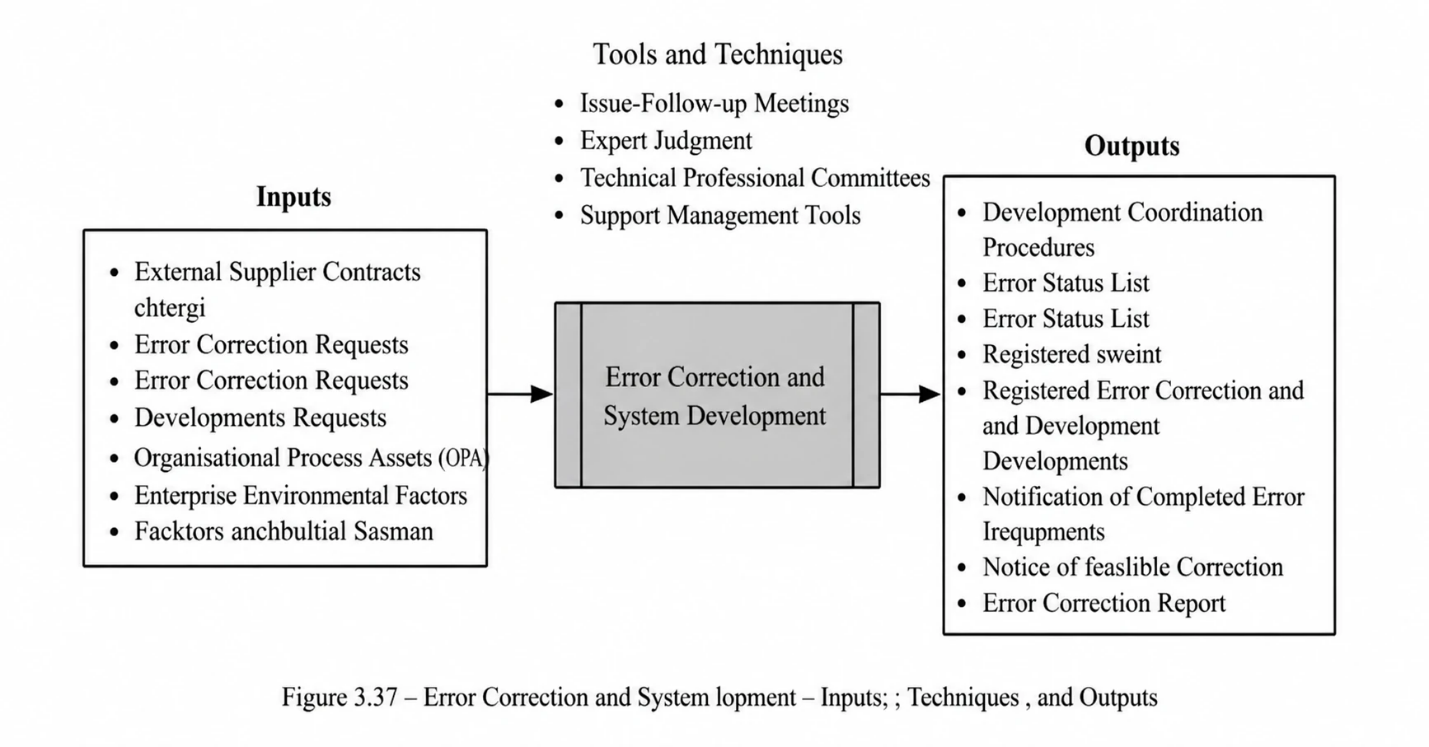
The nature of software systems is change. Two fundamental characteristics in the development of software systems are iterativeness and expandability. Considering the complexities that exist in the field of software engineering, both in identifying requirements and problems and in providing solutions, it is usually not possible at the outset to obtain all dimensions of the system and its solutions. Therefore, development is carried out in an iterative and progressive manner.
This means that, at the beginning, an incomplete definition of the solution is outlined, and over time the system is developed and completed. Therefore, in such an environment, it must be accepted that changes need to be managed, and whenever the volume of changes increases, the probability of errors and defects also rises.
On the other hand, considering the points presented in previous chapters, the information system or the tool required for the project may have been provided through several methods:
- Purchasing a product from an external vendor
- Placing an order with an external developer
- Creating and developing the system internally
If a problem or error occurs in any of the above models, the approach to addressing it will differ. If the system developer is external, meaning outside the organisation, error corrections and development-related items must be sent to that party in order to be resolved. The manner and format for sending issues to suppliers depend on the type of contract or agreement concluded with that company. The follow-up method will also be subject to that same agreement.
Usually, when a tool has been purchased as a packaged product, the possibility for extensive development will be more limited; however, error-correction items may be expected depending on the type of commitments of the vendor. If the required system has been ordered from an external developer, procedures for specifying changes, development items, and error corrections will certainly have been anticipated in the contract. However, if this has not been realised, preparing the agreements and defining the method of interaction with the developer will be among the responsibilities of this process.
In some cases, software development contracts include commitments regarding changes and error correction, while the details and the method of work are referred to subsequent directives. In such cases as well, preparing interaction procedures and reaching agreements with them are considered among the activities of this process.
In cases where the system has been developed internally within the organisation, an agreement shall be prepared with the development group regarding the manner of sending errors and development items, as well as the manner of their response, and on that basis the errors and changes shall be managed. The most important objective of this process is to clarify the status of system errors and development items with the development parties and to ensure the proper execution of the error-correction procedures. In fact, this process serves as the communication bridge between the PMIS and the developers of tools and systems.
Notes regarding development requests: Usually, in many cases, some time after a new system has been launched and after the users have understood the system and become familiar with its capabilities, requests for new facilities and development items begin. As pointed out in Section 3.1.4, requirements may be divided into several categories: needs, wants, desires, and expectations. One of the most important activities of this process is the correct identification of the type of change and development requests and the understanding of the project conditions in resolving these matters. Users—especially Iranian users—usually tend, when dealing with systems, to expect the maximum level of capabilities, and in some cases these requests even take on a fantasy-like aspect. This process is responsible, before referring requests for new requirements or changes to the development section, for examining the type of request and, after analytically reviewing that request, referring it to the development section if necessary. Development requests need to be reviewed from several aspects:
- Review for the validity of the request: Some change requests are technically flawed and are merely the opinions of users. Therefore, the validity of the request shall be examined from the technical point of view. In this regard, the advice of the relevant experts shall be used, or these matters shall be examined by forming technical and specialised committees.
- Review for being within the framework: One of the mandatory reviews is whether the submitted request is within the framework and scope of the requested system. A request may be correct from the technical and requirements point of view, yet it may not fit within the framework of the requested system. Such cases occur more frequently when the request pertains to a system procured from an external supplier. In such instances, the possibility of development and change does not exist; however, a solution must be proposed to satisfy the requirement.
- Review for priority and importance: In some cases, requests are correct but lack sufficient importance or priority. It is necessary, in the first stage, to address requests with higher importance and priority, and subsequently to address lower-priority requests, if feasible.
- Review of the time and cost of changes: Attention to the time and cost required to implement change requests is, in many cases, a determining factor. Requesters are certainly not expected to understand the time and cost of changes. In some instances, the time required to resolve a request may be such that the project requirement cannot be met, or the cost of fulfilling the request may be so substantial that the project is unwilling to implement such a change. If either the time or the cost is deemed unreasonable, these matters must be discussed with the users and the relevant responsible parties before a decision is made.
Following the review of each request, if the request is determined to require development, it shall be referred for development activities. However, if a request has importance and priority but, for any reason, development activities cannot be undertaken, it is necessary to propose a solution to fulfill that requirement.
Error Correction and System Development: Inputs
External Supplier Contracts
To gain clarity regarding the obligations of external suppliers in relation to error correction and required development items, their contracts shall be reviewed within this process. Based on those contractual provisions, the procedures for referring and following up on errors shall be agreed upon and implemented accordingly.
Error Correction Requests
One of the triggers for initiating this process is an error correction request. As stated in the process for identifying, recording, and correcting errors, those errors that fall outside the governance scope and require software development activities shall be referred to this process. Each request must contain information sufficient for system developers to identify and reproduce the reported error. The format for this request is specified in Process 3.5.2.
Development Requests
Any request for change or new requirements must be recorded in a specified format that shall be defined by this process. According to the established procedures, after the necessary reviews, if the request is deemed feasible, it shall be referred to the developers. A development request must include all the information required by the developers to review and implement the requested change. The specific details shall be agreed upon with the developers.
Organisational Process Assets (OPA)
The organisation’s processes for software change management, as well as methods used in other projects, may be utilised in this process.
Enterprise Environmental Factors (EEF)
The organisation’s existing patterns for recording errors and development requests, the organisation’s support-management tools, and the project and organisational structure are among the environmental factors influencing this process.
Error Correction and System Development: Tools and Techniques
- Error Follow-Up Meetings
Holding periodic meetings to follow up on reported errors and negotiating how these errors should be resolved with the governance group and the developers can enhance transparency and accelerate the resolution of problems.
- Expert Judgement
To verify the validity of requests submitted by users and to determine the priority and importance of these requests, the use of expert judgement is mandatory.
- Technical and Specialised Committees
In some cases where assessing the validity of a request becomes complex or leads to disagreement, the formation of technical and specialised committees and the review of such matters in these meetings can provide an effective solution and will be accepted by all parties.
- PMIS Governance Committee (PMIS Council)
Wherever the possibility of disagreement is anticipated or where managerial support is required, the role of the PMIS Governance Committee (PMIS Council) will be widely utilised. In cases where change requests or requirements encounter challenges during various reviews, or where consensus cannot be achieved, the position of the PMIS Council may be used to finalise decisions in this regard.
- Support Management Tools
To clarify communication between the governance group and the development unit—whether within the organisation or outside the organisation—support management tools may be used for referring issues and development items and for following up on such matters.
Error Correction and System Development: Outputs
- Procedures for Coordination with Developers
As described, it is necessary that, with each category of developers—whether internal or external—the procedures for referring, following up, and receiving reported errors and development requirements be agreed upon, and that these matters be carried out accordingly. These procedures may be manual or automated.
- Status List of Development Requests
To record and track development requests, and based on the procedures for coordination with developers, a list must be created so that the latest status of every request is identifiable and traceable at all times. This list may be maintained manually or electronically, and its information may be stored either in line-by-line form or as a historical record. Depending on the scope of work and the organisational capacity, an information system may even be considered for this purpose.
For each request, the following items must be specified
- Request number
- Description of the request
- Date of request submission
- Name of the requester
- Name of the system to which the request relates
- Type of request
- Priority of the request
- Name of the person receiving the request
- Description of actions taken
- Status of the request (resolved / under follow-up / referred to the implementer / in progress / cancelled / outside priority / not feasible …)
- Date of the last status change
- Date of referral to the developer
- Estimated time to complete the request
- Communication of Timeframes for Error Correction and Requested Developments:
After errors and development requests have been referred, it is necessary that, within the coordination procedures, it be agreed that developers are obliged to communicate the timeframes for error correction or for carrying out the requested developments.
- Notification of the Impossibility of the Requested Development:
If it is not feasible to carry out development requests, it is necessary that this matter be communicated in a specified format, together with the relevant reasons, and be recorded in the status list of development requests.
- New Error-Corrected Versions of the Systems:
If the reported errors are corrected and the reported requirements are implemented by the developers, it is necessary, in order for these changes to be applied, that they send the latest version of the relevant system to the Project Management Information System (PMIS) so that it may be updated.
Information Backup
View process diagram
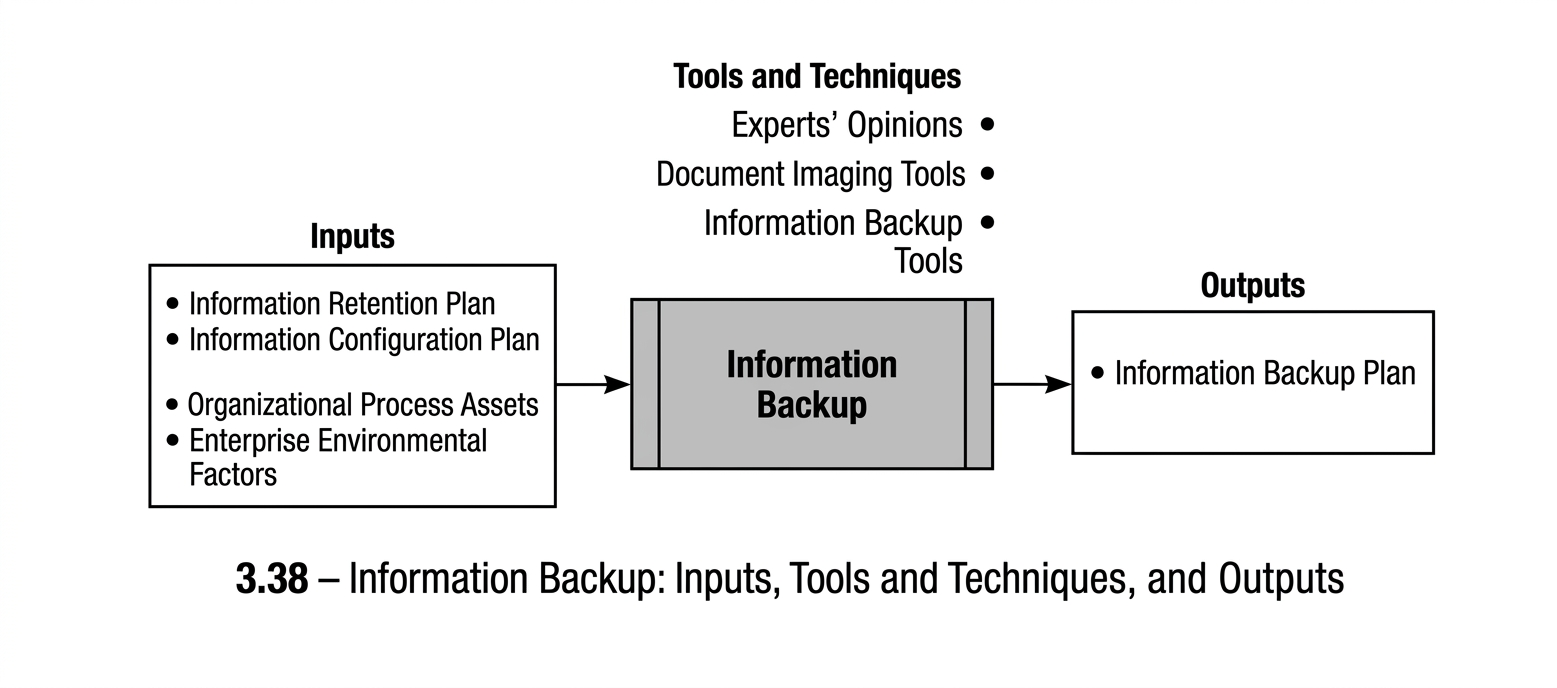
The more centrally and electronically information is stored within a project, and the more activities are carried out through mechanised processes, the greater the risk to that information becomes. User errors, and sometimes administrator errors, may in some cases be counted among the threats to information. For example, a user may mistakenly delete a list of information on the network, or an information system administrator, intending to update one part of the information, may mistakenly corrupt another part. All these threats necessitate that, from the very beginning of a project’s information-related activities, an appropriate plan for creating backup copies of information be defined and suitable tools be employed for this purpose. It should be noted that the execution of backup operations is usually among the responsibilities of network and server administrators, and in this process we will address the planning of backup procedures. However, in some projects, due to the geographical dispersion of the project or the independence of project-level information activities from the organisation, these tasks may also fall under the responsibility of information system administrators.
On the other hand, project information is not entirely electronic, and non-mechanised information must also be taken into account in this process. Project documents and records are likewise subject to threats depending on the way they are stored. Each of these documents may be damaged by threats such as fire, humidity, theft, and similar risks, and it is necessary, with regard to the importance of the information, to devise an appropriate plan for backup copies of them.
The first step in information backup is to determine where the information is stored. This information may be electronic or paper-based. In the next step, the degree of importance of the information must be determined. In the third step, the threats that may damage this information must be identified, and on this basis an appropriate solution for creating a backup copy for each type must be defined.
In some cases, it may be necessary to revise the project’s existing operational procedures. For example, if project information is stored on individuals’ personal computers, relevant instructions must be prepared so that the information is stored on the network instead, and backup copies are created according to a defined schedule. With regard to physical documents, such as financial and contractual project records, measures can be taken to scan all documents so that they are also stored electronically. Each of these solutions, depending on the project’s requirements, is regarded as falling within the scope of the activities of this process.
Information Backup: Inputs
- Information Storage Plan:
As described in Section 3.1.9, this document provides a comprehensive plan for the manner of storing, maintaining, supporting, and retrieving information by describing the project’s conditions and status from the perspectives of the project’s geographical dispersion, the types of project documents and information, and the communication conditions with other stakeholders. The Information Backup Plan shall be prepared based on this document.
- Information Configuration Plan:
One of the documents that can be used in identifying project information and determining the manner in which it is maintained is the Information Configuration Plan. This plan has been described in Section 3.1.10.
- Organizational Process Assets (OPA):
Existing procedures for preparing backup copies of physical and electronic information within the organisation or in other organisational projects shall be used in this process.
- Enterprise Environmental Factors (EEF):
The geographical location of the project, the size of the project and the number of its personnel, the project’s geographical dispersion, and the laws and regulations governing the manner of storing information are all factors that will influence this process.
Information Backup: Tools and Techniques
- Expert Judgement:
Expert judgement is used to identify the locations where information is stored, to identify the types of threats, and to obtain feedback on the procedures carried out within this process.
- Document Imaging Tools:
The use of imaging tools such as scanners and similar equipment is among the tools used for preparing backup copies of physical information.
- Information Backup Tools:
Information backup tools are highly diverse, and the use of an appropriate tool is one of the principal requirements of PMIS governance in this process.
Information Backup: Outputs
- Information Backup Plan:
This document specifies, by describing the project’s conditions and the project information, the operational and practical methods for preparing backup copies of physical and electronic information, and determines the requirements related to addressing information threats.
Project Closure
View process diagram
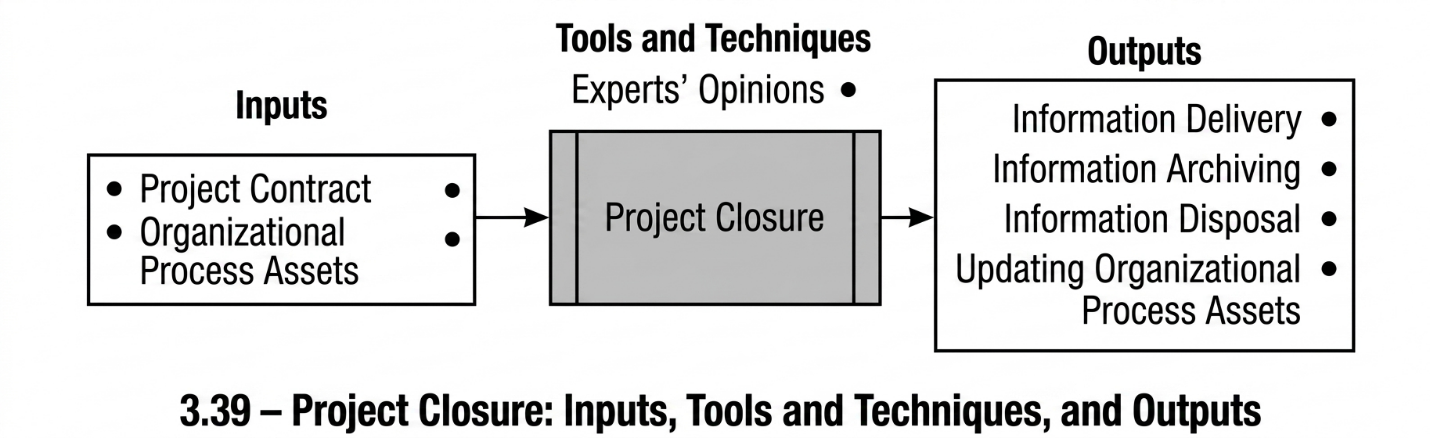
One of the characteristics of every project is its temporary nature. This means that each project reaches its end at some point, and at the time of project closure, it shall be determined what is to be done with the information accumulated during the project. From the perspective of project closure, project information can be classified into several categories:
- Information that is regarded as temporary project information and will not be required after the project.
- Information that may be referred to after the project for reasons such as financial or contractual matters, although the frequency of such references is not high.
- Information that, after the completion of the project lifecycle, shall be transferred to the product lifecycle — for example, the operational documents of a project that are delivered to the operations unit upon project completion.
- Information that may be used, after project completion, by other organisational projects, including the project’s lessons learned and technical documentation.
- Information for which the physical form is no longer required after the project and may therefore be archived electronically.
Project Closure: Inputs
- Project Contract:
If the project has a client, the contract shall be used to identify the contractual obligations regarding the delivery of project information to the client, and this information shall be delivered to the client at the end of the project.
- Organizational Process Assets (OPA):
These specify the organisation’s requirements for the manner in which information is to be maintained and archived.
Project Closure: Tools and Techniques
- Expert Judgement:
Using expert judgement is highly useful for determining the different types of information from the perspective of project closure.
Project Closure: Outputs
- Information Delivery:
The portion of project information that must be delivered to the client or to the designated organisational units shall be delivered at this stage.
- Information Archiving:
The portion of project information that is used infrequently after the project shall be archived and made available when required.
- Information Disposition:
Those project information items that were used temporarily, or that are not required after the project, shall be disposed of, whether in physical form or electronic form.
- Updating Organizational Process Assets:
After project closure, the project’s lessons learned shall be transferred to the organisation’s knowledge base, and other documents and files used within the PMIS context shall be retained appropriately for use in future projects.
Back to Book Overview